.png?width=210&height=40&name=bleu%20et%20gris_Sigle+logo%20SBO%20(4).png)
Quick to set up, Secursus parcel insurance protects you for 100% of the sale price in case of transport damage. Automatically send up the orders you want to insure and enjoy instant refunds.
1. Configure the webhook
The Shippingbo webhook lets you automatically process orders from your ShippingBO account. You can create a filter on your webhook if you do not want it to apply to all of your orders.
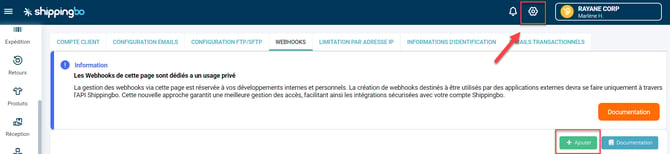
To do this, go to the menu Configurations -> Accounts -> Webhooks and click on "Add":
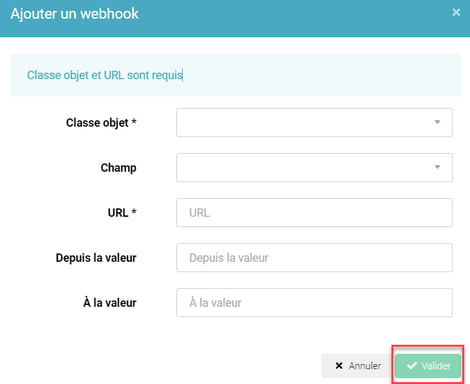
Fill in the requested information and click on "Confirm":
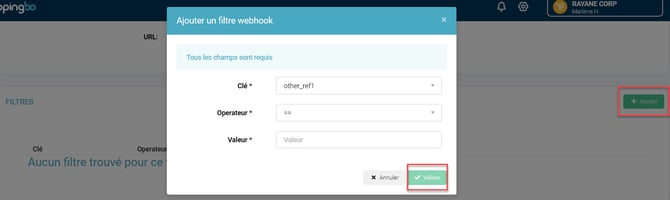
Once the webhook is created, open its details, then in Filters, click on Add and enter the filter you want to apply to your orders:
2. On your Secursus space
2.1: Log in to your Secursus back office: https://www.secursus.com/fr-fr/integration/registration/?rel=shippingbo.
2.2: Then enter your payment method (the account will be used for invoicing and for settling claims). You can choose between an automatic bank debit or an automatic bank card debit.
2.3: Retrieve your API credentials.
Click on the Shippingbo box, then enter your insurance criteria to generate your personalized URL. Example: I insure parcels with a value above €50 excl. VAT.
2.4: Finally, validate your email address via the email that was sent to you. Remember to check your spam folder if it is not in your inbox.
3. On your Shippingbo space
3.1: In Configurations → Account → Webhooks → Add a webhook:

3.2: Fill in the fields as follows:
- Object class: OrderEvent
- Field: state
- Url: paste the url obtained in Secursus
- From value: (leave empty)
- To value: shipped
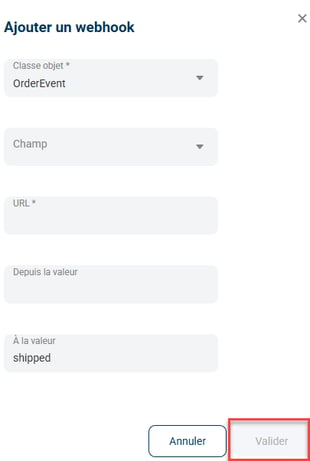
In the url, please replace the XXXX with your Secursus identification details: https://developer.secursus.com/webhook/wix?api_id=XXXXXXX&api_secret_key=XXXXXXX &merchant_email=XXXXXXX&send_email=true¤cy=eur&lang=en
⚒️ Framework and responsibilities:
Before fully using the feature described in this tutorial, we strongly recommend running a test phase with your own settings to check that the result matches your expectations. As the customer remains fully responsible for the actions carried out in the Shippingbo account, these tests are essential to use the tool with complete peace of mind.
Contact us 📬
Questions about this feature? Feel free to write to us here so that we can answer your questions.