.png?width=210&height=40&name=bleu%20et%20gris_Sigle+logo%20SBO%20(4).png)
1. Prerequisites✔️:
- Feature available from the package Premium +.
- Having defined a carrier mapping in Shippingbo.
2. How does session creation work from carrier mapping?
This feature allows you to create specific preparation sessions by filtering orders based on calculated carriers. This ensures better organization of shipments.
Example: You can create a session only for orders to be shipped by "Carrier X".
Determine your filters
-
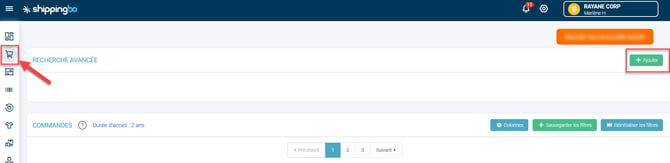
Go to the menu Ordersthen click the button Add To open the advanced search:
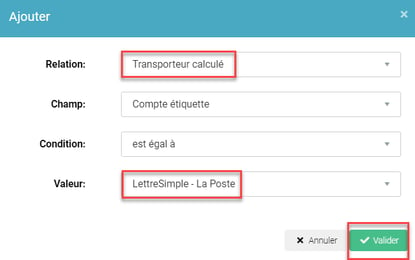
- In the window that opens, fill in:
- Relationship : Calculated carrier
- Value Enter the name of the carrier (e.g., "Chronopost")
- Click on To validate :
💠Note:
The "Field" and "Condition" fields are automatically populated and do not require any modification.
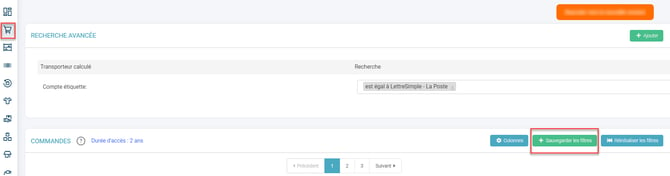
Once validated, the filter appears in the advanced search.
3. Enable session creation with the saved filter
-
Click on Save filters To save your search criteria:
📢Attention :
If you have other filters active, they will all be saved at the same time.
2.Configure the preparation session
- Give your session a name.
- Select the desired slip format.
- Leave the "Save filters for later use" option checked.
- Match the corresponding carrier.
- Click on Validate:
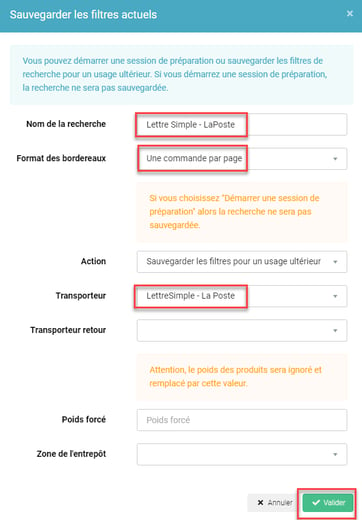
Once these steps are completed, your saved filter is ready to be used from the menu. Preparation to start a preparation session.
💠Note:
The saved filters remain available for later use and can be modified if necessary.
📢Attention :
For the same carrier, you can create multiple sessions with different filters (for example, one for urgent orders and another for standard orders).
- Time saving Sessions automatically adapted to the carrier.
- Better organization : Simplifies the management of logistics flows.
- Error reduction Automatically associates orders with the correct carrier.
⚒️ Recommendation:
Before fully using the functionality described in this tutorial, it is strongly recommended to performa testing phasefollowing your own parameters to verify that the result meets your expectations. The remaining customerfully responsibleThese tests, based on actions performed on the Shippingbo account, are essential to ensure the tool can be used with complete peace of mind.
To go further 🛫:
- Create a preparation session
Contact us 📬:
Any questions about this feature?
Feel free to write to us here so that we can answer your questions.