.png?width=210&height=40&name=bleu%20et%20gris_Sigle+logo%20SBO%20(4).png)
- Real-time customer tracking : Automatically inform your customers of each change in the status of their order.
- Simplicity and time saving : Automate SMS notifications to optimize your communication process.
- Message personalization : Add variables to include details specific to each order.
2. Prerequisites✔️:
This feature is available for the following packages:
- Starter +
- Pro +
- Premium +
- Expert
- WHO 3PL
- WHO Extranet 3PL
- WHO Supervision
3. How does SMS notification creation work?
The SMS notification feature allows you to automatically inform your customers as soon as an order status changes in Shippingbo. SMS notifications are not available only for shipments to France.
Example :
When an order changes status to “Shipped”, an SMS is automatically sent to the customer to inform them.
📢Attention :
SMS messages can only be sent to French numbers (starting with +33).
4. Enable SMS notifications in your account
To activate this SMS notification feature, follow these steps:
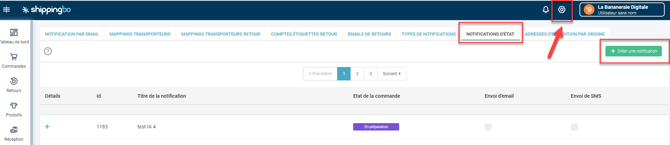
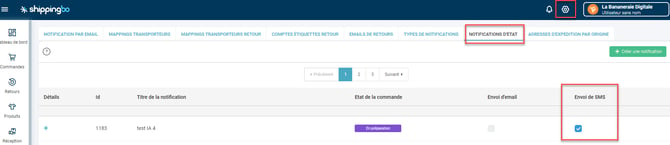
- Access Configurations→ Notifications and labels→ Status notificationsand click on "Create a notification" :
2. In the pop-up window, enter a title and select the order status for which you want to trigger the notification:
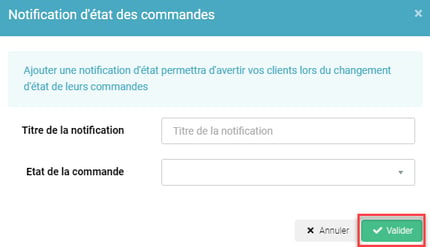
Example :
Create a notification titled "Order Shipped" to notify customers when their order is shipped.
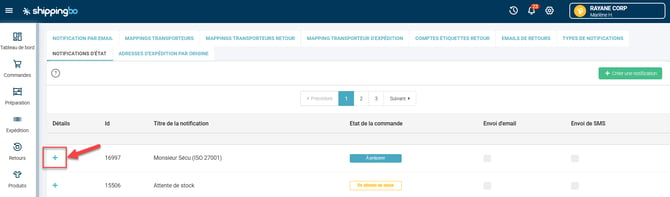
3. To access the details of the created notification, click on the "+"to the left of the latter:
5. Configure and customize SMS notifications
5.1 Create a notification
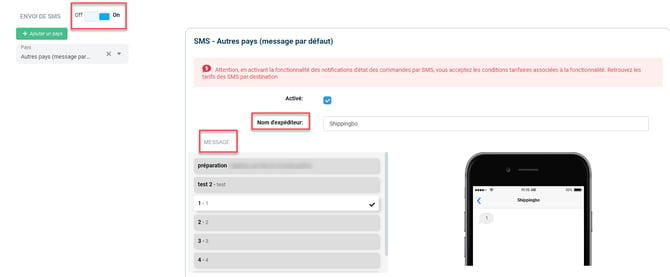
5.1.1 On the SMS configuration page that just opened, click on switch to the right of Sending SMS messages to pass it on OnThen enter:
-
- Sender's name : Customize the displayed name (11 characters max).
- Message Write the text of the SMS, respecting a limit of 160 characters.
5.1.2 Click on Save the notification To save your configuration, go to the bottom left of the page:

Your notification will appear in the menu Status notificationYou can return to it at any time to modify its content or to deactivate it.
If the notification is enabled, then it will be automatically sent to your customers when your orders switch to the corresponding state in Shippingbo.
📢Attention :
You are responsible for the content sent via the notification system.
5.2 Create notifications by country
Shippingbo allows you to configure content tailored to each market. To do this, you need to create a different template for each country.
5.2.1 Start by selecting the country for which you want to create the model:
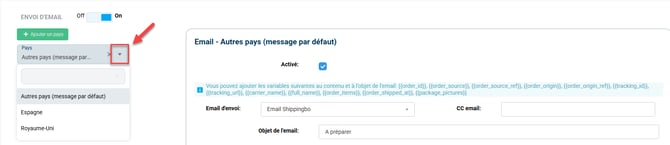
5.2.2 Next, fill in the information mentioned previously in point 5.1.1.
5.3 Add variables to your notifications
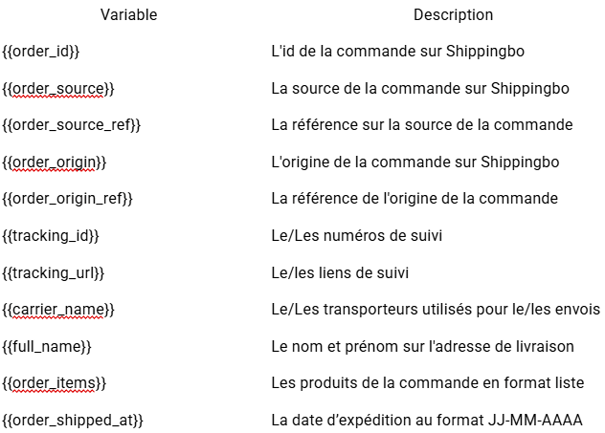
To best personalize your notifications, you can add the following variables:
❤️Recommendations:
- Pay attention to the tone The style of the message reflects your brand image.
- Segment intelligently Create messages tailored to each situation.
- Test regularly Especially after an update or configuration change.
5.4 Test sending your notifications
Before activating your SMS notifications, you can test sending them by clicking on Test an order ID :
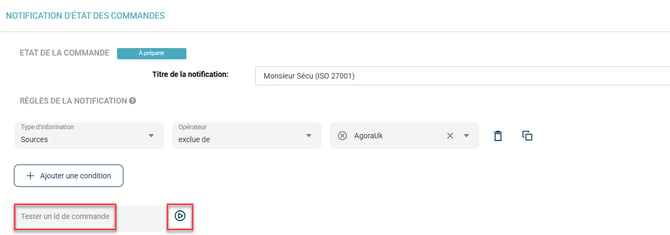
Once you receive your test notification, verify that the variables are working correctly.
If everything is correct, you can activate your notification.
5.5 Check if your notification was sent correctly
To check if a notification was sent correctly, please consult our FAQ. here.
⚒️ Recommendation:
Before fully using the functionality described in this tutorial, it is strongly recommended to performa testing phasefollowing your own parameters to verify that the result meets your expectations. The remaining customerfully responsibleThese tests, based on actions performed on the Shippingbo account, are essential to ensure the tool can be used with complete peace of mind.
To go further 🛫:
- Pricing for order status notifications via SMS
- Order status change notification and invoice sent by email
FAQ ❔:
- Check if an email or SMS notification has been sent correctly.
Contact us 📬:
Questions about this feature? Feel free to write to us. here so that we can answer your questions.