.png?width=210&height=40&name=bleu%20et%20gris_Sigle+logo%20SBO%20(4).png)
Summary
- Controlled synchronization: you decide when to send or pause updates
- Reduced risk of overselling: limit the stock sent when needed
- Advanced customization: thresholds, delays and channel-specific options
2. Prerequisites✔️:
- Available from the Premium + pack.
3. Enable / Disable the stock update to an external service
3.1 Access the connector configuration
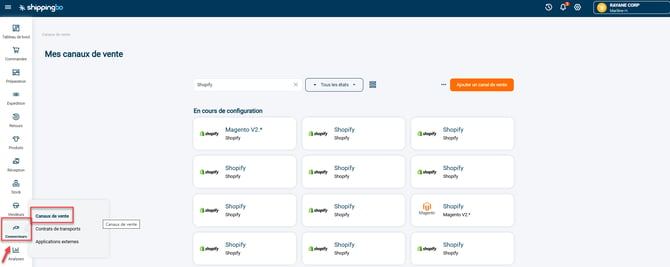
- In your Shippingbo interface, go to the menu Connectors -> Sales channels -> Open the details of your sales channel for which you want to enable or disable stock:
- Scroll down to the section Stock sending.
3.2 Enable stock sending
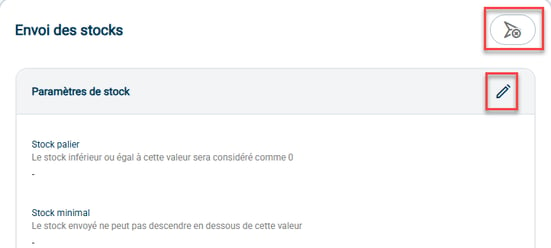
- Click on the arrow to the right of the title Stock sending to open the options:
3.3 Fill in the custom settings
- Click on thepen icon on the right to configure the options:
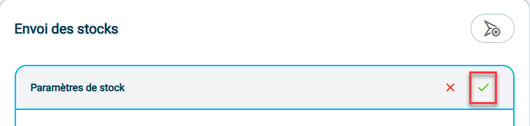
- Save the changes:
3.4 Disable the stock update
- Go back to the details of your connector for which you want to disable the stock update.
- Scroll down to the Stock sending section and click on the arrow again to disable sending:

4. Practical example
You are an e-merchant and sell on several marketplaces, including Amazon. During sales periods, you want to manually control the stock displayed on Amazon to avoid unexpected stockouts.
-
You temporarily disable stock sending via the Amazon connector.
-
You manually adjust the quantities displayed on Amazon according to your strategy.
-
Once the high-activity period is over, you re-enable stock sending.
Result: You avoid overselling and keep control of your catalog, while remaining agile.
⚒️ Recommendation:
Before fully using the feature described in this tutorial, we strongly recommend running a test phase with your own settings to check that the result matches your expectations. As the customer remains fully responsible for the actions carried out in the Shippingbo account, these tests are essential to use the tool with complete peace of mind.
To go further 🛫:
- Stock update with the external service
Contact us 📬:
Questions about this feature?
Feel free to write to us here so that we can answer your questions.