.png?width=210&height=40&name=bleu%20et%20gris_Sigle+logo%20SBO%20(4).png)
Summary
- Reliable communication with the carrier
- Optimized logistics tracking
- Fewer oversights
- Automation possible (EDI)
2. Prerequisites✔️:
-
Works only with P30 carriers (e.g., Geodis).
-
The end-of-day time must be configured in Shippingbo (e.g., 6 p.m.).
3. How to make a P30 pickup request?
3.1 Generate an end-of-day shipment order
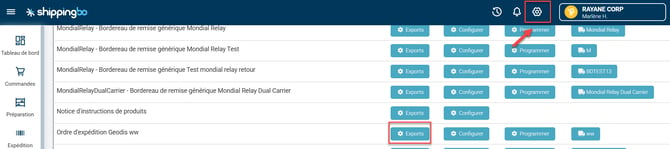
- Go to the Configurations menu → File management → Export → Shipment order of the desired carrier and click on the "Exports" button:
- Click on Add, then select a date and a time:
-
Calendar for the day
-
Clock for the shipping cut-off time
-
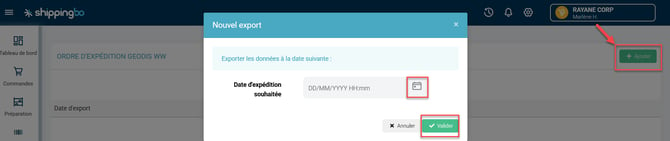
Then confirm.
📢 Important:
Orders received after the end-of-day time will not be included.
💡 Tip:
Perform the export just before the cut-off time to include all of the day’s orders.
3.2 Generate a transport slip
-
Configurations → File management → Export → Transport slip of the desired carrier -> click on the Exports button:

- Download and print the slip to hand it to the driver.
4. Practical example
You are an e-merchant selling furniture and work with Geodis.
Every day at 5:50 p.m., you:
-
Generate the shipment order
-
Then the transport slip
📦 The shipment order provides the carrier with the information on the parcels to be picked up at the next collection.
Result: all of your shipments for the day are sent on time, with nothing forgotten.
💡Tip:
Consider automating EDI exports to save time and secure exchanges with your carriers.
⚒️ Recommendation:
Before fully using the feature described in this tutorial, we strongly recommend running a test phase with your own settings to check that the result matches your expectations. As the customer remains fully responsible for the actions carried out in the Shippingbo account, these tests are essential to use the tool with complete peace of mind.
To go further 🛫:
- Automate your EDI exports for P30 carriers
Contact us 📬:
Questions about this feature?
Feel free to write to us here so that we can answer your questions.