Skip to content
English
  • There are no suggestions because the search field is empty.

INSTALL THE PICK-UP POINTS MODULE FOR PRESTASHOP 1.6 ORDERS

Summary

 
gif tuto-gif


  • Optimized logistics: automates the retrieval of pick-up points from Prestashop, avoiding manual entry and the associated errors.
  • Operational time savings: delivery information is integrated directly into Shippingbo, which speeds up order processing.
  • Shipment reliability: reduces the risk of errors on the pick-up points selected by customers, ensuring better service quality and fewer returns.


2. Prerequisites ✔️:

  • This feature is available from the LMS Starter+ pack and the OMS packs.
  • Have a Prestashop 1.6 connector already set up in Shippingbo, more information here.


3. Install the module for Prestashop 1.6

Once your Prestashop connector is installed, if you offer pick-up point delivery (regardless of the carrier) on your Prestashop, you will need to install the pick-up point retrieval module on Shippingbo.

3.1 Download the module by clicking on the following link: module 1.6

3.2 Then go to the sidebar menu Modules and services in Prestashop

3.3 Then, go back to Modules and services

3.4 Then, click on Add a new module
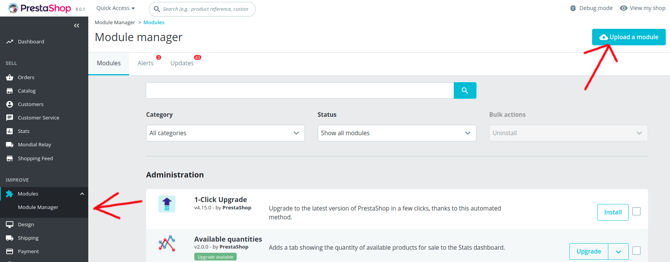

3.5
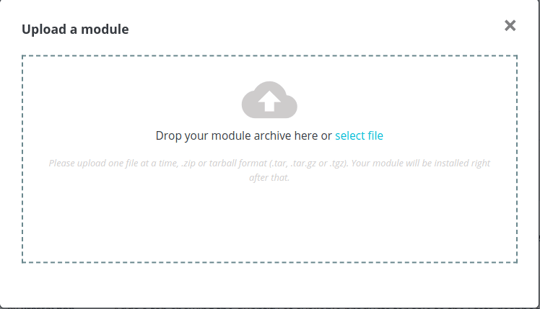
 Below, click on Choose a file:
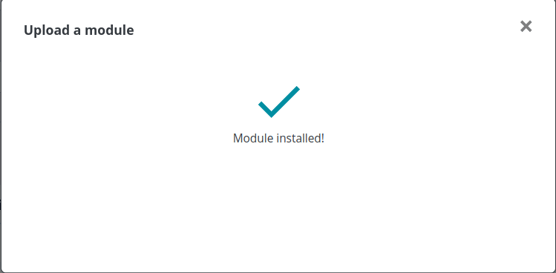
3.6 Check that the module is correctly installed:


4. Configure the webservice key for all Prestashop versions

4.1 Go to the customer's Prestashop back office.
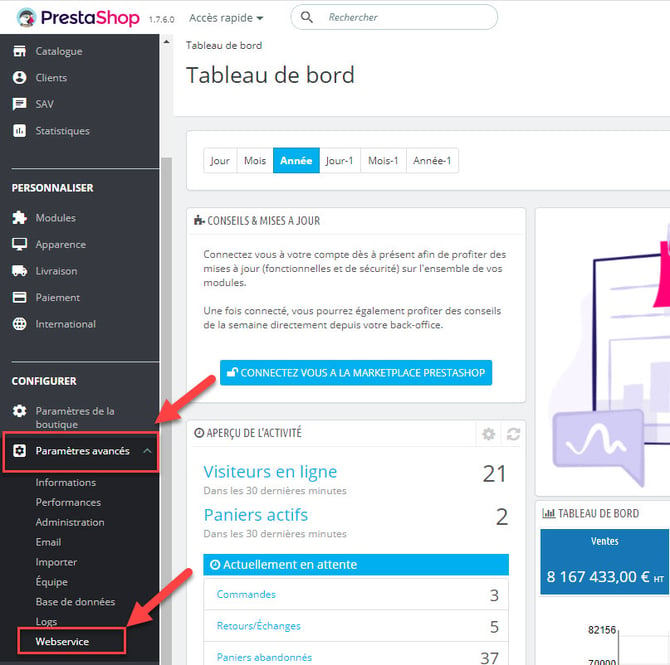
“Webservice”","type":"ordered-list-item","depth":0,"inlineStyleRanges":[{"offset":12,"length":18,"style":"BOLD"},{"offset":35,"length":10,"style":"BOLD"}],"entityRanges":[],"data":{}},{"key":"3uceb","text":"","type":"unstyled","depth":0,"inlineStyleRanges":[],"entityRanges":[],"data":{}},{"key":"96dg3","text":" ","type":"atomic","depth":0,"inlineStyleRanges":[],"entityRanges":[{"offset":0,"length":1,"key":0}],"data":{"width":768,"height":763.2416356877324}},{"key":"14vl5","text":"3. Cliquez sur la clé API déjà générée dans les étapes précédentes pour modifier. Référence : https://app.tettra.co/teams/shippingbo/pages/prestashop-801","type":"unstyled","depth":0,"inlineStyleRanges":[],"entityRanges":[],"data":{}},{"key":"8mcp","text":"","type":"unstyled","depth":0,"inlineStyleRanges":[],"entityRanges":[],"data":{}},{"key":"fpf6p","text":"","type":"unstyled","depth":0,"inlineStyleRanges":[],"entityRanges":[],"data":{}},{"key":"9gkai","text":" ","type":"atomic","depth":0,"inlineStyleRanges":[],"entityRanges":[{"offset":0,"length":1,"key":1}],"data":{"width":768,"height":152.71611253196932}},{"key":"i782","text":"4. Assurez-vous que le shippingbo_relay est activé, avec les Action active (GET and HEAD).","type":"unstyled","depth":0,"inlineStyleRanges":[],"entityRanges":[],"data":{}},{"key":"dr662","text":" ","type":"atomic","depth":0,"inlineStyleRanges":[],"entityRanges":[{"offset":0,"length":1,"key":2}],"data":{"width":768,"height":203.94258373205741}},{"key":"cb48u","text":"","type":"unstyled","depth":0,"inlineStyleRanges":[],"entityRanges":[],"data":{}},{"key":"6bqju","text":"Ensuite sur le service Prestashop sur Shippingbo, il faut activer l'option \"Activer la récupération des numéros de points relais via le module Shippingbo Relay Refs\"","type":"unstyled","depth":0,"inlineStyleRanges":[],"entityRanges":[],"data":{}}],"entityMap":{"0":{"type":"IMAGE","mutability":"IMMUTABLE","data":{"src":"https://tettra-production.s3.us-west-2.amazonaws.com/0d6efb4f154041e899af17bdcd19c1b5/75ea72e18b1d4d1277264893531034ba/d822b155a4112474fdb7aea5ee22465e/fa80564c9a111572cafd164476203596/4hs7keXeLjnzy6YQCziQqBaRsIhI8htskEpTlGDE.png","isPlaceholder":false}},"1":{"type":"IMAGE","mutability":"IMMUTABLE","data":{"src":"https://tettra-production.s3.us-west-2.amazonaws.com/0d6efb4f154041e899af17bdcd19c1b5/75ea72e18b1d4d1277264893531034ba/d822b155a4112474fdb7aea5ee22465e/fa80564c9a111572cafd164476203596/CW2nE5kGsDfbKqCJIN9UR8BtKTyEITaMkVPb4Ra3.png","isPlaceholder":false}},"2":{"type":"IMAGE","mutability":"IMMUTABLE","data":{"src":"https://tettra-production.s3.us-west-2.amazonaws.com/0d6efb4f154041e899af17bdcd19c1b5/75ea72e18b1d4d1277264893531034ba/d822b155a4112474fdb7aea5ee22465e/fa80564c9a111572cafd164476203596/THr7cqMVw9VNfoGOOhm9gMlNoxYiNnVoD8Lj5hfv.png","isPlaceholder":false}}}}" data-identifyelement="672">
4.2 Go to “Advanced Parameters” > “Webservice”
 
4.3 Click on the API key already generated in the previous steps to edit it:


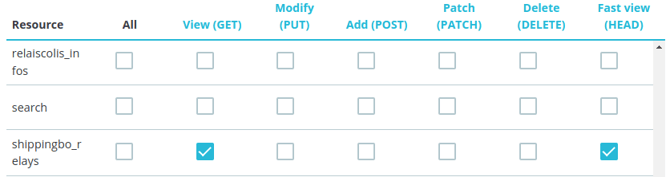
Make sure that the shippingbo_relays is enabled, with the Active actions (GET and HEAD).


💠Note:

If shippingbo_relays does not appear at step 3 above, you can try a few troubleshooting steps in this order:
“Performance”","type":"ordered-list-item","depth":0,"inlineStyleRanges":[{"offset":12,"length":18,"style":"BOLD"},{"offset":35,"length":11,"style":"BOLD"}],"entityRanges":[],"data":{}},{"key":"9ca07","text":"Clique sur \"Vider le cache\"","type":"ordered-list-item","depth":0,"inlineStyleRanges":[{"offset":12,"length":14,"style":"BOLD"}],"entityRanges":[],"data":{}},{"key":"6pmue","text":"Redémarrez à l'étape 2 pour 'Configurer le clé de webservice'","type":"ordered-list-item","depth":0,"inlineStyleRanges":[{"offset":29,"length":31,"style":"BOLD"}],"entityRanges":[],"data":{}},{"key":"8s96k","text":"Si shippingbo_relays ne s'affiche toujours pas, vous devez suivre les instructions ci-dessous pour 'Override manuellement les classes'.","type":"ordered-list-item","depth":0,"inlineStyleRanges":[{"offset":100,"length":33,"style":"BOLD"}],"entityRanges":[],"data":{}}],"entityMap":{}}" data-identifyelement="766">
  1. Go to your Prestashop back office 
  2. Go to “Advanced Parameters” > “Performance”
  3. Click on "Clear cache"
  4. Restart at step 2 to 'Configure the webservice key'
  5. If shippingbo_relays still does not appear, you must follow the instructions below to 'Manually override the classes':
- Go to the location where Prestashop is installed
- From the Prestashop installation, go to 'prestashop/override/classes/webservice' Note: If one of these directories is missing, it must be created manually!
 - Open the shippingbo module archive
 - Copy the file: 'override/classes/webservice/WebserviceRequest.php' from the module archive into the override folder for the Prestashop installation described in step 2.

4.4 Once the key is configured, go to the configurations of your Prestashop in your Shippingbo account, then check the option "Enable the retrieval of pick-up point numbers via the Shippingbo Relay Refs module" in the category Order retrieval:

➡️ If the option does not stay checked when you save it, it means that an installation parameter is in error. 

➡️ To check which one is in error, go to the logs of your Prestashop by clicking on the three small dots at the top right of the page: 
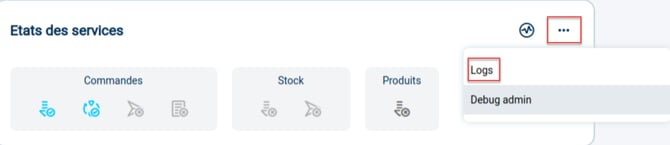
Then, select the following criteria in the left menu: 
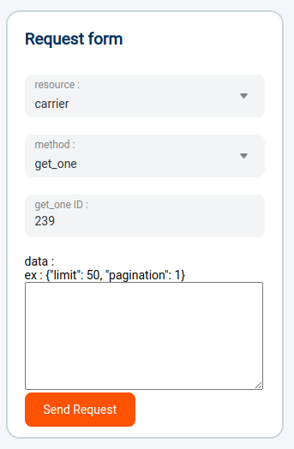
➡️ If you receive an error 400, 403 or 500, it means that an error occurred during the installation of the module. In such cases, please refer to your webmaster so that they can identify the source of the error.


⚒️ Recommendation: 

Before fully using the feature described in this tutorial, we strongly recommend running a test phase with your own settings to check that the result matches your expectations. As the customer remains fully responsible for the actions carried out in the Shippingbo account, these tests are essential to use the tool with complete peace of mind.


To go further 🛫:

- Connectors - Connect Prestashop 1.6

- Connectors - Connect Prestashop 1.7

- Connectors - Connect Prestashop 8.0.1


FAQ ❔: 

- Prestashop error: "Time out connecting to server" 


Contact us 📬:

Questions about this feature?
Feel free to write to us here so that we can answer your questions.