.png?width=210&height=40&name=bleu%20et%20gris_Sigle+logo%20SBO%20(4).png)
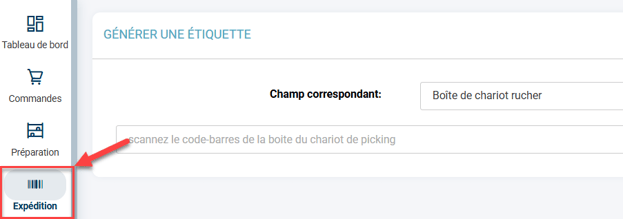
You want to generate a label manually for an order, via the menu Shipment -> Generate a label:
You receive the following error when entering the original reference or the source reference of the order:
"Validation failed: Order The order is already in a preparation session, another parcel cannot be created"
This error indicates that the order in question is already being prepared within a preparation session, and therefore it is not possible to generate a label without linking it to the current preparation process.
This is to avoid causing stock errors afterwards (because the current preparation process has reserved stock for this order, or the stock has already been picked).
✅Solution:
You can either wait for the order to be shipped via the current preparation session, or use one of the two solutions below:
- by downloading the preparation slip of the session containing the order, you can retrieve the parcel number and enter it as follows to generate the label for this parcel number (you can also scan the barcode).
- if you prepare the order using an apiary, you can also scan the apiary box corresponding to this order.
Contact us 📬:
Questions about this feature?
Feel free to write to us here so that we can answer your questions.