.png?width=210&height=40&name=bleu%20et%20gris_Sigle+logo%20SBO%20(4).png)
- Time saving Immediate stock updates, without waiting for logistical movement.
- Flexibility : Ability to adjust quantities on the fly, wherever you are.
- Versatility : Accessible from both the web interface and the Shippingbo PDA.
2. Prerequisites✔️:
- This feature is available from the Pro pack +.
3. How does adding/removing stock work?
3.1 On the interface:
- Go to the menu Products, then go into the details of the product in question:
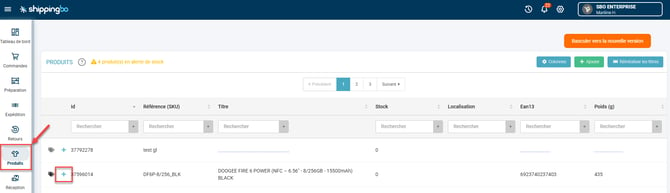
-
Click on Stock entry or exit din the section Quick actions of the product:
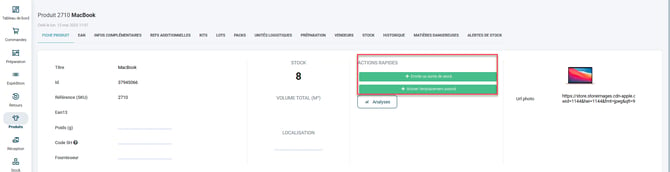
-
Specify the quantity to add or remove.
-
Click on the arrow high to add, down to remove from stock.
-
Then click on To validate to finalize the operation.
-
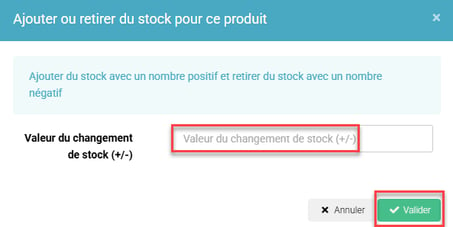
Example : To manually remove 5 units from a damaged product, click the down arrow to -5, then confirm.
💡 Trick :
This method is ideal for quickly correcting an inventory error or integrating manual restocking.
3.2 On PDA
- Go to the menu Adding stock Or Remove from stock :
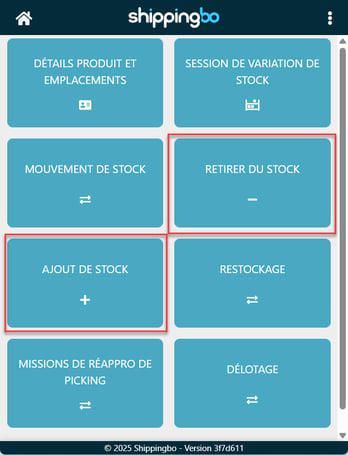
-
Enter the product location (optional) or click on to complete this step.
-
Scan the product barcode.
-
Change the quantity or scan multiple units, then click on To validate : A confirmation message is displayed.
💡 Trick :
This option is particularly useful during field inventories or adjustments in the preparation area.
📢 Attention :
If you are in a stock variation session, you will see an active session notification. To close this session, see the tutorial. Stock variation session.
5. Example of practical application
You're an e-commerce retailer specializing in smartphone accessories. During the sales period, you realize that one item is undervalued in your inventory. Using your PDA, you quickly scan the 15 units received outside of the standard procedure. In seconds, the stock is updated and your products are available for sale.
📢 Attention :
Any manual modification does not trigger not of logistical movement and must therefore be used rigorously to avoid inventory errors.
⚒️ Recommendation:
Before fully using the functionality described in this tutorial, it is strongly recommended to performa testing phasefollowing your own parameters to verify that the result meets your expectations. The remaining customerfully responsibleThese tests, based on actions performed on the Shippingbo account, are essential to ensure the tool can be used with complete peace of mind.
To go further 🛫:
- Add/Remove stock using your PDA in the advanced warehouse
- Modification of existing stock (excluding forward warehouse)
Contact us 📬:
Any questions about this feature?
Feel free to write to ushereso that we can answer your questions.