.png?width=210&height=40&name=bleu%20et%20gris_Sigle+logo%20SBO%20(4).png)
Benefits of the feature ✨
-
Seamless automation: Automatically send your orders to your logistics provider without manual re-entry.
- Accurate synchronization: Distinguish physical logistics stock from stock available for sale to avoid stockouts.
- Centralized orchestration: Manage the matching of your marketplace references and shipment tracking in one place.
1. Prerequisites
This feature requires activation by Shippingbo support, which you can reach here.
Several prerequisites are required:
- Have an active Shippingbo OMS account.
- Have an account set up with your external logistics provider (for example Octopia).
- Have a structured product catalog (master logistics SKU, additional references and EAN codes filled in; strongly recommended and often required by external providers).
2. How the Virtual Bridge works
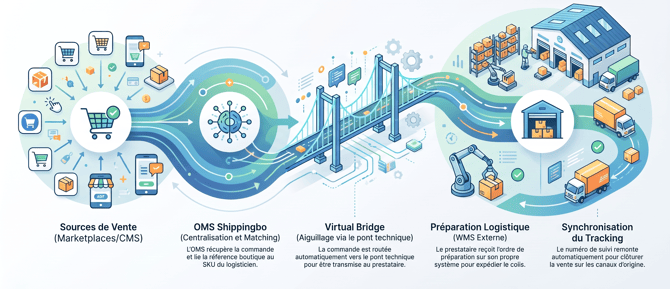
The Virtual Bridge acts as a technical intermediary between your Shippingbo OMS and your external logistics provider, which has its own Warehouse Management System (WMS) external to Shippingbo.
2.1 Order architecture and flows
An order goes through the following steps:
-
Retrieval of the order from the sales source (Marketplace / CMS) into the OMS.
-
Matching of the order lines with the products in the catalog.
-
Routing of the order to the Virtual Bridge warehouse.
-
Transmission of the order to the logistics provider for preparation and shipment.
-
Return of shipping information (carrier, tracking number) to Shippingbo, then closing and updating on the sales channel.
⭐ Key point:
The main SKU in Shippingbo must match your provider's logistics SKU, while marketplace references must be recorded as additional references. This guarantees automatic, error-free matching during routing.
2.2 Stock flow and synchronization
The stock flow is independent of the order flow:
-
The logistics provider communicates its available physical stock.
-
The Shippingbo OMS retrieves this data and calculates the stock available for sale according to your orchestration rules (stock reserved for orders, and stock pre-reservations).
-
This calculated stock is then sent from the OMS to your various sales channels.
💬 Good to know:
The stock held by your logistics provider is not necessarily identical to the stock published on your marketplaces. Do not manually modify stock in Shippingbo without first checking the synchronization chain.
2.3 Error and return management
When an order is marked In error in the OMS, the cause is generally a catalog matching failure or a lack of logistics stock. Once the problem has been corrected on the product or the stock, a manual routing retry action restarts the transmission.
🚩 Special case:
In the event of a stock shortage, Shippingbo automatically retries routing for a set period. Beyond the configured period (15 days by default) without replenished stock, a manual retry via the Retry routing button may be necessary:
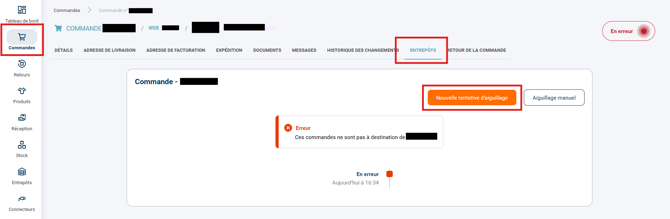
➡️ The rerouting delay can be modified on request by our technical teams, whom you can contact here. (((In Configurations > Account > tab Multishippingbo > option Number of days allowed to retry routing. )))
💡 Tip:
Returns are initiated directly from the Order return tab in the OMS, and are then propagated via the Virtual Bridge to your logistics provider depending on its integration capabilities.
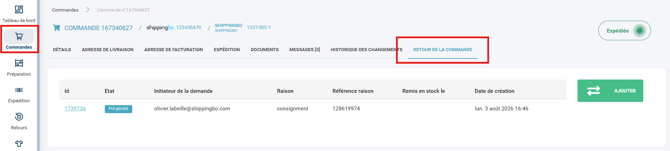
➡️ Some external logistics providers do not support the creation or receipt of inbound return orders via the connector API; it is recommended to look into this beforehand with your logistics provider.
3. Activating and configuring the Virtual Bridge
3.1 Requesting activation from the Shippingbo teams
Setting up a Virtual Bridge requires activation by our technical teams as well as advanced support; please contact your Shippingbo account manager for more information on the subject.
3.2 Setting up the product catalog
So that orders are transmitted correctly:
-
Go to your product catalog in the OMS.
-
Fill in the Main SKU with the exact reference expected by your logistics provider.
-
Add the SKU(s) of your stores/marketplaces in the field called Additional references.
-
Make sure to fill in the EAN code of each item (strongly recommended and often required by external providers such as Octopia).
3.3 Checking the routing
In the configuration of the sales sources and warehouses:
-
Check that the Virtual Bridge warehouse is correctly mapped.
-
Run a single-order test to validate transmission through to the logistics provider.
4. Practical example
A company sells an item on several marketplaces under different commercial references (e.g.: REF-MKT-A and REF-MKT-B). This item is stored and prepared at its logistics provider under the reference QUTI-CHAIR-01.
- Catalog configuration: In Shippingbo, the product is created with the Main SKU
QUTI-CHAIR-01, EAN3700000000001and the additional referencesREF-MKT-AandREF-MKT-B. - Placing the order: A customer orders
REF-MKT-Aon the marketplace. - Matching and routing: Shippingbo recognizes the item thanks to the additional reference, links it to
QUTI-CHAIR-01, and transmits the order to the logistics provider via the Virtual Bridge. - Shipment: The logistics provider ships the order, sends the tracking to the Virtual Bridge, which updates the OMS and closes the sale on the marketplace.
⚒️ Framework and responsibilities:
Before fully using the feature described in this tutorial, we strongly recommend running a test phase with your own settings to check that the result matches your expectations. As the customer remains fully responsible for the actions carried out in the Shippingbo account, these tests are essential to use the tool with complete peace of mind.
To go further 🛫
Contact us 📬
Questions about this feature?
Feel free to write to us here so that we can answer your questions.