.png?width=210&height=40&name=bleu%20et%20gris_Sigle+logo%20SBO%20(4).png)
Summary

- Fewer logistics errors: quickly corrects an order that was routed incorrectly.
- Reliable stock: the original order is automatically canceled to re-increment the stock of the wrong warehouse.
- Time saving: avoids complex handling and multiple manual interventions.
- Operational fluidity: rerouting ensures that the order is processed in the correct logistics chain.
2. Prerequisites ✔️:
- This feature is available for users working with Multi-Shippingbo.
- Contact our support team so that they activate the following options in your Multi-Shippingbo configurations:
- Cancel the order when it goes into error to reroute it to the reseller.
- Button to reroute an order in error to the supplier.
3. 👩🎓 How does order rerouting work?
3.1 Setting the order to error in the WMS or store
Automatic effects:
-
Cancels the order on the OMS side
-
Re-increments the stock of the initial warehouse or store
-
Switches the order to “In error” in the OMS
-
Releases the order for rerouting
3.2 Mandatory correction depending on the case
📢 Warning:
No rerouting must be launched until the correction has been made.
3.3 Retry routing
Relaunch the rerouting of the order to the correct warehouse by going to the details of the order concerned in your OMS, tab Warehouse, then click on Retry routing:
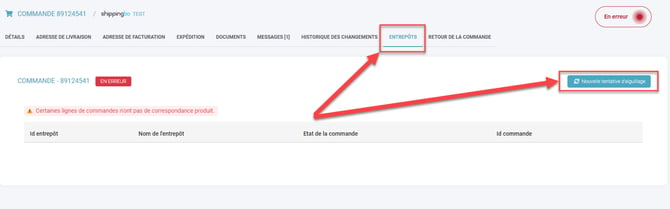
Result:
-
A new order is created in the correct warehouse or store
-
The old order is automatically canceled
-
The stock is correct and consistent.
💠 Note:
It is possible to schedule the routing retry over a given period. To do so, please send a request to our customer service.
4. 📖 Use cases
4.1 Use case: order routed to the wrong warehouse 🏬
Step 1: Set the order to error in the WMSThe picker notices that the order should not be in this warehouse → they set it to Error.
Immediate effects:
-
order canceled on the OMS side
-
stock re-incremented
-
order in status In error in the OMS
Step 2: Correct the warehouse mapping
- On the OMS account, go to the menu Configurations → Logistics → Warehouse mapping to correct your mapping. You can also use our tutorial here.
Step 3: Retry routing
In the order details, retry its routing.
Result:
-
New order created in the correct warehouse
-
Erroneous order automatically canceled
4.2 Use case: Click & Collect: incorrect store stock 🏫
An order is correctly routed, but impossible to prepare by the store.
Examples:
-
Actual stockout
-
Product not found / stolen
-
Breakage
-
Store stock not synchronized
-
Actual quantity < expected quantity
Step 1: Before any action in Shippingbo:
-
Physically check the actual quantities
-
Update the stock in the store's local tool
-
Let the synchronization send the correct quantities back to Shippingbo
Step 2: Set the order to error in the store
Immediate effects:
-
order canceled in the OMS
-
stock re-incremented
-
order in status In error on the OMS side
Step 3: Check / Adjust the routing rules in the OMS
Check in Configuration → Logistics → Warehouse mapping:
-
store priority → fallback
-
eligibility of other stores
-
switch to the e-commerce warehouse if no store has stock
Step 4: Retry routing
Possible results:
The new order automatically contains:
-
the right delivery method
-
the right preparation settings
-
correct tracking
📢 Warning: Rerouting is impossible if the order is:
-
already prepared
-
already scanned in picking
-
partially shipped
5. 🕵️Practical example
A merchant with two warehouses (North & South) notices that an order intended for the South is routed to the North.Steps to follow:
- They set the order to error in the North WMS
- The stock is re-incremented in the North
- They correct the mapping in the OMS
- They launch the “Retry routing”
- The order is recreated in the South warehouse
💠 Note:
Rerouting works only if the order has not already been prepared or shipped.
⚒️ Recommendation:
Before fully using the feature described in this tutorial, we strongly recommend running a test phase with your own settings to check that the result matches your expectations. As the customer remains fully responsible for the actions carried out in the Shippingbo account, these tests are essential to use the tool with complete peace of mind.
To go further 🛫:
- Reroute orders manually and by import
- Configure the warehouse mapping
- Existing order statuses in Shippingbo
Contact us 📬:
Questions about this feature? Feel free to write to us here so that we can answer your questions.