.png?width=210&height=40&name=bleu%20et%20gris_Sigle+logo%20SBO%20(4).png)
Summary

- Customs compliance: allows you to declare a value for free products when exporting outside the EU.
- Sample and after-sales management: products sent free of charge can still be correctly declared to customs.
- Automation: the customs value is automatically used in the CN23, with no manual changes at the time of shipment.
2. Prerequisites ✔️
- Ship orders outside the European Union
- Use the automatic generation of CN23 customs documents
- Have access to the Logistics configuration settings
3. Understanding the customs value for free products
In some cases, a product may be sent free of charge, whether it is a sample, an after-sales replacement, a goodwill gesture or simply a free gift.
However, customs always require a declared value, even if the customer does not pay for the product. The feature "Use customs value for lines at 0" therefore lets you define a specific value to declare when the line price is equal to €0.
This value is configured directly in the product sheet.
4. Configuring the retrieval of the note_attributes field
4.1 Enable the use of the customs value
To enable the feature, go to Configurations>Logistics:
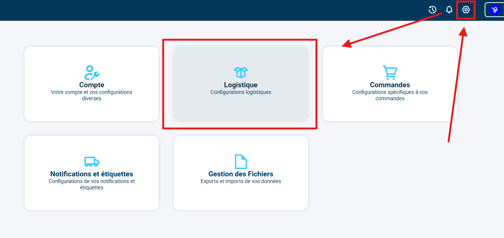
In the tab CN23:

Check the option Use customs value for lines at 0:

4.2 Set the customs value in the product sheet
Once the option is enabled, two new fields appear in the product sheets:
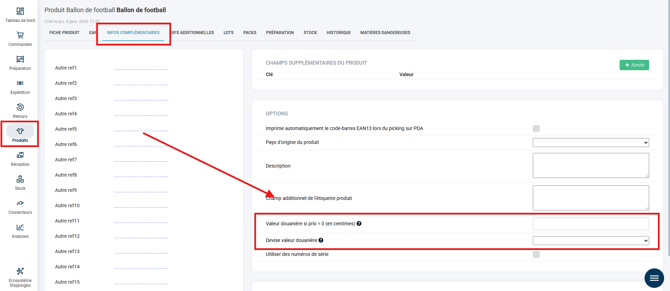
Customs value if price = 0 (in cents)
Lets you specify the value to declare to customs when the product is offered free of charge.
Customs value currency
Lets you select the currency used for this value (EUR, USD, etc.), which will appear in the CN23.
4.3 How it works in the order
When a product has a value entered in the field Customs value if price = 0 (in cents) in its product sheet:
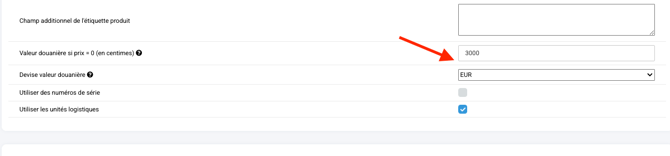
And this product is present in an order, with an entered price equal to 0:
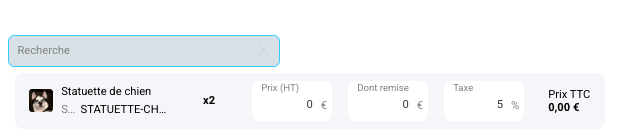
📢 Point of attention:
The price entered must be 0 in the order for the feature to trigger. If the price field is left empty, the field Customs value if price = 0 (in cents) does not activate.
➡️ The automatically generated CN23 will use the value defined in the field:
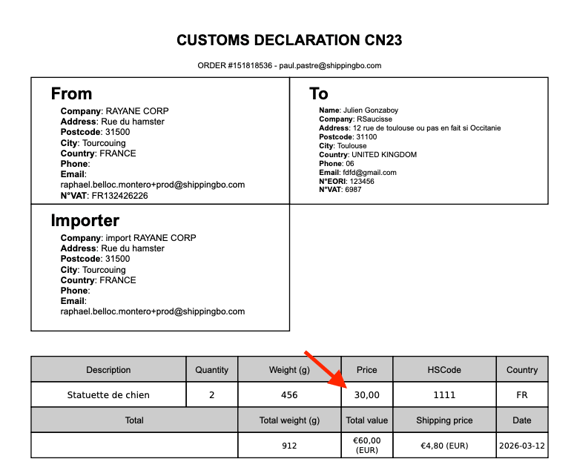
This makes it possible to correctly declare the product value to customs, even when it is offered free of charge.
⚒️ Framework and responsibilities:
Before fully using the feature described in this tutorial, we strongly recommend running a test phase with your own settings to check that the result matches your expectations. As the customer remains fully responsible for the actions carried out in the Shippingbo account, these tests are essential to use the tool with complete peace of mind.
Contact us 📬:
Questions about this feature? Feel free to write to us here so that we can answer your questions.