.png?width=210&height=40&name=bleu%20et%20gris_Sigle+logo%20SBO%20(4).png)
Benefits of the feature ✨
- Time saving : Automatic tracking of operations with mandatory justification.
- Error reduction : Facilitates the traceability of stock movements and returns.
- Optimizing warehouse management Ensures that each action is associated with a specific reason, improving the accuracy of inventory reports.
1. Prerequisites
- This feature is only available with the Advanced Warehouse package from Shippingbo.
2. How does the "Assign reasons" feature work?
This feature allows you to add predefined reasons to certain actions in Shippingbo. It can be enabled for stock movements or returns, providing a clear explanation for each operation performed.
⭐ Key point:
Any change to the reason for a return or to the Reference of that reason is entirely bidirectional.
➡️ So if you change this information on your WHOThe change is automatically propagated to the WMS concerned. Similarly, any modification made to the WMS is instantly reflected on your WHO.
Example If you assign a reason to a stock movement, it becomes mandatory to select a reason each time you perform one. This allows you to document precisely why an action was taken.
3. How do I activate the "Assign reasons" feature?
3.1 Go to the menu Configurations -> Logistics -> Reasons -> click on Add:

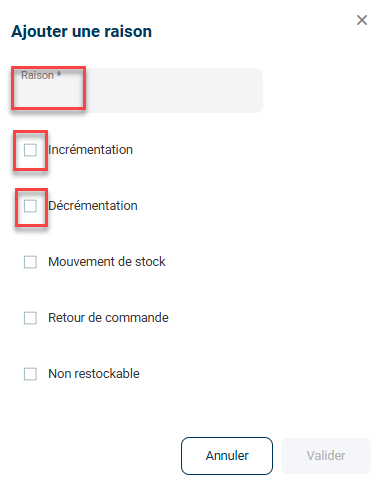
3.2 Enter the name of your reason and check the boxes corresponding to the actions for which you want this reason to be available:
3.3 Confirm the creation of your reason: The reason will now be available for the actions you have selected:
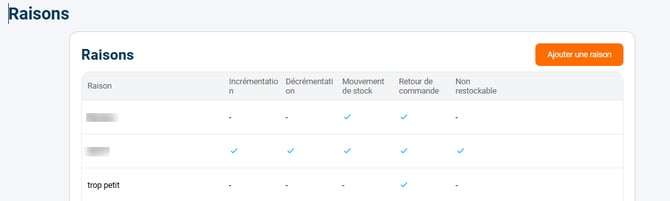
Example : If you have selected "Return", each time a return is recorded, you will have to choose a reason from those you have configured.
⭐ Key point:
Enabling a reason for an action makes it mandatory to enter a reason for that action. For example, if you enable a reason for stock movements, you will no longer be able to perform a stock movement without selecting a reason.
4. Example of practical application
Context :
You are an e-commerce business managing a clothing warehouse. You want to closely monitor all stock movements to avoid inventory discrepancies. By activating the "Assign reasons" feature for stock movements, you can now require your teams to provide a reason each time an item is moved within the warehouse, whether it's a transfer between departments or a product return.
Using the feature:
- You configure reasons such as "Customer Return", "Transfer Between Zones", "Replenishment" and "Inventory Correction".
- From now on, for each stock movement, your team must select one of the reasons you have predefined before finalizing the operation.
Result :
This feature provides complete traceability of your stock movements. It allows you to quickly identify the reasons for inventory adjustments and more easily detect potential errors or anomalies. Furthermore, it improves the accuracy of inventory reports, simplifying your monthly audits.
⚒️ Framework and responsibilities:
Before fully using the functionality described in this tutorial, it is strongly recommended to performa testing phasefollowing your own parameters to verify that the result meets your expectations. The remaining customerfully responsibleThese tests, based on actions performed on the Shippingbo account, are essential to ensure the tool can be used with complete peace of mind.
To go further 🛫:
- Modification of existing stock (Excluding advanced warehouse)
Contact us 📬:
Questions about this feature? Feel free to write to us.hereso that we can answer your questions.