.png?width=210&height=40&name=bleu%20et%20gris_Sigle+logo%20SBO%20(4).png)

- Optimal distribution of shipments Thanks to efficient automated cutting, the company can choose the most cost-effective transport options based on the size and volume of sub-orders, thus reducing shipping costs.
- Reduction of management errors Automation ensures that orders are cut correctly according to logical criteria (by product type, volume, weight, etc.), thus limiting errors that could occur during manual cutting.
- Automated processing of complex criteria : Automatic cutting is based on predefined rules (quantity, volume, availability, deadlines, etc.), reducing the need for manual intervention and minimizing errors.
2. Prerequisites✔️:
- Automatic order cutting is an available feature on request.
- Feature available to all Shipping packs.
3. How does the automatic order cutting work?
Functionality definition
There Automatic order cutting is a particularly useful feature in managing logistics flows, especially for processing orders complexes Or bulkyIt allows you to automatically split an order in several sub-orders or shipments, depending on various criteria.
Automatic order splitting is based on order grouping criteria defined by you, as well as the sales sources for which you want orders to be automatically split.
For example :
- packages containing refrigerated products that must be transported under refrigeration
- fragile packages
- packages containing hazardous materials
- large packages
4. Activation of automatic order cutting
Automatic order cutting is a feature available upon request. To add it, Please contact our Customer Care service here.
You will need to provide our department with the following two pieces of information:
-
the list of desired grouping criteria
-
there List of sales sources for which you want to activate automatic slicing
⇒ Example of an email to send to our Customer Care service to request the activation of automatic order splitting on your Shippingbo account:
" Hello,
We would like to activate automatic order splitting on our Shippingbo account.
Following the addition of cutting values to our products, here are the grouping criteria we would like for cutting:
- the values "fragile" and "light" together
- the values "solid" and "bulky" together
- the values "cold" and "temperate" separately
To be activated on the following sales sources: here, provide the list of sales sources with the name exact that they have on your Shippingbo account.
Thanks in advance,"
5. Example of using the feature:
For example An order has arrived in your Shippingbo account. It consists of 3 different products:
- 2 products that must be kept and transported under refrigeration (the blue square and the blue triangle in the example below)
- 1 product that must be stored and transported at room temperature (the red square in the example below):
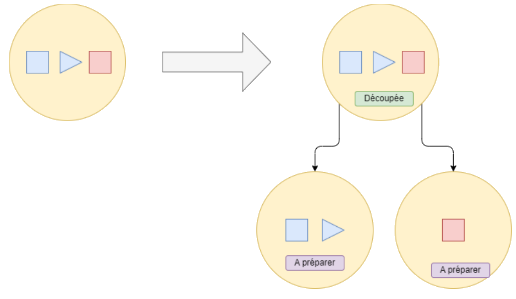
Let us assume automatic cutting criteria that separate products for cold storage from products for storage at room temperature:
➡️ This order will be automatically split into 2 separate orders in order to separate the products so that they are shipped differently.
⚒️ Recommendation:
Before fully using the functionality described in this tutorial, it is strongly recommended to performa testing phasefollowing your own parameters to verify that the result meets your expectations. The remaining customerfully responsibleThese tests, based on actions performed on the Shippingbo account, are essential to ensure the tool can be used with complete peace of mind.
To go further 🛫:
FAQ ❔:
No FAQs related to this feature are available at the moment.
Contact us 📬:
Any questions about this feature?
Feel free to write to us here so that we can answer your questions.