.png?width=210&height=40&name=bleu%20et%20gris_Sigle+logo%20SBO%20(4).png)
1. Prerequisites ✔️:
- Label cancellation is only available for shipments with a delivery slip method such as: Colissimo, Lettre Suivie or Kuehne & Nagel.
2. Cancel a label
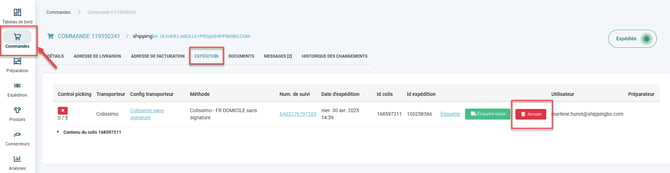
To cancel a label, simply go to the details of the order in question and click on the tab. Shipping and click on the button Cancelopposite the corresponding label:
💠Note:
Cancelling labels is only possible (and useful) for shipments with a delivery slip method such as: Colissimo, Lettre Suivie or Kuehne & Nagel.
For most other carriers, simply not handing the package over to the carrier is enough to avoid being charged for the label. Otherwise, we advise you to get in touch with your carrier.
⚒️ Recommendation:
Before fully using the functionality described in this tutorial, it is strongly recommended to performa testing phasefollowing your own parameters to verify that the result meets your expectations. The remaining customerfully responsibleThese tests, based on actions performed on the Shippingbo account, are essential to ensure the tool can be used with complete peace of mind.
To go further 🛫:
FAQ ❔:
No FAQs related to this feature are available at the moment.
Contact us 📬:
Questions about this feature? Feel free to write to us.hereso that we can answer your questions.