.png?width=210&height=40&name=bleu%20et%20gris_Sigle+logo%20SBO%20(4).png)
Benefits of the feature ✨
- Time saving : Performing inventories directly from the PDA without using a computer.
- Traceability Centralized tracking of inventory sessions in Shippingbo.
- Instant update The stock is updated in real time on the platform.
- Error reduction : Elimination of errors related to duplicates or omissions during inventory.
1. Prerequisites
-
This feature is only available from the Expert Pack + with the option Advanced Location activated.
-
Do not have any orders being prepared on the locations to be inventoried.
2. How does the inventory work on a PDA?
The PDA-based inventory feature allows you to create and manage inventory sessions from the warehouse, scanning locations, products, expiration dates, batches, and quantities. Each session is recorded in Shippingbo, ensuring complete traceability of stock movements.
Example: When launching an inventory session titled “April 2025 Inventory”, all scanned locations will be updated with the data entered via the PDA. Unscanned products will not be modified.
💡 Trick :
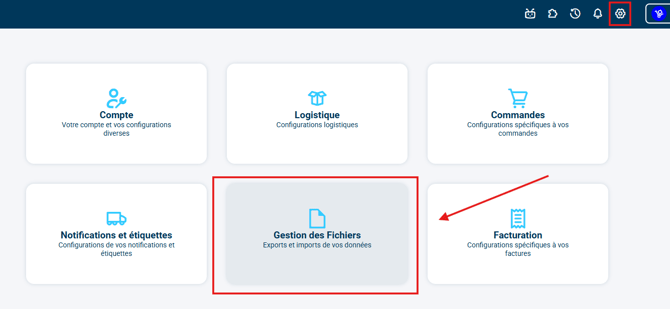
Before starting, it is advisable to export the status of the locations to have an overview of the reserved stock: Menu > Settings > File Management > Export > Location:


📢 Attention :
Ensure that no orders are being prepared in the locations you are going to inventory. This could cause stock errors.
4. How do I activate the feature?
4.1 Conducting your inventory
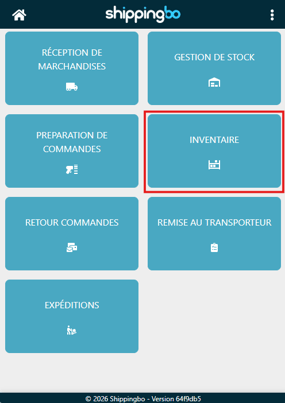
- Go to your PDA and then click on the module Inventory :
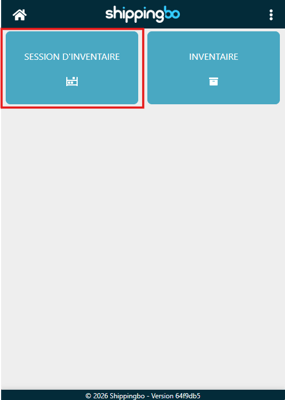
- Click on Inventory session (Or Inventory (if you wish to resume an existing session):
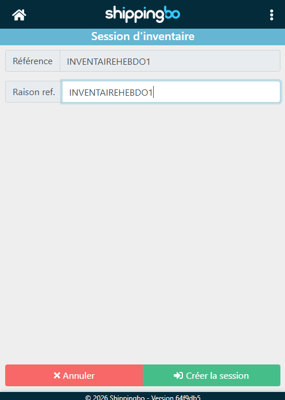
- Then enter a name of your choice for your session (e.g. : "WEEKLY INVENTORY1"). Then, click on Create the session:
-
Now that you are in the inventory session you just created, click on Inventory To start the session:
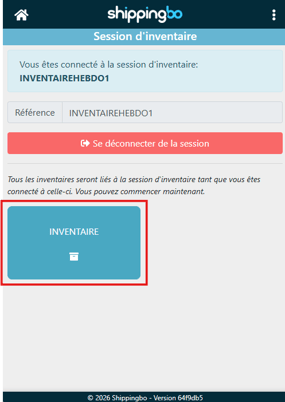
💬 Bwe need to know:
If the picking decrement is enabled and reservations are in progress, Shippingbo will display a pop-up alerting you to the possible impacts:
-
The most recent reservations can be cancelled.
-
Orders already assigned can be removed from the run or have their slip cancelled.
-
Start by scanning the barcode of a location:
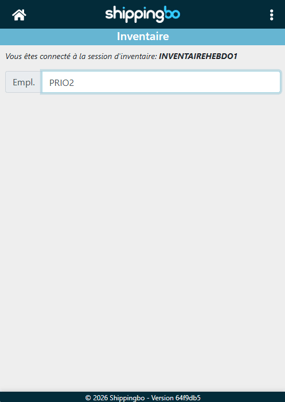
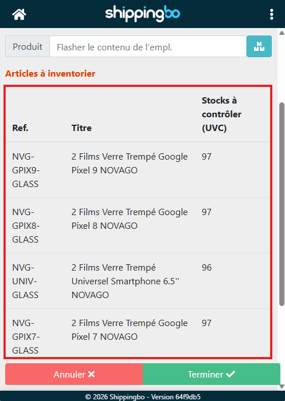
➡️After the location scan, thelist of products already presentThe following is displayed in this location: -
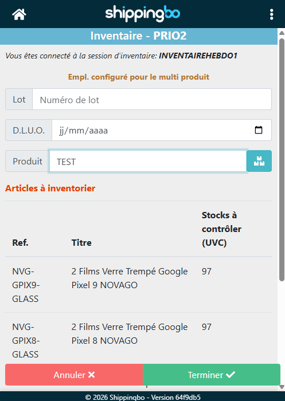
Scan the relevant product and then fill in the information, if necessary.has Best Before End or THE number of batch :
-
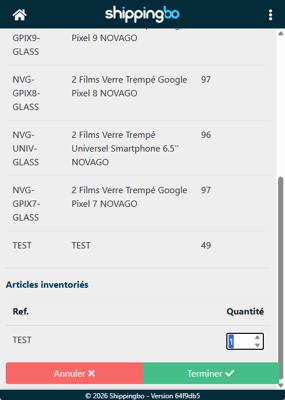
Next, enter the quantity of the product at the bottom of the page:
⭐ Key point:
-
Each piece of data entered overwrites the previous information in the location.
-
In the case of multiple products in the same location, all products must therefore be scanned before validation.
4.2 Closing your inventory
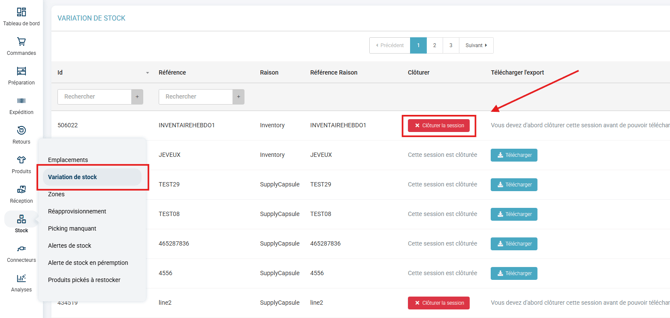
Once your inventory session is complete from the PDA, you must close it from the Shippingbo web interface.
- Go back to the computerYou will find the inventory session that has just been completed in the menu. Stock > Stock variation, click on Close the session :
-
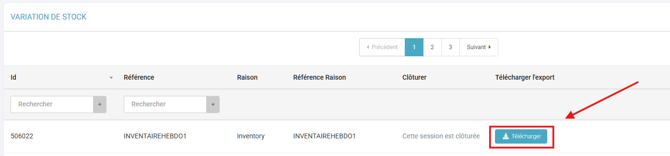
Once the session is closed, you have the option to download a session summary file:
💠 Good to know :
Locations not scanned during the session will retain their initial inventory. No changes will be made to them.
5. Example of practical application
Context :
You are an e-commerce business in the cosmetics sector and you are preparing your annual inventory. Thanks to the inventory functionality via PDA, you can carry out this operation directly from your warehouse without interrupting your logistics operations.
Using the feature:
You start a session titled "Inventory April 2025" from your PDA. You begin by scanning each location in your storage area, then the relevant products, entering the expiration date and batch number each time. You confirm the available quantities for each item. At the end of the day, you return to the Shippingbo interface to close the session.
Result :
Your inventory is up-to-date, traceable and visible from Shippingbo, without having to go through Excel files or a manual survey.
To go further 🛫:
- Taking inventory at the picking station using your PDA
- Performing an inventory with your PDA outside of an advanced warehouse
Contact us 📬:
Any questions about this feature?
Feel free to write to ushereso that we can answer your questions.