.png?width=210&height=40&name=bleu%20et%20gris_Sigle+logo%20SBO%20(4).png)
- Time saving : Automation of invoice creation and issuance.
- Reliability : Reduction of errors related to manual data entry.
- Compliance Compliance with legal obligations through complete and up-to-date documentation.
- Centralization : Managing invoices directly from Shippingbo.
2. Prerequisites ✔️:
- The invoice option is apaid optionPlease contact your Shippingbo business account manager to activate this feature.
3. How does the Invoice option work?
Once activated, the Invoice option allows you to generate automatically an invoice for each order integrated into Shippingbo after the activation date.
These documents can then be used for your accounting and sent to your clients.
💡 Trick Remember to fill in your legal information and shipping address before activating the feature, so that your invoices are compliant from the first generation.
4. Activating and configuring the Invoice option
4.1 Provide your company's identification information
- Go to the menu Configurations -> Account -> Customer Account -> Billing information :
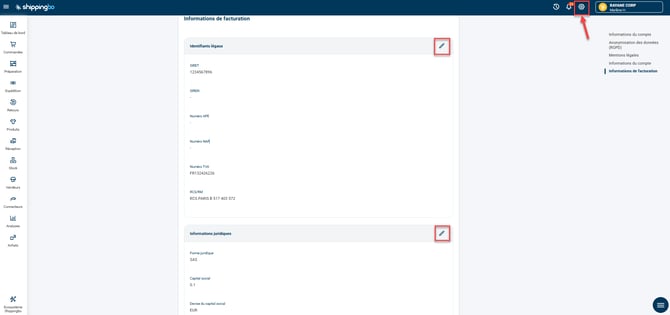
- Complete the required fields:
-
-
SIRET (pre-filled if provided at registration)
-
VAT number
-
Legal status (SAS, SA, SARL, etc.)
-
Share capital (in cents)
-
Currency of the share capital
-
RCS/RM Number (e.g.: RCS Toulouse A/B 123456789 or 123456789 RM XX)
-
4.2 Configure a shipping address
- Go to the menu Configurations -> Billing -> Tab Shipping address -> Click on the pen to Create a shipping address :
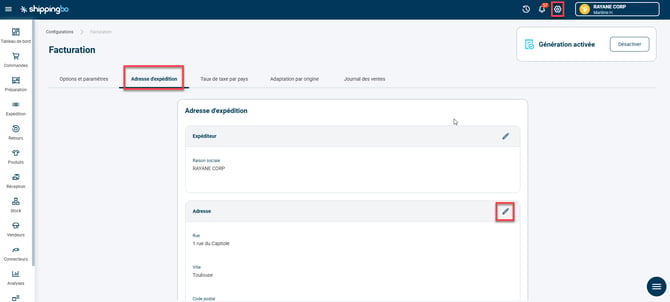
- Please fill in the required fields:
- Company name
- Street, Postal Code
- City
- Country
- Country code
- Phone
💠Note:
If an address already exists in the menu Configurations -> Accounts -> Customer Account, This last field will be automatically pre-filled.
4.3 Enable invoice generation
- Go to the menu Configurations -> Billing -> Tab Options and settings.
- Optional: Indicate the closing date of your fiscal year to trigger the generation of accounting documents.
- Click the button Enable To activate invoice generation:
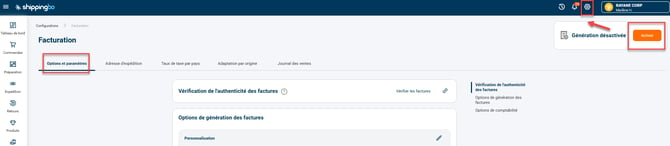
Invoices will be generated automatically for all integrated orders. after this activation.
📢 Warning:
Orders placed before activation will not be automatically billed.
To use the Invoice option, please refer to our tutorial now. Use the Invoice option on Shippingbo.
5. Example of practical application
You are a e-commerce merchant in the textile sector.
You sell several hundred items per month and previously spent time manually creating invoices for each order.
By activating the Invoice option in Shippingbo:
-
You centralize all your invoices in one place.
-
Each shipped order triggers automatically generating an invoice in the correct format.
-
You save several hours per week and reduce the risk of data entry errors.
💠 Noticed :
This feature is particularly useful if you work with an external accountant, as you can send them a complete export in just a few clicks.
📢 Attention :
If you have not correctly entered your legal information or shipping address, invoice generation will be blocked.
⚒️ Recommendation:
Before fully using the functionality described in this tutorial, it is strongly recommended to performa testing phasefollowing your own parameters to verify that the result meets your expectations. The remaining customerfully responsibleThese tests, based on actions performed on the Shippingbo account, are essential to ensure the tool can be used with complete peace of mind.
To go further 🛫:
- Use the Invoice option on Shippingbo
FAQ ❔:
- Generate old invoices on Shippingbo.
Contact us 📬:
Questions about this feature? Feel free to write to us.hereso that we can answer your questions.