.png?width=210&height=40&name=bleu%20et%20gris_Sigle+logo%20SBO%20(4).png)
To make things easier for you, we have set up a login process, which is a series of steps to follow to ensure that no login information is missing.
Here are the steps to follow.
Add a new sales channel
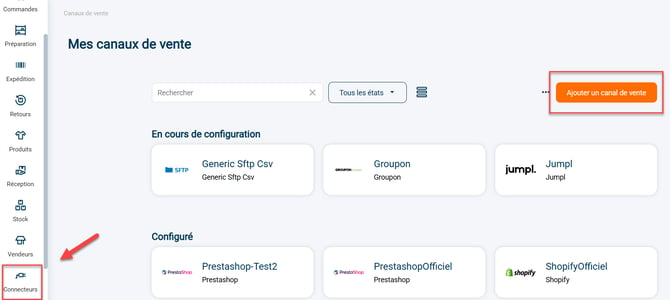
Step 1:Go to the menu Connectors -> Sales channels -> Add a sales channel:
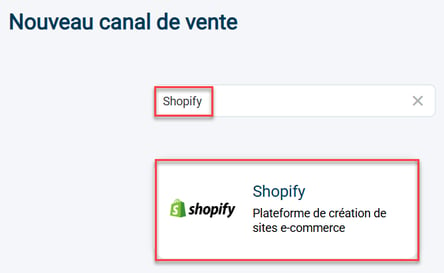
Step 2: Find your new sales channel to add and select it: (here we will use Shopify as an example):
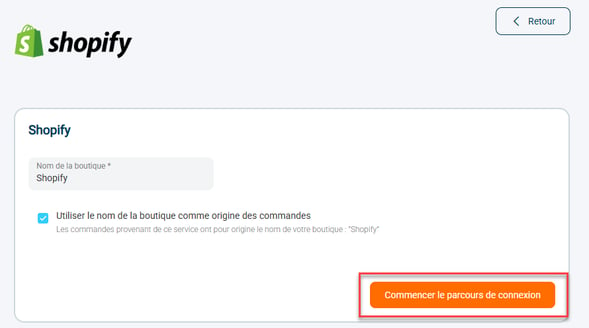
Step 3: Enter the requested information and then click on Start the login process :
AttentionThe name you choose here will appear exactly as is throughout the Shippingbo application (even in the dashboard and other analytics).
Step 4:Start the login steps:
- On the left side of the screen you will find instructions for the information to be entered
- On the right side of the screen, you will find the fields where you can enter this information.
- You can consult the connection tutorial for your sales channel at any time by clicking on "Consult the help section" :

Once the fields are filled in, click at the bottom of the page on Following.
💠Noticed :
If you want to access all your sales channel connection settings directly, click on View all settings :

You can also view the progress of the connection steps by checking the top bar:

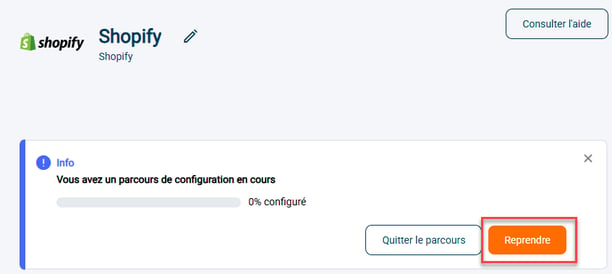
If, for any reason, you are unable to complete the connection fully on the first attempt, you can always resume it by going to your sales channel's connection settings and clicking on To resume :
⚒️ Recommendation:
Before fully using the functionality described in this tutorial, it is strongly recommended to performa testing phasefollowing your own parameters to verify that the result meets your expectations. The remaining customerfully responsibleThese tests, based on actions performed on the Shippingbo account, are essential to ensure the tool can be used with complete peace of mind.