.png?width=210&height=40&name=bleu%20et%20gris_Sigle+logo%20SBO%20(4).png)
1. Prerequisites
This export is reserved for logistics providers with a packageWMS for 3PL on Shippingbo. It allows them to access all the data necessary to invoice their customers.
2. Download the logistics export
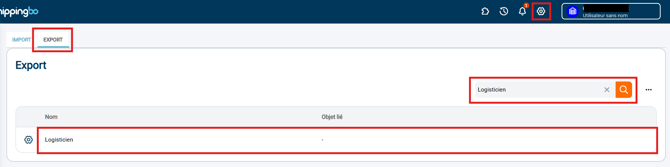
Step 1: Go to the menu Configurations > File management > tab Export > Logistics Officer > Exports :
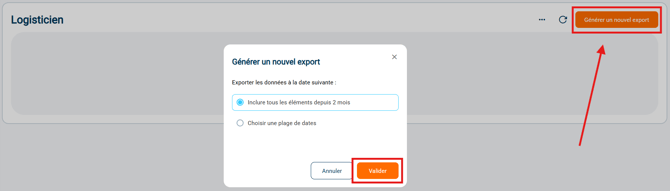
Step 2: Click on Add and select the desired start and end date and time for the export before confirming:
Step 3: Download the export:

Step 4: The export consists of4 pages :
- Billing preparationOn this first page you will find all the data for the orders that have been prepared by your services and which client you should invoice them to.
- Invoicing for stock placementThis second page groups together all the data for the stocking operations carried out by the customer.
- Return billingThis third page provides all the data on returns and their content made by customer.
- Location billingFinally, this last page gathers all the information concerning the locations used by the client.
2. Configure your export
You can select certain criteria and field configurations for your export.
To do this, go to the menuConfigurations >File management> tab Export>Logistics Officer >Configure :
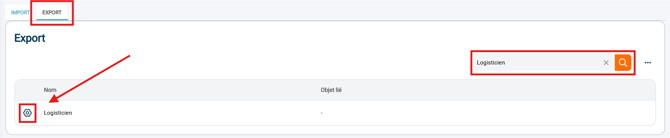
Here you can configure the export format you want by checking/unchecking the listed options.
🚩 Special case:
If your file contains commasin the exported data, select the separator ";"during the configuration of your export.
💠 Noticed :
-
If the data format is not displayed correctly, go to the menuDataand select the desired format.
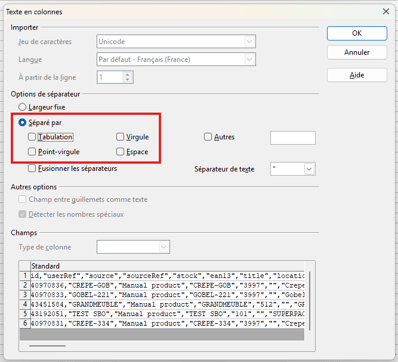
In OpenOffice Calc, select the column to reformat, then the menuText in columns... :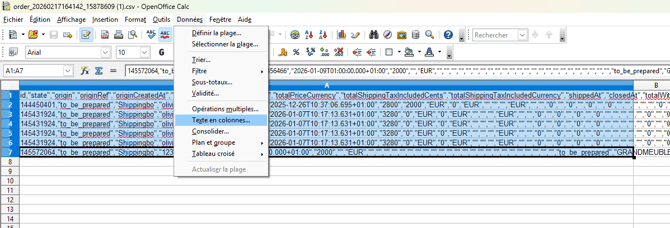
And check the separator that will format your data correctly (in this example,Comma) :
⚒️ Framework and responsibilities:
Before fully using the functionality described in this tutorial, it is strongly recommended to performa testing phasefollowing your own parameters to verify that the result meets your expectations. The remaining customerfully responsibleThese tests, based on actions performed on the Shippingbo account, are essential to ensure the tool can be used with complete peace of mind.
Contact us 📬:
Questions about this feature? Feel free to write to us.hereso that we can answer your questions.