.png?width=210&height=40&name=bleu%20et%20gris_Sigle+logo%20SBO%20(4).png)
Benefits of the feature ✨
- Simplified bulk download Exporting invoices in PDF format via SFTP allows you to easily retrieve all your invoices in a single operation.
- Quick access to accounting data All your invoices are centralized and readily available for tracking and accounting management. Essential for your year-end accounting needs.
To be able to export your Shippingbo invoices to your SFTP server, several conditions must be met:
- You must have an SFTP connection to your Shippingbo account.
- The latter must be secure (which is why we are talking about SFTP here)
- You must have the invoice option activated on your Shippingbo account.
➡️ For more information on activating the Billing option, please follow the dedicated tutorial: CONFIGURE THE SHIPPING INVOICE OPTION.
2. Enable automatic export of invoices to SFTP
Step 1: Go to the menu Configurations > Billing:
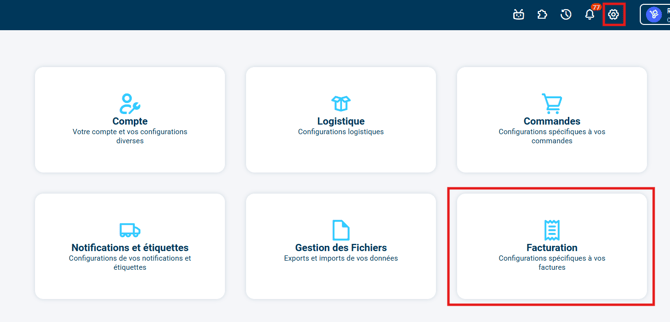
➡️ If the tile Billing born does not displayIt's because you don't have The Billing option has not yet been activated. on your Shippingbo account. Please Contact your Shippingbo account manager to activate the Invoice option.
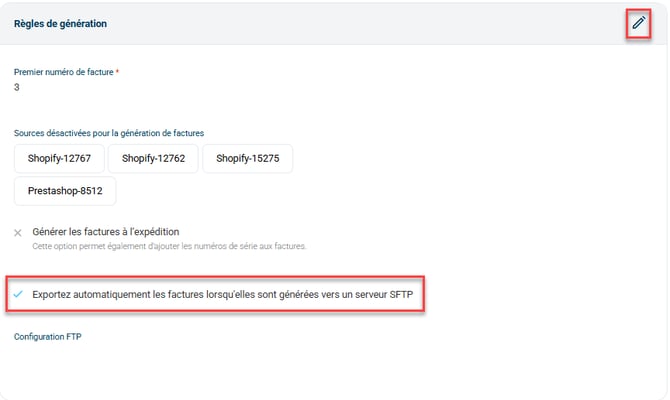
Step 2: In the tab Options and settings, Then check the option Automatically export invoices to an SFTP server when they are generated. in the category Generation rules :
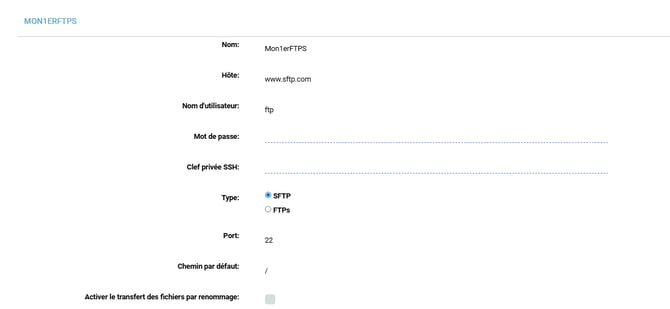
Step 3:Next, go to the menu Configurations > Account > Tab FTP/SFTP configuration > Click on Add a configuration :

-
Create a new configuration by filling in the requested information.e Port SFTP is the22 :
⭐ Key point:
The invoices will be added to the SFTP account as soon as they are generated in the Shippingbo account.
-
Shippingbo also allows you to import CSV files to your SFTP server; for this, you can consult our tutorial. Importing CSV files via FTP.
⚒️ Framework and responsibilities:
Before fully using the functionality described in this tutorial, it is strongly recommended to performa testing phasefollowing your own parameters to verify that the result meets your expectations. The remaining customerfully responsibleThese tests, based on actions performed on the Shippingbo account, are essential to ensure the tool can be used with complete peace of mind.
⚒️ Framework and responsibilities:
Only direct connections sales channels allow at Shippingbo to guarantee control of the flowsWhen orders are not retrieved via an official Shippingbo connector, but are routed through a third-party tool (intermediate CMS, external connector, FTP, manual or automated import), Shippingbo cannot guarantee the integrity, reliability or completeness of the transmitted data.
This data may be modified, truncated, reformatted or duplicated before being received in Shippingbo, leading to processing errors, duplicate orders, status inconsistencies, label blocks, carrier or customs anomalies, and a degradation of the final customer experience.
In this context, Shippingbois unable to investigate or correct anomaliesissues from the third-party system. Any anomaly related to upstream data is outside the scope of Shippingbo's responsibility (more information on the scope of support).hereThese investigations can only be carried out as part of a specific service and will be subject to a charge.
For all these reasons, it is highly recommended to connect your sales channels directly to Shippingbo via the official connectors.
To go further 🛫:
Contact us 📬:
Questions about this feature? Feel free to write to us.hereso that we can answer your questions.