.png?width=210&height=40&name=bleu%20et%20gris_Sigle+logo%20SBO%20(4).png)
1. Perform the export
1.1:Go to the menu Configurations > File management > Export > Products :
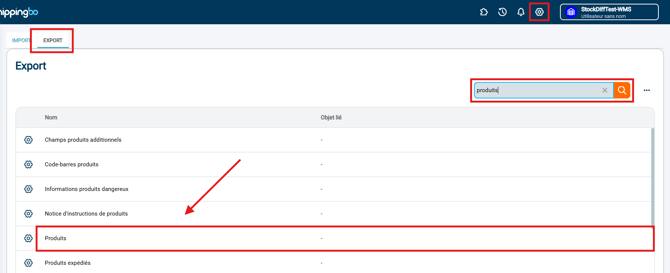
1.2: Click onGenerate a new exportthen click on Download regarding the export that appears:

2. Configure your export
You can select certain criteria and field configurations for your export.
To do this, go to the menuConfigurations >File management > tabExport>Products >Configure :
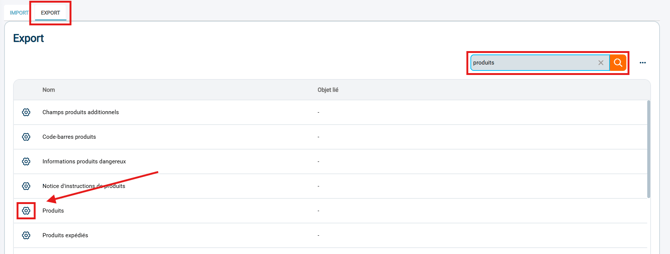
Here you can configure the export format you want by checking/unchecking the listed options.
🚩 Special case:
If your file contains commasin the exported data, select the separator ";"during the configuration of your export.
💡 Tip:
-
If the data format is not displayed correctly, go to the menuDataand select the desired format.
In OpenOffice Calc, select the column to reformat, then the menuText in columns... :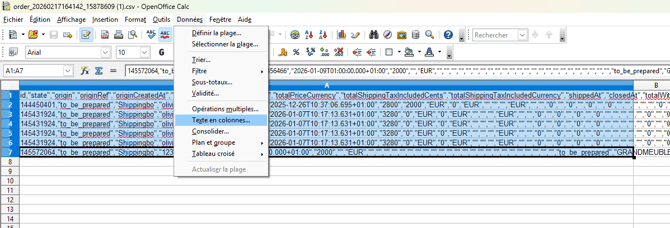
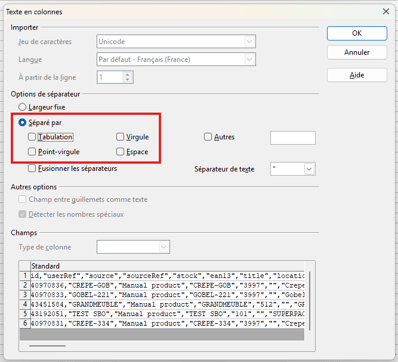
And check the separator that will format your data correctly (in this example,Comma) :
Contact us 📬:
Questions about this feature? Feel free to write to us.hereso that we can answer your questions.