.png?width=210&height=40&name=bleu%20et%20gris_Sigle+logo%20SBO%20(4).png)
1. Prerequisites✔️:
- This feature is available for all Shippingbo packs.
2. How does order filtering work?
To efficiently manage your orders, Shippingbo offers several filtering tools that allow you to refine your searches and organize your data. Whether you need to edit a specific label or create a preparation session, you can filter your orders according to your needs.
Here are the main features that allow for order filtering:
- The button Columns : allows you to customize the columns visible in your order table.
- The button Add : provides access to advanced filters for more in-depth searches.
- THE column headers : allow you to sort and filter orders directly.
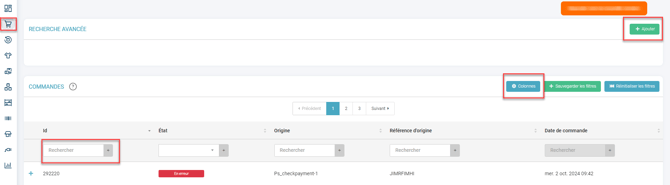
Example : You can easily filter all orders destined for France using the column headers or by adding an advanced filter via the "Add" button.
3. Enable order filtering
-
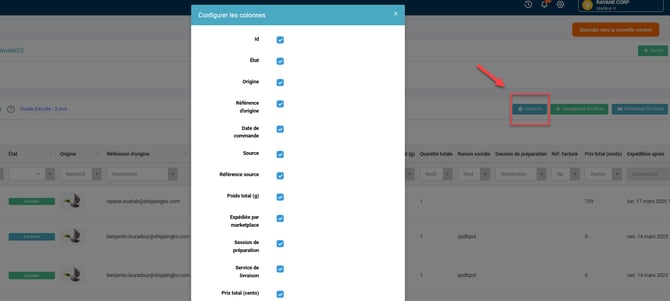
Customize the columns visible in the command table :
- Click the button Columns located in the top right corner of the page.
- Select the columns you want to display by checking the corresponding boxes.
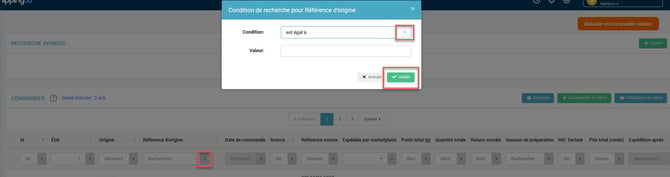
Use column headers to sort and filter :
- Click in the search field of a column to type the value you are looking for.
- For numeric fields, the search is done by exact value.
- For alphanumeric fields, the search is performed on the values containing your search.
If you wish to refine your search even further, click on the " symbol+"To add specific criteria to your search:
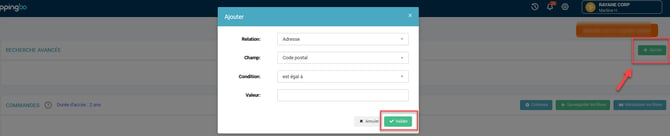
Advanced search using the "Add" button :
- Click on Add to access advanced filters.
- Select your search criteria using the drop-down lists.
- Confirm to apply your filters:
4. Use command filtering
Practical example :
Let's say you want to filter orders ready to be prepared, shipped to France, with a minimum value of €1, placed after October 19, 2024. You can combine several filters in the advanced search to get exactly the results you want.
Cumulative filters allow for a more precise result by combining several criteria at once, for example: order status, destination, amount and order date.
Adding multiple filters simultaneously can slow down the loading of results if the number of commands is very high. Be sure to adjust your criteria to refine your searches effectively.
- Save time by quickly finding specific commands.
- Optimize your processes thanks to precise and detailed research.
- Customize your interface depending on your needs by choosing which columns to display.
⚒️ Recommendation:
Before fully using the functionality described in this tutorial, it is strongly recommended to performa testing phasefollowing your own parameters to verify that the result meets your expectations. The remaining customerfully responsibleThese tests, based on actions performed on the Shippingbo account, are essential to ensure the tool can be used with complete peace of mind.
To go further 🛫:
- Save a filter / Create a preparation session
- Searching and creating filters in the product catalog
FAQ ❔:
No related FAQs at the moment.
Contact us 📬:
Any questions about this feature?
Feel free to write to us here so that we can answer your questions.