.png?width=210&height=40&name=bleu%20et%20gris_Sigle+logo%20SBO%20(4).png)
How do I generate my QR code?
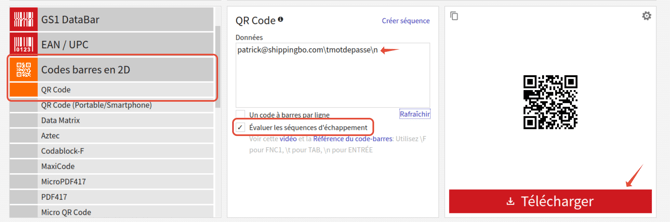
1: Go toBarcode Generator
2: Make sure you are on the Barcode menu. 2D -> QR Code
3: Check the box Evaluate the escape sequences
4: In the field DataDelete the content and type (all one word and lowercase): email\tpassword\n
- e-mail user's email
- \t : is used to enter the value "tab" to position yourself in the password field
- password : user password received by email at the user's address once the PDA user is created in Shippingbo
- \n : is used to validate the selection at the end of the flash.
example : patrick@shippingbo.com\tpassword\n
5: Download the QR code:
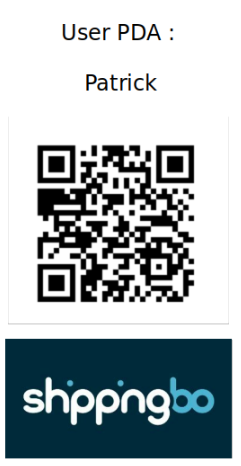
Here is an example of a badge you can create and provide to each PDA user so they can log in:
⚒️ Recommendation:
Before fully using the functionality described in this tutorial, it is strongly recommended to performa testing phasefollowing your own parameters to verify that the result meets your expectations. The remaining customerfully responsibleThese tests, based on actions performed on the Shippingbo account, are essential to ensure the tool can be used with complete peace of mind.
To go further 🛫:
Contact us 📬:
Any questions about this feature?
Feel free to write to ushereso that we can answer your questions.