.png?width=210&height=40&name=bleu%20et%20gris_Sigle+logo%20SBO%20(4).png)
Summary
- Increased autonomy: You manage your returns without depending on support, in complete independence.
- Efficiency : You can process multiple returns at the same time, which saves you time.
- Error reduction: The sample file templates guide you to avoid formatting errors.
2. Prerequisites✔️
- Feature available from the Pack Premium +
- Access to imports in your Shippingbo account
3. How does importing returns work?
With this import, you can import a CSV file containing information about your returns in order to:
- Create new feedback.
- Update existing returns (for example, to change their state to canceled).
Example files are available to guide you and ensure that you are following the correct data structure.
4. How do I use the returns import feature?
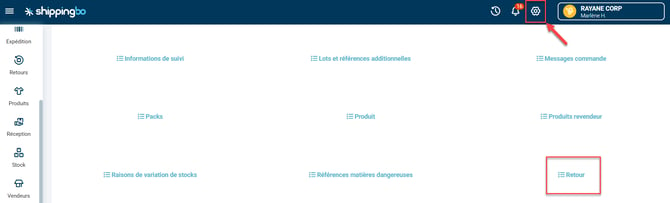
- Go to the menu Configurations -> File management -> Import -> Back :
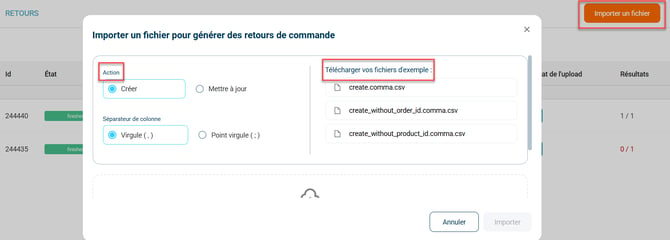
- Click on Import a fileSelect the desired action and download one of the corresponding example files:
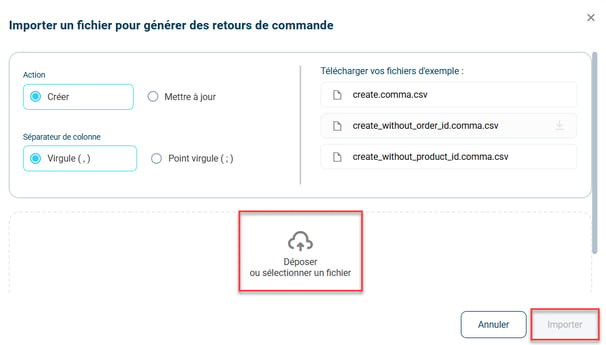
- Once the file is complete, import it by clicking on Drop or select a file, then on Import :
5. Example of practical application
Context:
You are an e-commerce business that has just completed a major promotional campaign, resulting in a massive influx of orders. Naturally, this also leads to a number of customer returns, which you need to manage quickly to maintain good after-sales service.
Thanks to the functionality Updating and creating bulk returnsFor example, you can decide to update the returns status in bulk in order to cancel them (for example, if a customer returns an item but you have already accepted a refund).
Using the feature:
- You download the example file 'without_order_id', because you don't always have the order IDs on hand.
- You fill in the fields source And source_ref with order-related information (order number or other reference) to identify returns to be cancelled.
- Once the file is complete, you import it directly via the platform.
- In a few minutes, all returns are updated, their status changing to canceledand everything is ready in your system to continue managing inventory and refunds.
Result :
In a few simple steps, you were able to process dozens, even hundreds of returns in bulk without manual effort, thus saving valuable time while ensuring efficient returns management.
⚒️ Recommendation:
Before fully using the functionality described in this tutorial, it is strongly recommended to performa testing phasefollowing your own parameters to verify that the result meets your expectations. The remaining customerfully responsibleThese tests, based on actions performed on the Shippingbo account, are essential to ensure the tool can be used with complete peace of mind.
To go further 🛫:
FAQ ❔:
No related FAQs at the moment.
Contact us 📬:
Questions about this feature? Feel free to write to us.hereso that we can answer your questions.