.png?width=210&height=40&name=bleu%20et%20gris_Sigle+logo%20SBO%20(4).png)
Summary
1. Benefits of the feature
2. Prerequisites
3. Feature description
4. Activation and configuration
5. Example of practical application
6. To go further
7. Contact us
- Time saving: Fast and simultaneous import of a large number of supplier products.
- Simplicity: Easy-to-complete CSV file to import from your OMS catalogue.
- Data reliability: Smart Procurement automatically and accurately matches products with the right suppliers.
2. Prerequisites✔️:
- Feature available from the packPremium +.
- Import exclusively reserved for accounts using the Smart Procurement ShippingTo activate it, please consult our documentation. here.
3. How does the import of supplier products work?
Supplier product import allows you to easily link a large number of products to their suppliers. This import, exclusively for Smart Procurement, requires access to this module as well as the Shippingbo product catalogue.
Example : If you have a supplier already created in your space, you can import all of its products from the OMS catalogue in a few steps, in order to automatically associate them with this supplier in Smart Procurement.
4. How do I use the supplier product import feature?
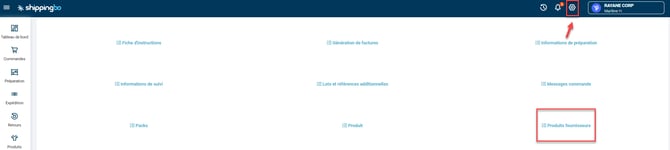
- Access the menuConfigurations->File management->Import-> Supplier products:
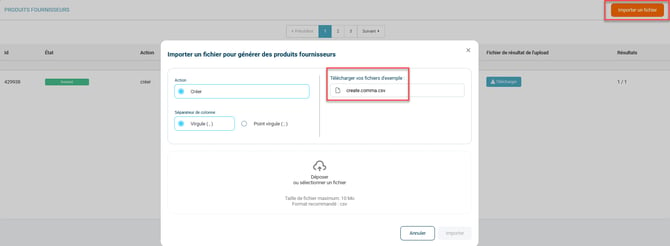
- Click onImport a fileThen download the example file:
- Fill in the file with the following information:
- manufacturerProductRef: allows you to create the supplier SKU
- merchantManufacturerId : allows you to identify the supplier
Then, at least a of these 3 columns:
- User_ref : SKU
- Product ID
- EAN13
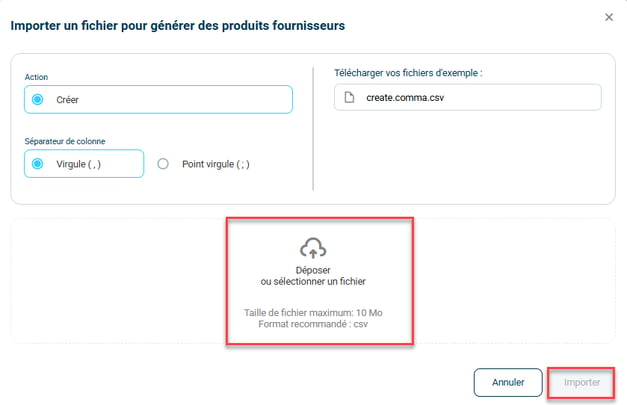
- Once the file is filled out, import it by clicking on Drop or select a file, then on Import :
💠 Noticed :
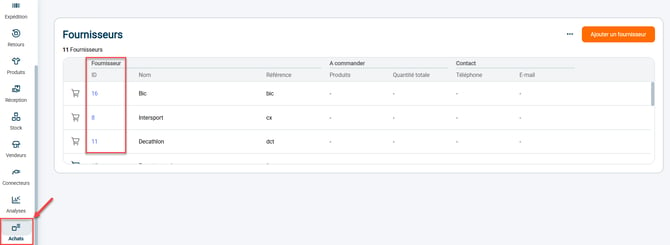
You will find the merchantManufacturerId in the Supplier view of the menu Purchases -> Suppliers:
📢Attention :
Consider doing a test with a single supplier product before launching the full import to verify that all data is in the correct format.
5. Example of practical application
Context :
You are responsible for purchasing for a company using Smart Procurement, and you need to link a large number of products from multiple suppliers to your OMS catalog. Rather than doing this manually product by product, you decide to use the supplier product import functionality.
Using the feature:
You download the import file template provided by Shippingbo, then fill in the necessary information for each product: supplier SKU, supplier ID, and at least one product reference (internal SKU, product ID, or EAN13). Once the file is complete, you import it into Smart Procurement in just a few clicks.
Result :
All products are automatically linked to the correct suppliers within the platform. This saves you time, reduces data entry errors, and allows your teams to manage supplier catalogs and prepare your procurement more efficiently.
⚒️ Recommendation:
Before fully utilizing the functionality described in this tutorial, it is strongly recommended to perform a testing phase following your own parameters to verify that the result meets your expectations. The remaining customer fully responsible These tests, which are essential for ensuring the tool can be used safely and securely, are crucial for monitoring actions performed on the Shippingbo account.
To go further 🛫:
- Import a catalog of purchasing conditions
Contact us 📬:
Questions about this feature? Feel free to write to us.hereso that we can answer your questions.