.png?width=210&height=40&name=bleu%20et%20gris_Sigle+logo%20SBO%20(4).png)
Summary
Time saving: Quick stock updates via import file.
Error reduction: Automated update, minimizing human error.
Precise inventory tracking: Ensure optimal management of available quantities.
2. Prerequisites✔️:
- Inventory management in Shippingbo is only available from the package onwards. Premium +.
3. How does the integration of available stock work?
This feature allows stock levels to be updated either when a new product is created or for a product already created via an import file in Shippingbo. Orders will reserve stock, with older orders being prioritized.
4. How to integrate the available stock?
4.1 Integrating stock when creating a product:
When importing a new product into your catalogue, you have the option to directly enter its available stock.
Example :
When you import a product file to expand your catalog, you can populate the "stock" column with the available quantity for each product. This allows you to add stock at the same time as you create new items.
💡 Trick : For more details on importing new products, please see our Tutorial on importing products into Shippingbo.
4.2 Integrating the stock of a product that has already been created:
For an existing product, you can perform an update import.
Steps to follow to update stock levels:
- Access Settings -> File management -> Import -> Product :

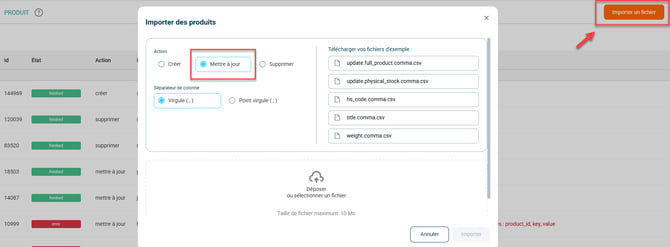
- Click on Import a file and then check Update:
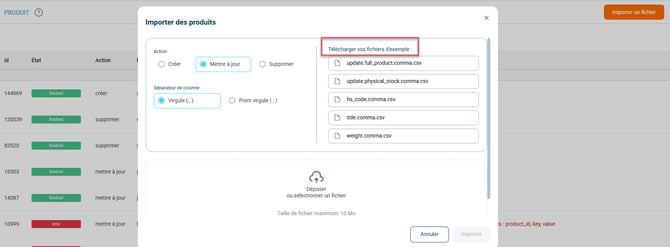
- Download the example file:
- Fill out the file:
Fill in the Product SKU in the columnuserRefand the stock in the columnstock.
- Import the CSV file:
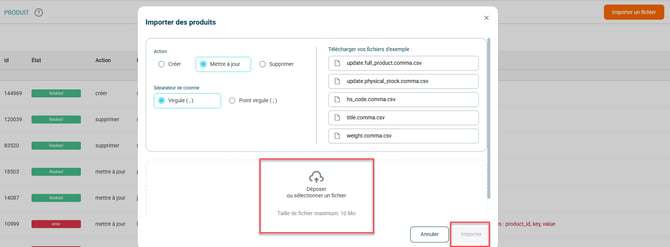
Click on Drop or select a file and upload your modified file. Finish by clicking on Import :
📢 Attention :
Ensure that your import file is in CSV format and that the information entered (SKU, stock) is correct to avoid update errors.
⚒️ Recommendation:
Before fully using the functionality described in this tutorial, it is strongly recommended to performa testing phasefollowing your own parameters to verify that the result meets your expectations. The remaining customerfully responsibleThese tests, based on actions performed on the Shippingbo account, are essential to ensure the tool can be used with complete peace of mind.
To go further 🛫:
- Create, modify, or delete products in Shippingbo
Contact us 📬:
Questions about this feature? Feel free to write to us.here so that we can answer your questions.