.png?width=210&height=40&name=bleu%20et%20gris_Sigle+logo%20SBO%20(4).png)
1. Prerequisites✔️:
- Feature available from the package Pro +.
2. How does pre-order management work?
Pre-order management in Shippingbo allows you to receive orders in advance, store them in the system, and ship them at a later date you specify. This enables you to process orders on time without them being automatically integrated into your preparation sessions.
-
To exclude pre-orders from preparation sessions, go to the menu Configurations → Logisticsand check the option Exclude pre-orders from sessions:
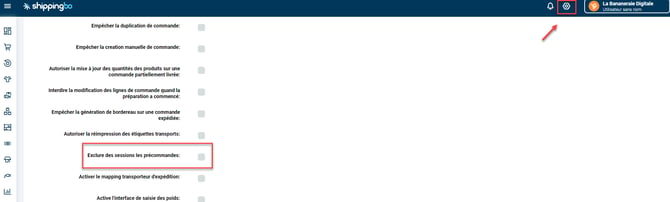
2. Add the "Shipping after" column to the orders: Go to Orders → Columnsthen check the box Shipping afterThe column Shipping after will appear in your order board with the shipping date you have predefined.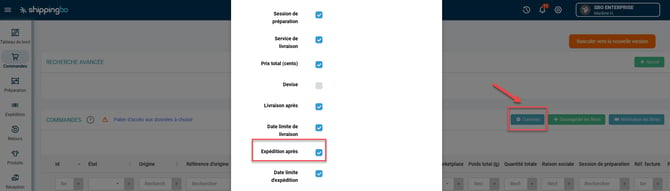
Example : You're selling a new product via pre-order and want to ship all orders starting November 15th. Configure the shipping date and use the "Shipping after" column to view and manage these pre-orders.
3. Use the pre-order management system
Practical example :
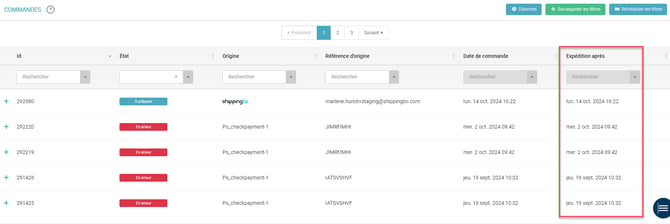
During a pre-order product launch, you can configure the option Shipping after for each order. Once activated, the column Shipping after This will allow you to view the scheduled shipping dates. Pre-orders will remain in "to be prepared" status until the defined shipping date and cannot be added to preparation sessions before that date.
💠 Noticed :
Pre-orders will only be included in preparation sessions from the date defined in the "Shipping after" column.
📢Attention :
This feature allows you to receive orders in advance while ensuring that they will not be shipped before the scheduled date.

- Workflow optimization : manage your orders without rushing by scheduling their shipment for a later date.
- Sales forecasting : receive and organize your orders in advance, while maintaining control of the shipment.
- Error reduction : avoid sending pre-orders before the scheduled date by excluding preparation sessions.
⚒️ Recommendation:
Before fully using the functionality described in this tutorial, it is strongly recommended to performa testing phasefollowing your own parameters to verify that the result meets your expectations. The remaining customerfully responsibleThese tests, based on actions performed on the Shippingbo account, are essential to ensure the tool can be used with complete peace of mind.
To go further 🛫:
- Create a preparation session
Contact us 📬:
Any questions about this feature?
Feel free to write to us here so that we can answer your questions.