.png?width=210&height=40&name=bleu%20et%20gris_Sigle+logo%20SBO%20(4).png)
Benefits of the feature ✨
- New sales channel : Multiply your distribution points by connecting to multiple merchants.
- Time saving : Complete automation of order and invoicing processes.
- Logistics optimization Your carriers and pricing schedules are shared automatically.
- Simplified B2B management : B2B pricing, merchant sales and discounts centralized in Shippingbo.
1. Prerequisites
- Availableonlyfor the following Shippingbo packs: Premium +, Expert, OMS 3PL, OMS Supervision, WMS Expert, WMS 3PL, WMS Premium.
2. How does Smart Fulfillment work for suppliers?
Once activated, smart fulfillment allows you, as supplier, of :
-
Share your carrier rates with merchants,
-
offer them a B2B catalogue with personalized pricing.
-
automatically receive their commands in your interface.
-
manage invoicing using dedicated exports.
Example :
"A reseller integrates your catalog. They sell your products on their site. For each sale, Shippingbo transfers the order to you with the defined prices, and you ship the package directly to the end customer."
💡 Trick :
Thanks to balance management, you can control the number of orders allowed per merchant and secure your logistical commitments.
3. Activate and configure Smart Fulfillment
3.1 To activate the Multi-Shippingbo feature on your account, please contact our customer support.
3.2 Once activated, you need to create your carrier offers. Make sure each delivery service is correctly mapped to your suppliers. To do this, follow our tutorial. here.
3.3 Next, create your shipping zones:
Go to the Settings menu -> Accounts -> Dropshipping and then create your shipping zones by clicking on Create :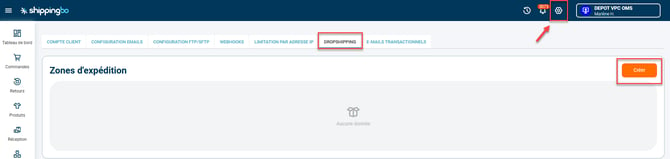
3.4 Export or create your transport rates: you can export your existing rates to modify them or import new ones:

3.5 Enter your shipping rates:
- Then go to the menuConfigurations->File management->Imported->Shipping cost :
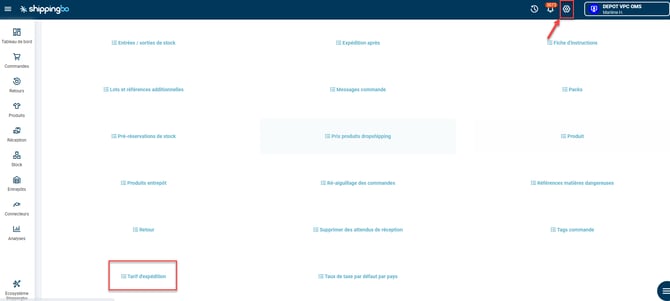
-
Click onAddThen download the example file:
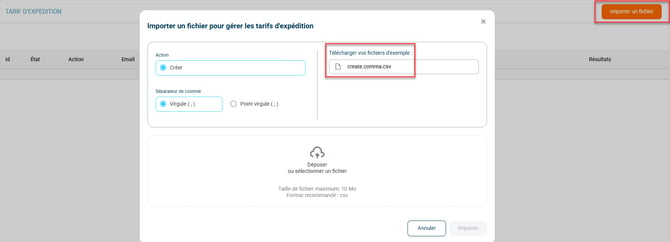
-
Please fill in the requested information:
- logistician_service_config_nameTo find the exact name, go to the Settings menu -> Orders -> Shipping Service Mapping
- nameHere you can enter the name you want.
- minminimum weight of the slice
- maxMaximum weight of the slice
- expedition_area_name: name of the previously created shipping zone. Note: the name must be exactly the same, respecting the lowercase and uppercase letters entered in the shipping zones menu.
- price _centsEnter the price here.
Once completed, integrate the file by clicking onDrop or selectthenImport :
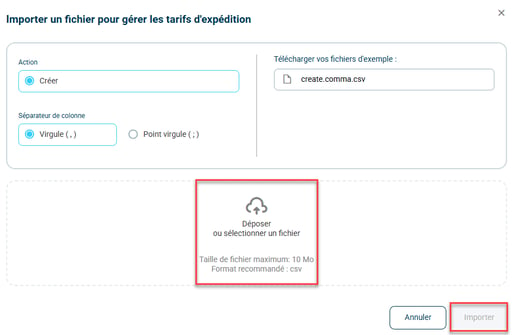
4. B2B Product Catalog Management
In Shippingbo you can define a specific B2B pricing for each product you make available to your merchants via smart fulfillment.
💡 The B2B price corresponds to the rate at which You sell your products to merchants (and not to the end customer). It is essential for properly automating invoicing and managing merchant balances.
How do I enter a B2B price?
-
Access your product catalog via the menu Catalog.
-
Click on the relevant product.
-
In the field "Dropshipping product"Please provide the applicable B2B price for this product.
🔎Frequently Asked Questions
Q: How does product catalog propagation work in smart fulfillment?
It works exactly like in Multi-ShippingboOnce the catalogue is shared, the data is automatically synchronized with the associated merchant accounts.
Q: Where can I find my B2B prices in an export context?
Go to the menu:
-
Configurations -> File management -> Export -> Products
-
Click on Configure
-
Select the "Dropshipping price" option to include it in the export.
5. Management of merchant contracts
Overall rate
-
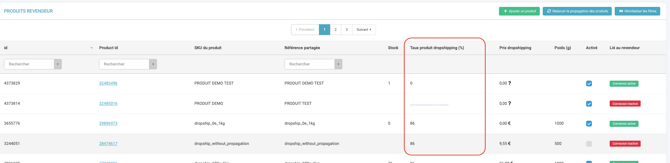
In the merchant contract settings, modify the "percentage of the default price" to adjust B2B prices globally.
Rates per product
-
You can define a specific rate per product, provided that it remains ≤ the initial overall rate.
-
Deletion is only possible if this rate ≥ the overall rate.
Smart Fulfillment Sale
-
Set an order limit via a balance per merchant.
-
The balance is decremented with each order according to:
-
B2B pricing of products
-
transport price
-
-
Top-up available at any time. Discount available upon request from support.
📢 Attention :
An empty balance prevents orders from being routed to your account.
6. Billing Management
To help you with invoicing your merchants, you have access to a smart fulfillment order export.
To do this, go to the menu Configurations -> File Management -> Export -> Dropshipping Orders:

-
order_id = Order ID
-
order_creation_date = Order creation date
-
order_state = Order status
-
reseller_id = reseller ID
-
reseller_ref = SKU of the shared product
-
order_source = Reseller account
-
order_source_ref = SBO order ID at the reseller
-
order_price_cents = Order price
-
order_products_price_cents = B2B price of the order
-
order_shipment_price_cents = calculated shipping price
-
sbo_order_commission_cents = SBO commission
-
product_id = Product ID
-
product_user_re = product SKU
-
product_dropshipping_price_cents = B2B price of the product
-
product_quantity = Quantity of product in the order
7. Example of practical application
You are an office equipment supplier.
Several retailers are interested in reselling your staplers and binders. To facilitate sales management, you indicate a B2B price of €1.50 for the stapler, while the recommended retail price is €2.99.
You integrate this rate into the Shippingbo product sheet, then share the catalog with your merchants. Shippingbo then automatically calculates the amounts owed by each merchant, and you can track your B2B sales directly from the exports.
🧾 Result : Your margins are controlled, sales are monitored, and your merchants always have access to real-time updated pricing.
⚒️ Recommendation:
Before fully using the functionality described in this tutorial, it is strongly recommended to performa testing phasefollowing your own parameters to verify that the result meets your expectations. The remaining customerfully responsibleThese tests, based on actions performed on the Shippingbo account, are essential to ensure the tool can be used with complete peace of mind.
To go further 🛫:
- Smart Fulfillment for Merchants
Contact us 📬:
Any questions about this feature?
Feel free to write to ushereso that we can answer your questions.