.png?width=210&height=40&name=bleu%20et%20gris_Sigle+logo%20SBO%20(4).png)
1. Prerequisites✔️:
- Feature charged and reserved for the package Premium +
- Functionality included free in the Expert + and WMS 3PL pack
- Compatible with modules LMS Premium And WMS Premium.
This feature is subject to a fee; please contact your sales representative Go to Shippingbo to activate it.
2. How does the single-delivery goods receipt process work?
This feature allows you to receive all the goods listed in a receiving order with a single click or scan. This is especially useful for businesses handling large quantities of products, enabling them to automatically close the receiving order and update inventory without any additional effort.
-
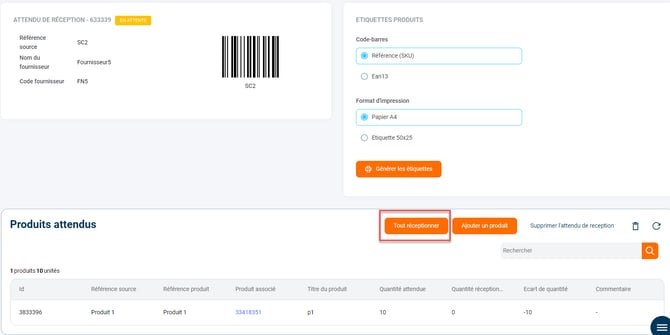
On the PC interface A button Receive everythingThis appears in the details of your expected receipts. Clicking on it closes the receipt and automatically updates the stock for each product concerned:
-
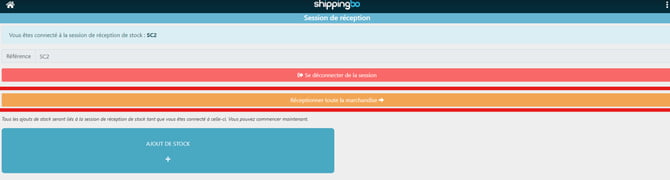
On the PDA During the scan of the expected receipt ID, the button Receive everythingalso appears, allowing you to close the receipt directly with a single scan:
Example: If your company receives a shipment of 100 items per day, with one click or scan, all products will be marked as received, without needing to manually validate each product.
📢 Attention :
Once the receiving request is closed via the “Receive All” button, it is no longer possible to modify the quantity received. Ensure that your suppliers deliver the correct quantity.
3. Activation and configuration of the feature:
How do I activate the receipt of goods all at once?
- On the PC interface:Go to the Reception menu -> Reception Expectations -> enter the details of the expectation in question -> click on Receive everything.
- On the PDA: menu Receiving goods -> Fashez your expected receipt ID -> click on Receive everything.
4. Example of practical application
Context:
You are an e-commerce retailer specializing in online clothing sales and you regularly receive large quantities of products from your suppliers. Every week, several pallets containing hundreds of items arrive at your warehouse. Thanks to the functionality Receive the goods all at onceYou can now simplify the receiving process.
Using the feature:
Instead of having to manually check and validate each product, you simply scan the expected receipt ID or click the “Receive everything" on your interface. This immediately marks all products as received and updates the stock in your warehouse management system (WMS), allowing you to quickly close the receipt of the entire delivery.
Result :
With a single step, you save valuable time, allowing your teams to focus on other tasks. This process also reduces human error associated with manual validation, ensuring greater accuracy in your inventory management.
📢 Attention :
Once the receiving request is closed via “Receive all”, you will no longer be able to adjust the quantities received.
⚒️ Recommendation:
Before fully using the functionality described in this tutorial, it is strongly recommended to performa testing phasefollowing your own parameters to verify that the result meets your expectations. The remaining customerfully responsibleThese tests, based on actions performed on the Shippingbo account, are essential to ensure the tool can be used with complete peace of mind.
- Time saving : Automation of the goods receiving process.
- Error reduction : Reduces the risk of manual errors during receiving.
- Simplification of operations : Easier reception for companies handling large quantities.
To go further 🛫:
- Create a reception expectation
- Goods receipt / Expected receipt on PDA
FAQ ❔:
No related FAQs at the moment.
Contact us 📬:
Any questions about this feature?
Feel free to write to us here so that we can answer your questions.