.png?width=210&height=40&name=bleu%20et%20gris_Sigle+logo%20SBO%20(4).png)
Summary
- Gain in precision : Allows you to correct stock errors stuck in the "picking" status.
- Improved inventory management : Release the stock held for products that have already been shipped.
- Warehouse optimization Reduce product availability errors.
2. Prerequisites✔️:
- Available from the Pack Pro +.
- Use the functionality of picking.
3. How does stock removal work in picking?
When products are stuck in the "picking" status even though they have already been shipped, it is necessary to remove them from stock manually by following the steps below.
💡 Trick Perform this action outside of picking periods to avoid stock conflicts.
4. How do I delete picked products that have been shipped?
- Go to the menu Configurations -> File management -> Export -> Selected products - awaiting restocking -> Exports :
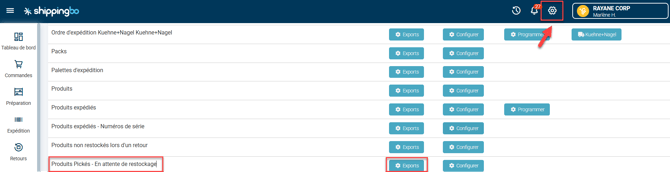
- Click on Generate a new exportthen download the generated export:

- Retrieve the product IDs from column A.id" from the previously downloaded export.
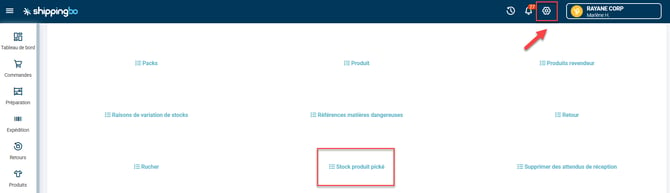
- Go to the menu now Configurations -> File management -> Import -> Picked product stock :
- Click on Import a fileThen download the example file:
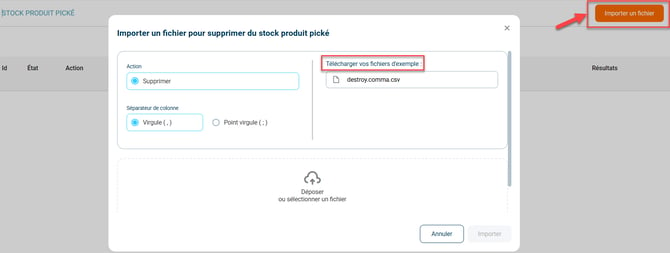
- Paste into the column HAS copy the previously copied product IDs and then save your import.
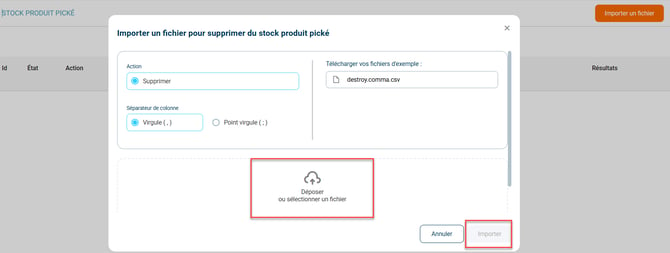
- Then select it by clicking on Drop or select a file then click on Import :
📢 Attention :
Ensure that there is no picking in progress during import to avoid stock conflicts.
📢 Attention :
- Any deletion isfinalPlease carefully check the file contents before importing it.
- Always test with a one-line file before a general import.
5. Example of practical application
You're an e-commerce business managing a warehouse and you've noticed that some products are stuck in "picking" status despite having been shipped. By following this process, you can generate an export to identify these products and then remove them from inventory in just a few steps. This allows you to maintain accurate stock management, preventing unsold items from becoming unavailable.
To go further 🛫:
- Perform your picking using your PDA.
FAQ ❔:
- Why do I have stock in picking when my order has been shipped?
Contact us 📬: