.png?width=210&height=40&name=bleu%20et%20gris_Sigle+logo%20SBO%20(4).png)
Summary
- Optimization of logistics operations : Improves the structure of your warehouse.
- Time saving Massive import of locations in just a few clicks.
2. Prerequisites✔️:
- Available for all Shippingbo packages working in Advanced Warehouse.
- Having locations configured on Shippingbo.
3. How do I delete locations in Shippingbo?
📢 Attention:
Any deletion is final.When a location is deleted, all history associated with that location is also deleted.
💠 Note:
To maintain better traceability of your activity, you can export your locations before deletion, in Configurations -> File management -> Export -> Locations.
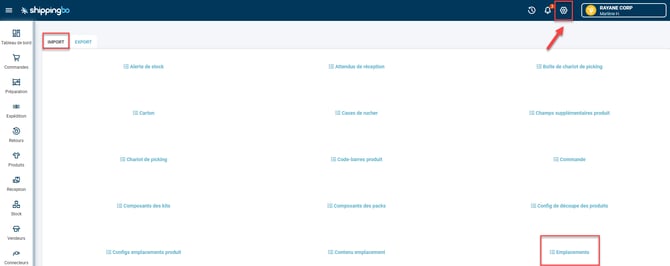
- Go to the menu Configurations -> File management -> Import -> Locations :
- Click on Import a filethen select the action DELETE before downloading one of the example files:
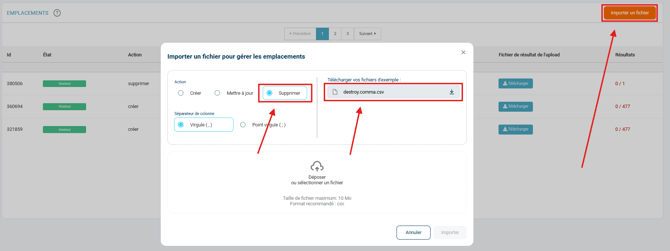
- Fill in the file by completing the single column name.
💠 Note:
You can find the names of all your locations via export, in Configurations -> File management -> Export -> Locations.
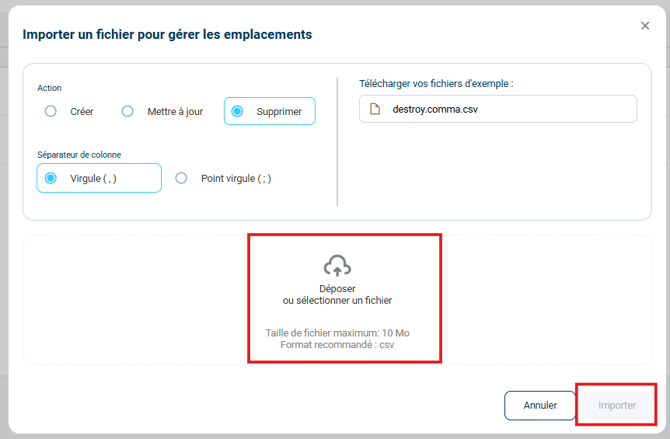
- Once your deletion import file is ready, click on Drop or select a file, then on Import :
📢 Attention :
If an error is detected in the file (e.g., invalid location name or incorrect column separator selected), the import will fail.
4. Delete the contents of locations
The contents of your locations are subject to change. To empty them completely, you can delete the contents of the locations.
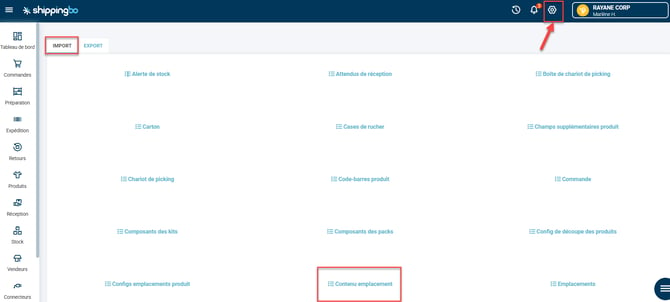
- Go to the menu Configurations -> File management -> Import -> Content Location :
- Click on Import a fileselect the action DELETEthen download the example file:
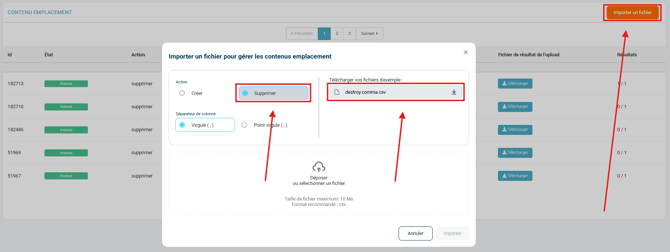
- Fill in the file by completing the single column name.
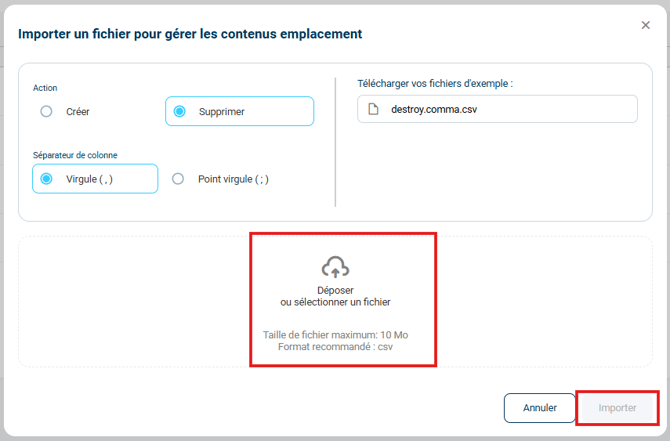
- Once your file is ready, import it by clicking on Drop or select a file, then on Import :
⚒️ Recommendation:
Before fully using the functionality described in this tutorial, it is strongly recommended to performa testing phasefollowing your own parameters to verify that the result meets your expectations. The remaining customerfully responsibleThese tests, based on actions performed on the Shippingbo account, are essential to ensure the tool can be used with complete peace of mind.
To go further 🛫:
- Create locations manually and via import
- Configure your warehouse zones
- Create a location from your PDA
- Managing multi-product locations
- Stock movement from location to location
Contact us 📬:
Any questions about this feature?
Feel free to write to ushereso that we can answer your questions.