.png?width=210&height=40&name=bleu%20et%20gris_Sigle+logo%20SBO%20(4).png)
Benefits of the feature ✨
- Reliability: Only products that have actually been returned are put back into stock.
- Traceability: Each movement is recorded in the movement history.
- Time saving: Restocking is done directly from your PDA.
- Ergonomics: Smooth navigation via the terminal's "Back to commands" menu.
1. Prerequisites
-
Having activated the advanced warehouse.
-
Having activated the Returns Management.
-
Use a PDA configured with Shippingbo.
-
Having set up locations like Return bin.
2. How does restocking via PDA work?
The process involves identifying a product within a Return binremove it from this location (passage to stock in transition), then manually reintegrate it into a standard location via your PDA.
From the tab Stock of the product sheetYou can track the status of your products awaiting processing in real time:
-
From the Shippingbo interface, you can precisely track the status of your products awaiting restocking directly in the tab Stock From the product sheet:
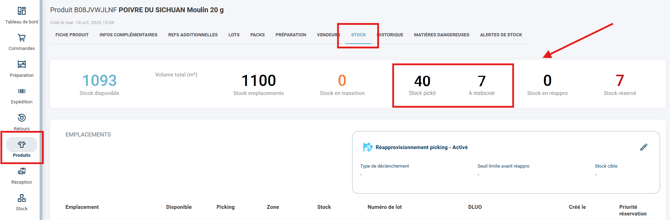
➡️ The stock counter To be restocked displays the sum of the quantities of products awaiting restocking.
➡️ The counter of Picked Stock refers only to the picked quantities that are not To be restocked. -
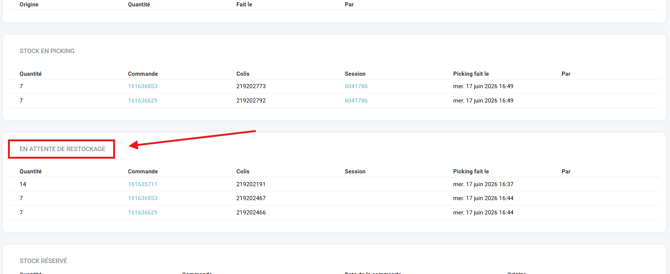
In this tab, a new dedicated area entitled Awaiting restocking has been created. It groups together all the stock lines containing the products to be restocked:
3. How do I restock returned products using the PDA?
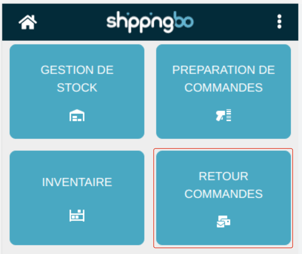
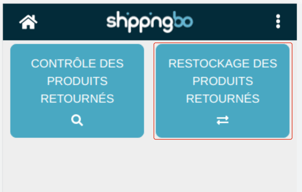
- Go to the menu Return orders → Restocking of returned products on the PDA
- Scan the designated location as Return bin containing the products to be restocked:
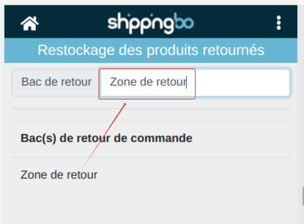
- Scan the product you wish to remove from the Return bin :
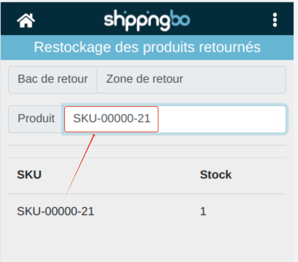
- A summary screen is displayed, showing the product, its quantity in the bin, and its information.
- Enter the number of units to restock, then click on Remove the stock from the location to validate:
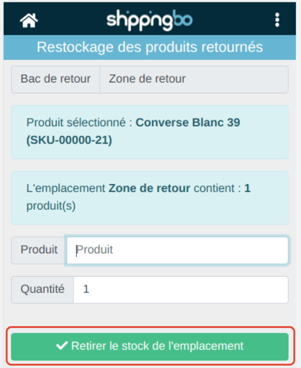
💬 Good to know:
-
At this stage, the quantity automatically changes to stock in transition.
-
If the product requires a Best before date or batch numberYou will be asked for it here.
-
Scan the destination location
-
The PDA will offer you thethe locations already used for this product and theis free spaces (without product).
-
Scan the location where you want to restock the product:
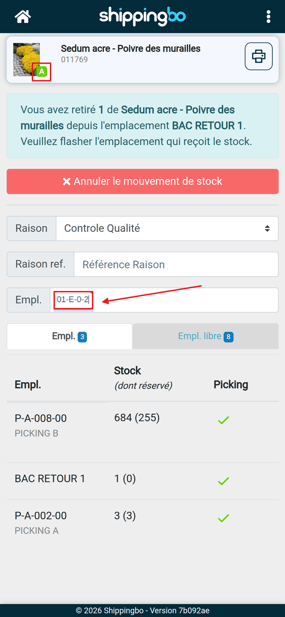
✅ Your product has been restocked in the location indicated.
➡️ Stock is updated immediately in Shippingbo.
➡️ The movement is recorded in your stock variation history.
-
4. Example of practical application
You are a retailer of small electronic devices. A customer returns a defective charger, which has since been replaced. The return is received, and the product is placed in a return bin.
An operator uses their PDA to scan the bin, scan the loader, and verify its status. The product is functional and can be restocked. It is transferred to an available location in your picking area.
Result :
-
Your inventory is reliable and up-to-date.
-
The product is ready to be sold again.
-
You avoid errors or duplicates thanks to the automated process.
To go further 🛫:
- Record a return using the PDA (in the advanced warehouse)
Contact us 📬:
Any questions about this feature?
Feel free to write to ushereso that we can answer your questions.