.png?width=210&height=40&name=bleu%20et%20gris_Sigle+logo%20SBO%20(4).png)
- Time saving : Automation of notifications between Shippingbo and your internal tools.
- Reactivity Instant update of your third-party systems.
- Reliability : Less risk of oversights or manual errors in updates.
2. Prerequisites ✔️:
- This feature is available from the Premium pack +.
3. How does the "Configure a Webhook" feature work?
A webhook is a mechanism that allows Shippingbo to automatically send an HTTP request to a URL when certain events occur on your account.
Example : If the stock of a product is modified, a webhook can notify your ERP system to update the available quantities.
💡 Trick :
You can use webhooks to trigger automated workflows in tools like Zapier, Make, or directly in your ERP/CRM systems.
4. How do I activate "Configure a Webhook"?
-
Go to the Settings menu -> Account -> Webhooks:

- Click the button Add a webhook To create a new webhook:

You can also consult the technical documentation by clicking on Documentation, even without having created a webhook yet.
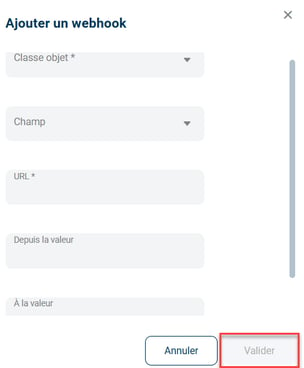
Please fill in the required information:-
Object class : Select the resource (e.g., Product, Order).
-
Field : (optional) Specify a specific field to monitor.
-
URL Enter the destination URL to receive notifications (⚠️ It must start with
https). -
Since the value : (optional) Initial value to trigger sending.
-
At the value : (optional) Target value to trigger sending.
.📢 Attention :
-
Only two fields are mandatory: the Object class and theURL.
-
If only these two fields are filled in, you will receive a notification for all changes related to the chosen object class.
5. Example of a practical application
Context :
You are an e-commerce merchant and you want to be alerted in real time as soon as a product stock is modified in Shippingbo to avoid any invisible stock shortages on your site.
Using the feature :
Here's how to configure your webhook:
-
Object class : Product
-
Field : quantity_available
-
Since the value : (Leave blank to track any stock changes)
-
At the value : (Leave blank to track any stock changes)
Thus, with each impact on the available quantity of your products, your external system (ERP, CRM, etc.) will be instantly updated without any manual action on your part.
💠 Noticed :
Once your webhook is created, it will be visible in your menu. WebhooksYou can modify or delete it at any time by clicking the button. Delete:

📢 Attention :
Make sure that theURL informed begins well with https and that your server is ready to receive HTTP POST requests so that communication works correctly.
⚒️ Recommendation:
Before fully using the functionality described in this tutorial, it is strongly recommended to performa testing phasefollowing your own parameters to verify that the result meets your expectations. The remaining customerfully responsibleThese tests, based on actions performed on the Shippingbo account, are essential to ensure the tool can be used with complete peace of mind.
Contact us 📬:
Any questions about this feature?
Feel free to write to ushere so that we can answer your questions.