.png?width=210&height=40&name=bleu%20et%20gris_Sigle+logo%20SBO%20(4).png)
Summary
1. Benefits of the feature
2. Prerequisites
3. Where can I find the feature?
4. Feature description
5. Prepare a group of identical orders
6. Find an identical order prepared
7. Example of practical application
8. Contact us

Significant time savings in order processing
Error reduction related to duplicates
Optimization picking and inventory management
2. Prerequisites ✔️:
- Available only to customers with the option Similar orders active. To activate this feature, contact the Shippingbo support team.here.
- There new search page Shippingbo must also be activated on your account. To activate this feature, contact the Shippingbo support team.here.
3. Where can I find the feature?
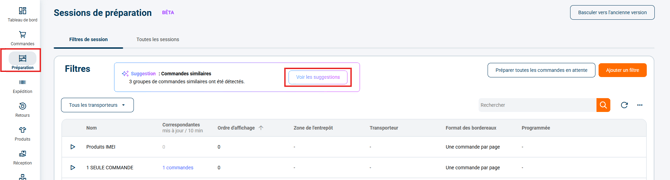
To discover the feature Similar commands, go to the menu Preparation -> Session filter, then click the button See the suggestions:
🔷 Note:
If the box See the suggestions does not appear in the panel Preparationthe option Similar orders is not activated. To activate this feature, contact the Shippingbo support team.here.
4. Functionality Description
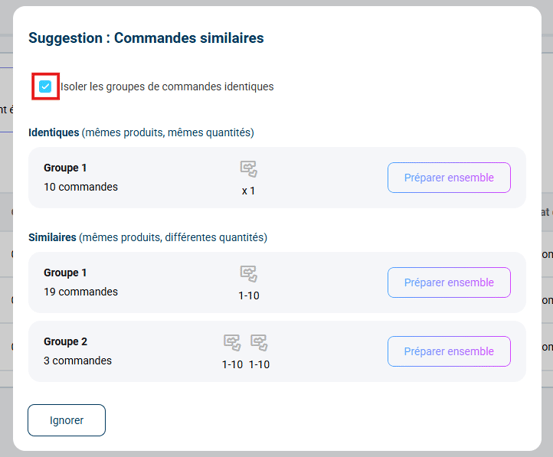
Orders are grouped into two categories: identical orders and similar orders.
- THE identical orders have both exactly the same product lines and the same quantities ordered for each product
- THE similar orders : have exactly the same product lines with different ordered quantities for each product
🔷 Note:
The option Isolate groups of identical commands This allows the use of a session filter for identical orders. Disabling it displays only similar orders.
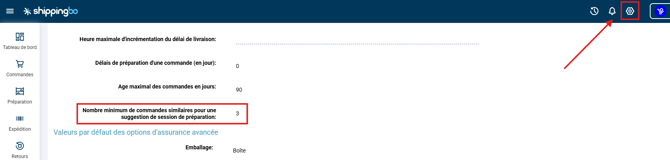
It is possible to set the minimum number of similar orders for a preparation session suggestion.
To do this, go to the menu Configurations -> Logistics-> Minimum number of similar orders for a suggested preparation session :
💠Noticed :
The preparation sessions page is automatically refreshed as soon as you arrive on it. The system also automatically updates the search to detect and group new, identical orders.
5. Prepare a group of similar orders
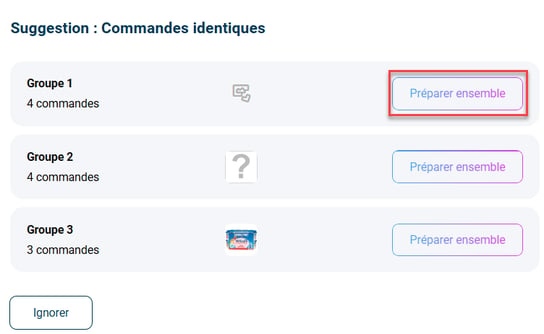
Step 1: Go to the menuPreparation -> Session filters -> click on See the suggestions to display the identical command groups suggested by the system.
Step 2: Click on Prepare together on the desired group:
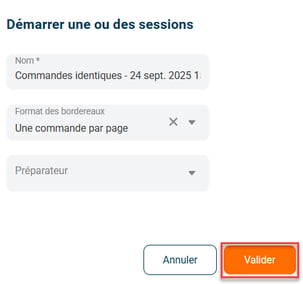
Step 3: Complete the modal
- Enter the name of the similar command group
- Choose a preparer (Optional)
- Choose the slip format
- Confirm
💠Noticed :
All order preparation methods are compatible with the similar order functionality.
However, the preparation methods single label, labels and lists, or pick and print are the more relevant.
6. Find a similar order that has been prepared
After validation, go to the tab All sessions, then locate the session in question:
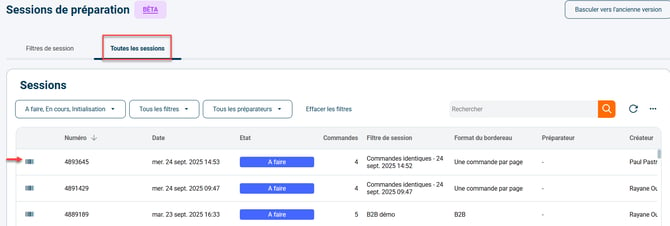
Click on its line to view preparation details.
7. Example of practical application
You are an e-commerce merchant selling electronic accessories.
- Several customers pass the Same order for a USB 3.0 cable – quantity 2
- Shippingbo automatically groups these orders
- You click on Prepare the orders togetherComplete the modal and submit.
The orders are then processed simultaneously.
Result :
- Time saved during picking
- Fewer preparation errors
- Better utilized inventories
⚒️ Recommendation:
Before fully using the functionality described in this tutorial, it is strongly recommended to performa testing phasefollowing your own parameters to verify that the result meets your expectations. The remaining customerfully responsibleThese tests, based on actions performed on the Shippingbo account, are essential to ensure the tool can be used with complete peace of mind.
Contact us 📬:
Questions about this feature? Feel free to write to us.hereso that we can answer your questions.