.png?width=210&height=40&name=bleu%20et%20gris_Sigle+logo%20SBO%20(4).png)
- Real-time tracking of stocks in transition : Instantly view items that have been moved but not yet reassigned, to avoid losses or duplicates.
- Reduction of inventory errors : Limit inventory discrepancies by accurately identifying products being transferred.
- Simplification of the logistics process : Manage internal movements from the transfer interface, with complete traceability of steps.
- Automation of inventory integrations Locations are automatically updated upon confirmation of receipt, without any manual action required.
Prerequisites✔️:
This feature is available from the Pack Premium + and in Advanced Warehouse.
Moving stock in transition
If you exit the stock movement menu after removing a product from a location, without putting it back in another location, the destocked stock of that product appears "in transition" in its product sheet.

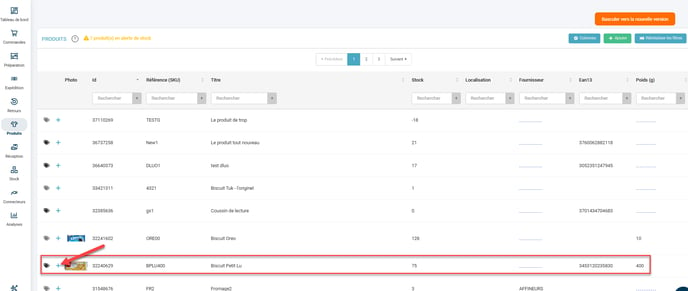
Go to the product page for your product that has been moved from your location by clicking on +:
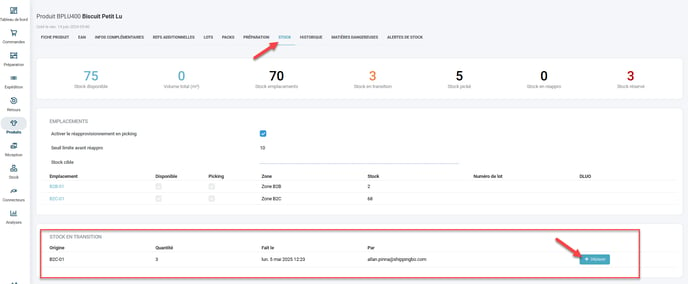
Next, go to the Stock in Transition menu and see the number of products that have been moved from one location without being moved to another. To move these products back to a location in shippingbo, click on Move.
Fill in the empty fields in the window that opens:
- Destination locationName of the location where you wish to deposit these products
- Reason (if configured)the reason for this trip
- Reference reason (if configured) : the reference for this reason if you have one.
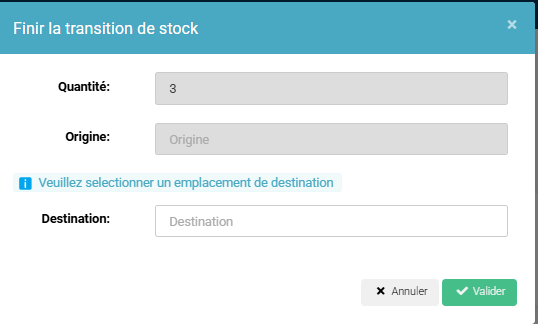
Then click on Validate.
📢Attention :
Stock that is "in transition" is not available for picking.
To go further 🛫:
Contact us 📬:
Questions about this feature? Feel free to write to us. here so that we can answer your questions.