.png?width=210&height=40&name=bleu%20et%20gris_Sigle+logo%20SBO%20(4).png)
Summary

- Time saving : Allows for the rapid processing of bulk stock entries and exits.
- Error reduction : Facilitates precise stock management with adjustments via CSV file.
- Optimizing inventory management : Enables automated stock updates for connected products.
2. How does the modification of existing stock work?
Stock updates can be made either manually for a small number of products or in bulk via a CSV file. This method allows you to precisely manage your stock inflows and outflows without overwriting previous values.
📢 Attention :
If a stock variation is incorrectly implemented, it can lead to errors in your inventory management. If you have any doubts, contact our support team.
3. How to modify the existing stock?
3.1 Modify the stock manually
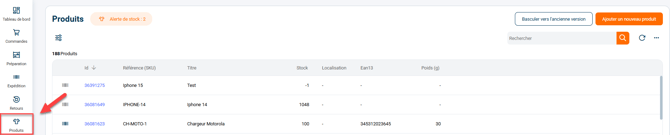
- Access the menu Products and select the relevant product page:
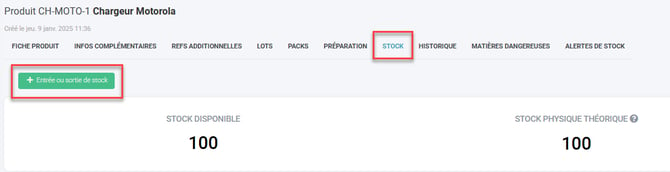
- Go to the tab Stock, then click on ""Stock entry or exit":
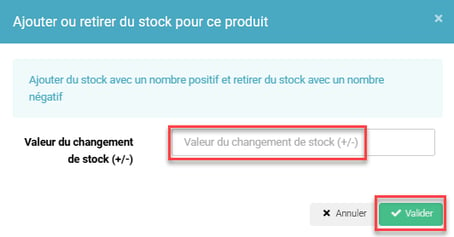
- Enter the quantity to add or subtract (use a "-" for a stock withdrawal) in the field Value of the inventory change, then confirm:
3.2 Modify the stock by importing a CSV file
This method is recommended for massive stock changes.
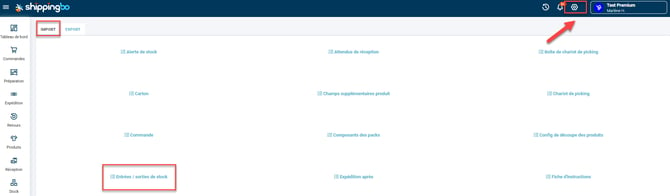
- Go to the menu Configurations -> File management -> Import -> Stock entries/exits :
- Click on Import a file, then download the example file:
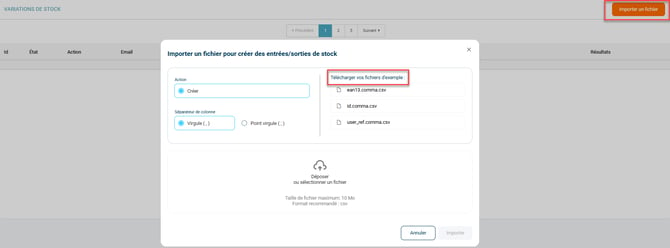
💡 Trick The example file uses the Shippingbo identifier to identify products, but you can also use your SKU reference or EAN code by changing the column header to "user_ref" or "ean13".
-
Complete the CSV file with two columns:
- A column for product identification (id, user_ref, or ean13).
- A column for stock variation (variation).
- A column for product location (location)
- Import the file by clicking on Drop or select a file, then on Import :
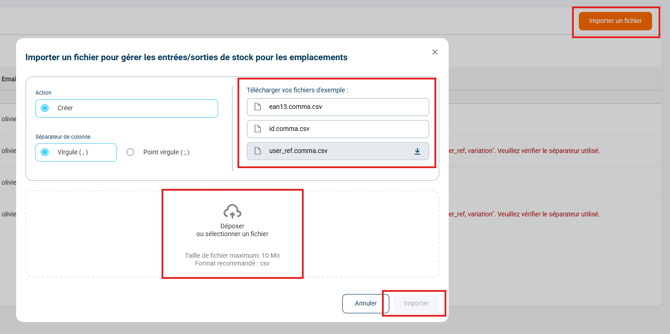
📢 Attention Your file should only contain the pre-existing columns from the import template. Adding any columns will cause errors during import.
🔷 Trick :
Example of importing a stock variation of 0 for the product SKU LARGE FURNITURE for a Premium Package: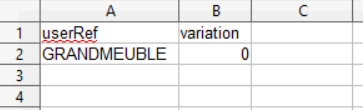
THE Premium Pack not providing access to the functionality Locations (available from the Expert Pack), the column rentalcan be ignored during import.
4. Example of practical application
Context :
You are an e-commerce retailer specializing in online clothing sales. You receive a new shipment of 500 t-shirts that you want to quickly add to your inventory without having to manage it manually for each item. Your previous stock of t-shirts was 200 units, and you receive 500 new units of several different styles.
Using the feature :
- You download the template file provided in Shippingbo and replace the values with your product identifiers (id, SKU or EAN) and the quantity to add for each reference (ex. +500).
- You follow the import procedure from the tab Configurations → Import → Stock entries/exitsYou check that the column separator matches the one used in your CSV file, then you upload the file.
Result :
In just a few minutes, your 500 t-shirts are added to your various product inventory, and the update is automatically propagated to your connected sales channels. Your total stock is now fully up-to-date, and you can immediately resume online sales with complete peace of mind, without the risk of errors or stockouts.
⚒️ Recommendation:
Before fully using the functionality described in this tutorial, it is strongly recommended to performa testing phasefollowing your own parameters to verify that the result meets your expectations. The remaining customerfully responsibleThese tests, based on actions performed on the Shippingbo account, are essential to ensure the tool can be used with complete peace of mind.
To go further 🛫:
FAQ ❔:
No related FAQs at the moment.
Contact us 📬:
Questions about this feature? Feel free to write to us.hereso that we can answer your questions.