.png?width=210&height=40&name=bleu%20et%20gris_Sigle+logo%20SBO%20(4).png)
Automated update from the catalogue via FTP, saving time and reducing errors.
Accurate tracking products thanks to serial numbers and barcodes.
Reliable and structured data, better synchronization and fewer inconsistencies.
Prerequisites✔️:
- If you would like to access this feature, please request it from oursupport service.
Update the product catalog via FTP import
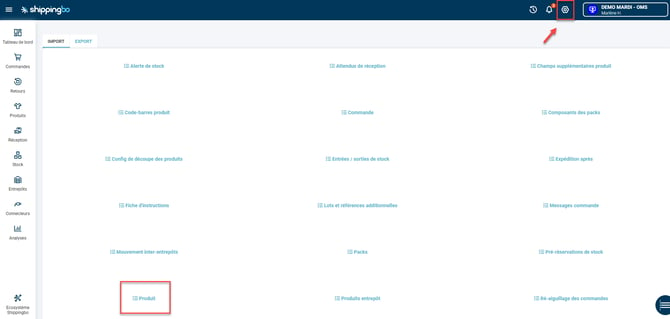
To update or even automate your Shippingbo product catalog, including serial numbers and barcodes, via FTP import, please download the corresponding file from the menu. Configurations -> File management -> Import -> Product :
Click on Import a file, select Create in Action, then download the example file:
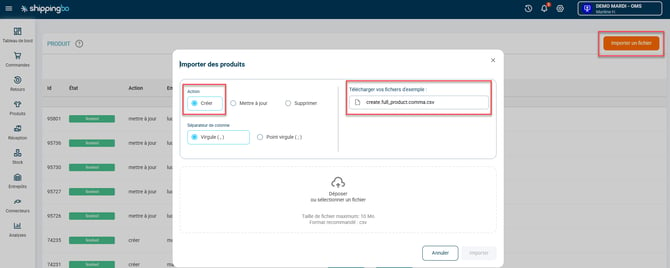
To complete the file correctly, you will need to fill in at least the following columns:
- userRef: product reference
- stockEnter your product's current stock level here if you wish.
- ean13Product EAN
- titleProduct title
- Complete the other columns according to your needs.
Next, go to the end of the file and fill in the last two columns:
- serialNumbersEnabled : enter "No"If you do not wish to activate the serial number functionality for this product, and"Yes"if you ever wish to activate it."
- barcode : if you wish to add several barcodes to the product, enter them in this column between quotation marks and separated by commas ("XXXXXXXX,XXXXXXX,XXXXXX").
💠 Noticed :
Remember to delete empty columns from your file before importing it.
⚒️ Recommendation:
Before fully using the functionality described in this tutorial, it is strongly recommended to performa testing phasefollowing your own parameters to verify that the result meets your expectations. The remaining customerfully responsibleThese tests, based on actions performed on the Shippingbo account, are essential to ensure the tool can be used with complete peace of mind.
To go further 🛫:
- Create or delete products in Shippingbo
Contact us 📬:
Any questions about this feature?
Feel free to write to ushereso that we can answer your questions.