.png?width=210&height=40&name=bleu%20et%20gris_Sigle+logo%20SBO%20(4).png)
Summary

- Time saving : Simplifies the handover process to the carrier via a direct and intuitive interface.
- Improved traceability : Enhanced monitoring of order status after shipment.
- Error reduction : Immediate alerts in case of incorrect parcel number or non-compliant condition.
- Flexibility : Compatible with all carriers, without restriction.
2. Prerequisites✔️:
- Available on all packs performing shipments.
3. How does the "Handed over to carrier" status work?
Once your orders have been shipped, you can change their status. Handed over to the carrier to inform internally that the orders have successfully left your warehouse and are now in the hands of your carrier.
- Conditions to follow for your orders to be able to move to the status Handed over to the carrier :
- Scan the Shipping ID of the package or the tracking number on the shipping label
Your order includes a single package
Your order includes several packages : in these cases, a warning message will appear asking you to confirm the handover of all packages in the order to the carrier.
- The status works regardless of the carrier.
💬 Good to know:
If the parcel number is unknown or if the order is not in the “Shipped” status, an alert is displayed to avoid any processing errors.
4. How do I change the status of orders to "Handed over to carrier"?
-
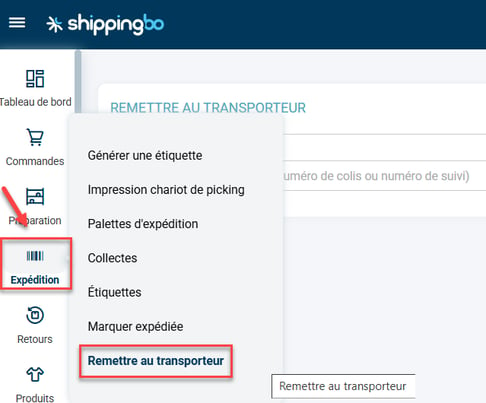
To place an order with the status "Handed over to carrier", go to the menu Shipping -> Hand over to the carrier :
-
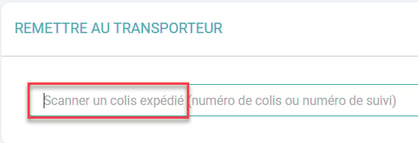
Next, scan the package ID or the tracking number from the shipping label in the field provided for this purpose:
-
Your order is now in the status Handed over to the carrier :

5. Example of practical application
You are an e-commerce merchant specializing in the sale of cosmetic products. Every day, your logistics team prepares dozens of orders. After packing them, you scan them in the menu. Shipping from Shippingbo.
Thanks to the new feature “Hand over to the carrier”You can now easily finalize the shipment:
🎯 You scan the packageand the command instantly changes to the state “Handed over to the carrier”with a clear validation message. No more manual verification or external monitoring required.
For orders with multiple packages, a message alerts you and offers you the option to confirm the overall discount: you retain control at every stage.
⚒️ Framework and responsibilities:
Before fully using the functionality described in this tutorial, it is strongly recommended to performa testing phasefollowing your own parameters to verify that the result meets your expectations. The remaining customerfully responsibleThese tests, based on actions performed on the Shippingbo account, are essential to ensure the tool can be used with complete peace of mind.
Contact us 📬:
Any questions about this feature?
Feel free to write to ushere so that we can answer your questions.