.png?width=210&height=40&name=bleu%20et%20gris_Sigle+logo%20SBO%20(4).png)
Benefits of the feature ✨
-
Time saving : Immediate access to product and location information via barcode scanning.
-
Improved visibility Precise tracking of available and reserved stock in real time.
-
Optimizing inventory management : Better replenishment planning thanks to a clear view by location.
1. Prerequisites
- This feature is available from the Premium pack +.
- A feature designed for e-commerce merchants using the advanced inventory management in Shippingbo.
2. How do I view the details of a product or location?
This feature allows you to check product availability in different locations or access stock information, such as total virtual stock in Shippingbo and stock reserved per location.
Example: You receive a large order for a specific product. By scanning its barcode, you instantly access the available stock, the reserved stock, and the exact location in the warehouse.
3. Enable viewing of product or location details
3.1 Access to the section Inventory management from your PDA.
- Navigate to Product Details and Locations.
- Make sure that the option is enabled in the module configuration.
- Access the "Product Details and Locations" module via the menu Inventory management:
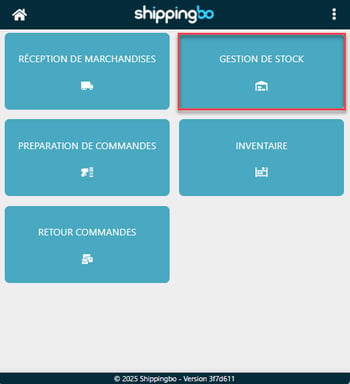
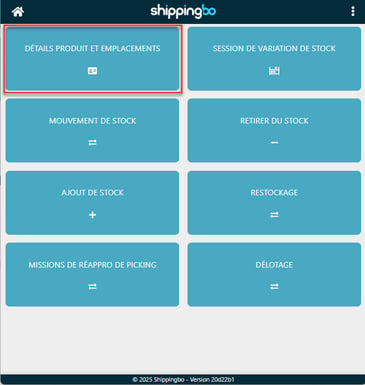
2. Scan the barcode of your product or location to display details:
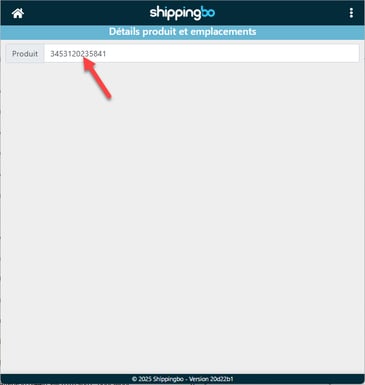
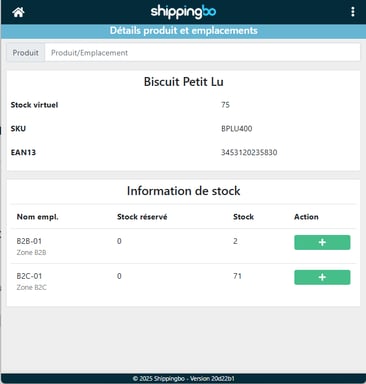
3. View the information available:
-
- Virtual stock Total stock of the product in Shippingbo.
- Location Quantity of stock reserved and present in the selected location.
📢 Attention :
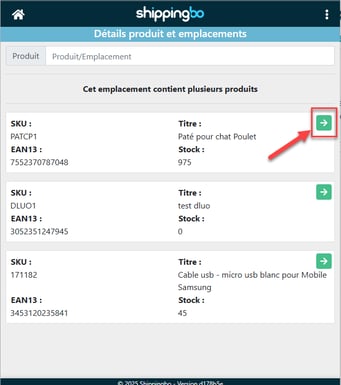
If you are in "multi-product" mode per location, all products present in the location will be displayed. You can then click on "Details" To obtain product-specific information:
💠 Noticed :
If you wish to create a stock entry from this menu, please consult the following tutorial: Record stock entry based on a product, not a location.
To go further 🛫:
- Configure a usage for a location
- Create locations manually and via import
- Create a location from your PDA
Contact us 📬:
Any questions about this feature?
Feel free to write to us here so that we can answer your questions.