.png?width=210&height=40&name=bleu%20et%20gris_Sigle+logo%20SBO%20(4).png)
Benefits of the feature ✨
- Optimized time and travel: Global picking that limits back-and-forth trips and improves the flow of the process.
- Increased productivity: Separation of tasks (picking and sorting) allowing better efficiency and fewer errors.
- Higher quality and speed of service: Fewer preparation errors, faster shipping and better handling of activity peaks.
1. Prerequisites
- Feature available from the Premium + Pack with the PDA option, or from the Expert+ Pack.
- Have already configured your fixed apiary. More information in the dedicated tutorial: CONFIGURE YOUR FIXED APIARY.
- Have a PDA to scan the products and the fixed apiary compartments.
2. How apiary preparation works
2.1 Recommendations
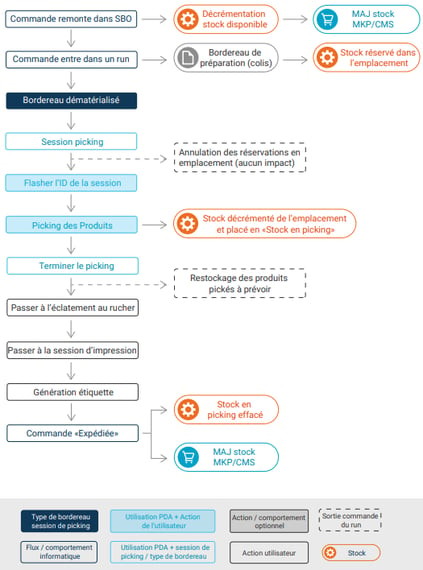
For this preparation process, all operations can be carried out without using a preparation slip.
We therefore advise you to use the digital slip format in this preparation process to avoid handling errors.
2.2 Apiary preparation: a diagram
3. Fixed apiary preparation on the PDA
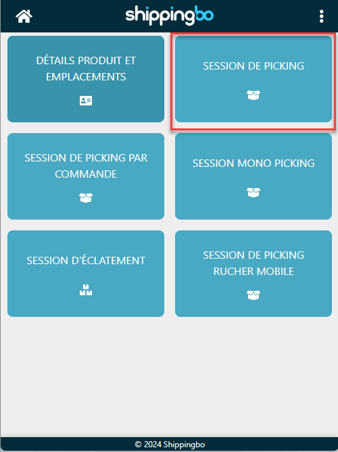
Step 1: On the PDA, click on the "Order preparation" menu > then "Picking session".
Step 2: Scan the barcode of the session available on the page of your preparation session in Shippingbo.
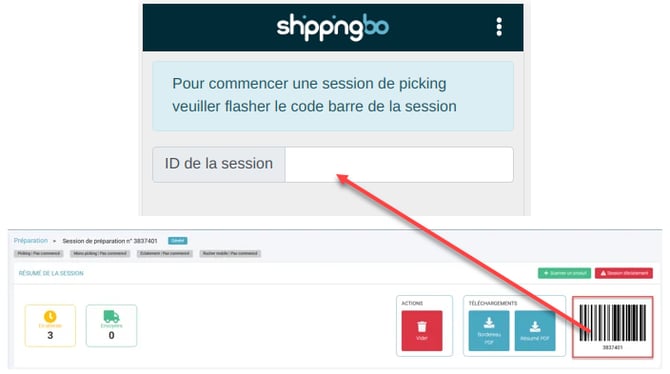 ➡️ You can also enter the preparation session ID using the keyboard of your PDA.
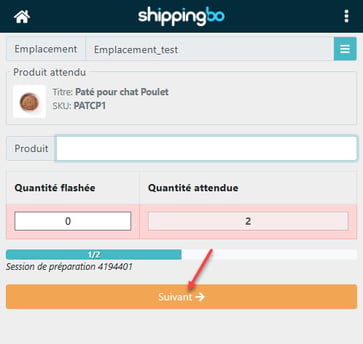
Step 3: Scan the total quantity of this product expected for the whole session.
Step 4: Once you have scanned as many products as the expected quantity, the PDA will suggest the next product to pick.
💬 Good to know:
The order of the products follows your locations to avoid unnecessary back-and-forth trips in your warehouse.
➡️ If you want to customize your picking path, please follow our dedicated tutorial: CONFIGURE A CUSTOM PICKING PATH ORDER.
➡️ If you cannot pick all the expected quantities, you can manually move on to the next one using the Next:
Step 5: Finish picking.
-
If you were able to pick 100% of the products suggested in the picking session, it ends automatically.
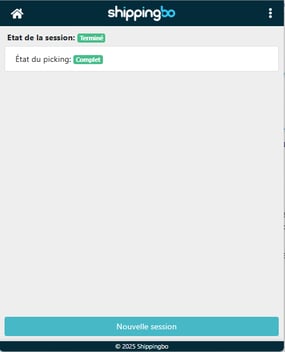
- If products are missing at the end of the preparation session or if they are not mapped, the PDA displays a summary of the products in error.
➡️ You can then either "Continue picking" to complete it, or "Finish picking".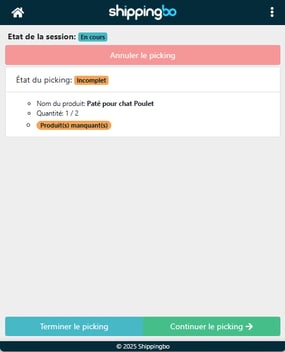
⭐ Key point:
If you were not able to pick 100% of the requested products and you click on Finish picking, some orders will be tagged as incomplete, and you will not be able to ship them.
In the next step, Shippingbo will suggest putting some products in the Restocking bin.
Step 6: Once your picking session is finished, you can move on to the apiary splitting session.
-
If you want to carry out this splitting session on the PDA, follow the dedicated tutorial: FIXED APIARY PREPARATION PROCESS (2/2) - Apiary splitting on the PDA.
- If you want to carry out this splitting session on PC, follow the dedicated tutorial: FIXED APIARY PREPARATION PROCESS (2/2) - Apiary splitting on PC.
⚒️ Framework and responsibilities:
Before fully using the feature described in this tutorial, we strongly recommend running a test phase with your own settings to check that the result matches your expectations. As the customer remains fully responsible for the actions carried out in the Shippingbo account, these tests are essential to use the tool with complete peace of mind.
To go further 🛫
Contact us 📬
Questions about this feature? Feel free to write to us here so that we can answer your questions.