.png?width=210&height=40&name=bleu%20et%20gris_Sigle+logo%20SBO%20(4).png)
Summary

- Greater customs accuracy: each parcel contains only the lines corresponding to the products actually present.
- Fewer manual corrections: the distribution of products is automatically respected according to picking.
- Document reliability: CN23 and Proforma invoices aligned with the physical reality of the packing.
- Secure preparation: new interface with visual control and blocking in case of a scan error.
- Better operational management: ability to pause, resume or reset a picking control.
2. Prerequisites ✔️:
-
Have the picking control feature enabled to benefit from the automatic distribution of products per parcel. More information on picking control here.
3. Description of the harmonized CN23
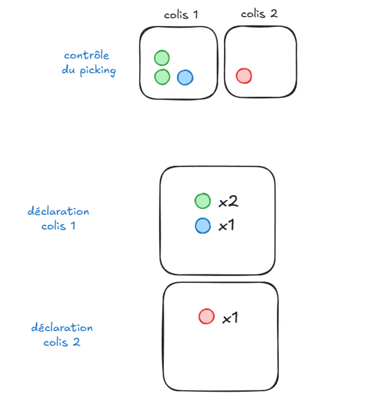
The customs declaration aligns directly with the reality of picking: each parcel contains only the customs lines corresponding to the products physically in it, which guarantees perfect consistency between preparation and documentation.
This distribution is fully automated, because the customs documents are generated from the picking control performed, without any additional action. Proforma invoices are also generated via the same automated process. These documents can still be edited manually.
Example of shipping an order in two parcels:
4. Activation and configuration
4.1 Activation
The feature is available by default in the display of the new version. To access the feature, click on Activate in the pop-up that appears when you log in to Shippingbo:
-webp.webp?width=1059&height=171&name=unnamed%20(1)-webp.webp)
4.2 Configuring the harmonized CN23
In Configurations>Logistics:
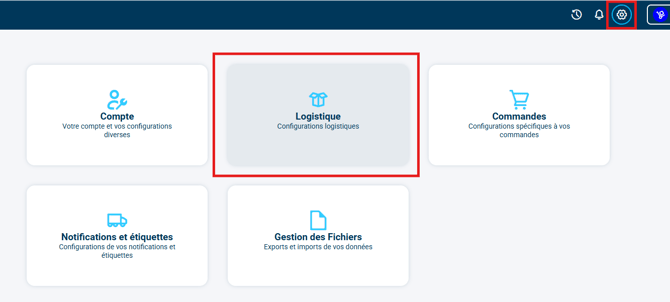
You will find all your CN23-related settings in the tab CN23:
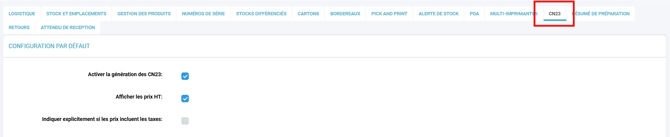
More information on the CN23-specific configuration here.
🚩 Special case:
-
If you add a parcel after the end of the picking control, Shippingbo will:
- duplicate the content of the first parcel
- set the quantities to 0➡️ It will then be up to you to manually enter the correct quantities in this new parcel
-
If there is no picking control, Shippingbo will:
- duplicate the content of the first parcel
- set the quantities to 0➡️ The distribution of products therefore remains entirely manual
➡️ In both situations, Shippingbo cannot automatically deduce the actual distribution of products.
⚒️ Recommendation:
Before fully using the feature described in this tutorial, we strongly recommend running a test phase with your own settings to check that the result matches your expectations.
As the customer remains fully responsible for the actions carried out in the Shippingbo account, these tests are essential to use the tool with complete peace of mind.
Contact us 📬:
Questions about this feature? Feel free to write to us here so that we can answer your questions.