.png?width=210&height=40&name=bleu%20et%20gris_Sigle+logo%20SBO%20(4).png)
Summary

- Reliable invoicing: Generation of invoices with tax rates compliant with Amazon rules
- Tax compliance: Fewer errors caused by taxation differences depending on the shipping countries
- Time savings: Automation of the invoicing process after orders are shipped.
2. Prerequisites ✔️:
- The settings described below require an Amazon connector to be already configured on Shippingbo. More information here.
- This also requires activating the option Invoicing on Shippingbo. For more information, please contact your Shippingbo account manager.
3. Amazon configuration
To get an optimal tax rate configuration in invoices, it is recommended to keep the tax calculation on Amazon, so you need to:
- Make sure the tax rates are correctly set up on Amazon
- Uncheck the option Recalculate taxes in the Amazon connector on Shippingbo, in Sales channels > your Amazon connector:
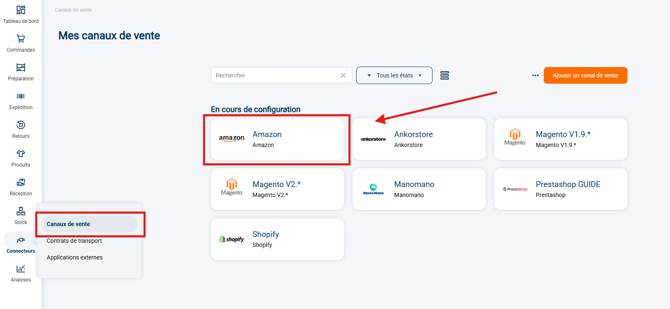
-
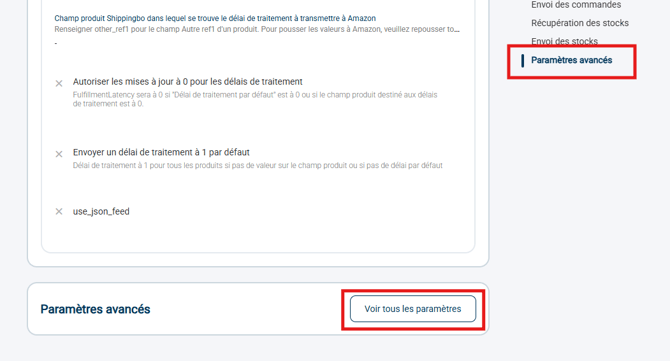
- In the Advanced settings of this connector:
-
- You can uncheck the option Recalculate taxes to keep your Amazon tax rate settings:

-
In the same section of your Amazon connector settings, also check the option Update prices after order shipment:

-
- It is essential to check this option if the option Wait for post-shipment price update (Amazon) is also enabled, because if it is unchecked, the invoice will never be generated.
- Finally, if you retrieve orders shipped by FBA (more information here), check the option Wait for post-shipment price update (Amazon) in the Invoicing module.
- In Configurations > Invoicing:
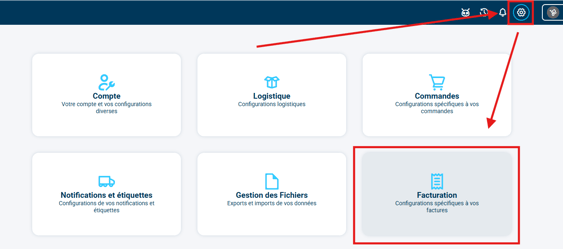
-
- You will find the option to check Wait for post-shipment price update (Amazon) at the bottom of the page:

-
- It is essential to check this option because if the order is shipped by FBA from another country, it can cause inconsistent tax rates. Indeed, FBA may ship the order from a country different from the one initially planned, which changes the tax rules. This information is therefore only available after shipment.
➡️ With this setting, the invoice appears after shipment and price update, according to Amazon tax rates.
🚩 Special case:
If, despite these recommendations, you choose to recalculate tax rates on Shippingbo, i.e. to have the option Recalculate taxes checked, it is not recommended to retrieve orders Awaiting payment, so you must uncheck the option Retrieve orders awaiting payment in your Amazon connector options:


➡️ Otherwise, the risk incurred if orders Awaiting payment are retrieved is that orders shipped internationally may lead to an inconsistency in the tax rate and the prices displayed in invoices: since the delivery address is not yet known, the invoice may be calculated before it is retrieved, so the prices then do not take into account the per-country tax rate configurations defined in Shippingbo.
⚒️ Recommendation:
Before fully using the feature described in this tutorial, we strongly recommend running a test phase with your own settings to check that the result matches your expectations.
As the customer remains fully responsible for the actions carried out in the Shippingbo account, these tests are essential to use the tool with complete peace of mind.
To go further 🛫:
- Retrieve orders shipped by Amazon (FBA)
Contact us 📬:
Questions about this feature? Feel free to write to us here so that we can answer your questions.