.png?width=210&height=40&name=bleu%20et%20gris_Sigle+logo%20SBO%20(4).png)
Summary
1. Prerequisites
- Have a smartphone or a browser extension to generate security
codes or passkeys.
2. Migration schedule
As part of a drive to strengthen the protection of your data and your users, two-factor authentication (MFA) will gradually become mandatory to access orders and configurations.
➡️ All your Shippingbo users with access rights to Orders and Configurations must therefore have enabled MFA to log in to and use Shippingbo.
To ensure that this security reinforcement takes place smoothly, the migration is carried out in three progressive phases:
-
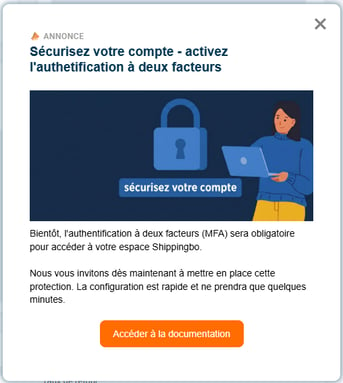
Phase 1: Information and Encouragement
During this period, we communicate with your teams to invite them to set up MFA voluntarily. An informational banner will appear on your interface:
-
Phase 2: Preventive Redirection
MFA is about to become necessary to use your Shippingbo account. At each login, you will be automatically redirected to the MFA configuration page. It will still be possible to skip this step, but the message will remind you that it will soon become mandatory: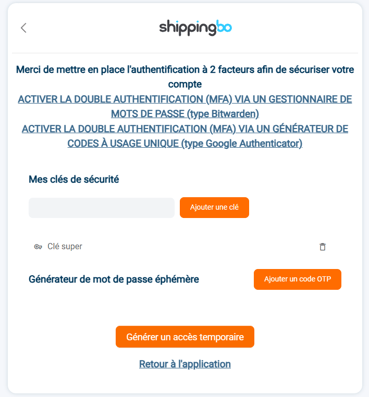
-
Phase 3: Mandatory Activation
At login, a user without MFA will be automatically redirected to the MFA configuration page, this time with no option to skip this step. MFA therefore becomes mandatory at login for all users with access rights to Orders and Configurations.
3. Activation and configuration
Two-factor authentication can be activated in different ways. Depending on your usage and your tools, choose the guide that matches your situation:
-
You want to use a password manager such as Bitwarden:
➡️ Please see the dedicated tutorial here. -
You want to use an OTP application, such as Google Authenticator, please see:
➡️ Please see the dedicated tutorial here.
-
You use a PDA:
➡️ Please see the dedicated tutorial here. - If you made a mistake when configuring your MFA two-factor authentication and you want to reconfigure MFA for this user, you can follow the related documentation here.
5. Practical example
A logistics manager wants to secure access for his 10 order
pickers. In Phase 1, he asks everyone to install an OTP application. In Phase 2,
the pickers see the reminder every morning on their PDA. In Phase 3, access is
locked: only those who have scanned their security QR code can start their
picking session.

-
Maximum security: Enhanced protection of your data against credential theft.
-
Compliance: Alignment with international security standards (GDPR, cybersecurity).
-
Peace of mind: Drastic reduction of the risk of fraudulent access to your Shippingbo account.
-
Trust: Assurance for your customers and partners that their data is protected by a double barrier.
⚒️ Framework and responsibilities:
Before fully using the feature described in this tutorial, we strongly recommend running a test phase with your own settings to check that the result matches your expectations.
As the customer remains fully responsible for the actions carried out in the Shippingbo account, these tests are essential to use the tool with complete peace of mind.
To go further 🛫:
Contact us 📬:
Questions about this feature? Feel free to write to us here so that we can answer your questions.