.png?width=210&height=40&name=bleu%20et%20gris_Sigle+logo%20SBO%20(4).png)
Benefits of the feature ✨
-
Logistics optimization: orders are automatically directed to the most relevant warehouse according to defined rules.
- Decision automation: no more manual intervention to choose the shipping warehouse.
- Efficient multi-warehouse management: smart prioritization based on mapping, priority and available stock.
- Operational flexibility: ability to distribute orders across several warehouses in certain specific cases.
1. Prerequisites
- The warehouse mapping must already be configured. More information here.
- This feature requires activation by Shippingbo support, which you can contact here.
-
Several warehouses must be connected to your Shippingbo OMS.
By default, order routing follows three decision levels, applied in this order:
-
Warehouse mapping (also called Routing rules)
-
Warehouse priority (defined under Warehouse)
-
Available stock
2.1 Warehouse mapping
If an order matches a rule defined in the warehouse mapping, it is routed entirely to that warehouse.
💬 Good to know:
An order cannot be split between several warehouses at this stage.
All the products in the order will therefore be shipped from the same warehouse.
2.2 Warehouse priority
If the order does not match any mapping rule, routing moves on to the next rule: warehouse priority.
Each warehouse can be configured with a priority level in the OMS.
The order will then be directed to the warehouse with the highest priority, provided that stock is available there.
🚩 Special case:
When several warehouses have the same priority and have the necessary stock, the order can be distributed across several warehouses.
In this case, the products in the order can be shipped from different warehouses.
3. Enabling multi-warehouse routing
To allow optimal multi-warehouse routing, four activation steps are required. It is essential to carry out these steps in this order:
3.1 Request activation from Shippingbo support
Multi-warehouse order routing requires, for optimal configuration, the activation of settings by our technical teams. You can contact them to request this activation here.
3.2 Configure the settings so that product stocks are not left empty
Once the activation has been carried out by our technical teams, on the WMS, in the Sellers tab, in the details of the seller concerned, you can check the option Initialize the stocks of propagated products to zero :
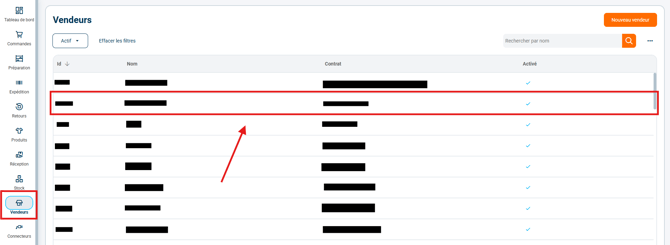

➡️ By default, when a product is propagated from the OMS to the WMS, the product's stock field is left empty. However, the product stock field must contain a value, even zero, for multi-warehouse routing to take place.
3.3 Configure warehouse priorities
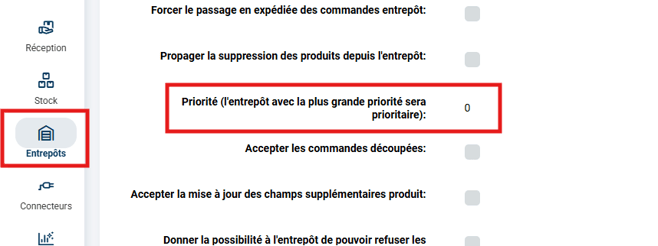
OMS: under Warehouses, for each connected warehouse, you can configure the priority of each warehouse in the field Priority (the warehouse with the highest priority will take precedence):
3.4 Allow available stock to be taken into account
OMS: under Warehouses, for each connected warehouse, you can disable the option Ignore available stock, so that available stock is taken into account in multi-warehouse routing:
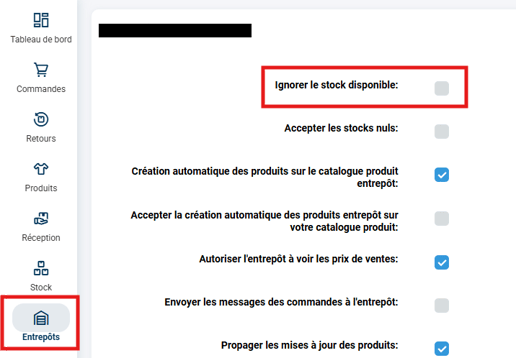
➡️ Orders can now be routed optimally.
4. Practical example
An OMS is connected to three warehouses:
-
Warehouse A → priority 1
-
Warehouse B → priority 2
-
Warehouse C → priority 2
Case 1: mapping defined
An order matches a mapping rule to warehouse B.
➡️ The entire order is sent to warehouse B, even if other warehouses have the stock.
Case 2: no mapping
The order does not match any rule.
➡️ The system then checks the warehouse priorities.
-
If warehouse A has the stock → the order is routed to A.
-
If A has no stock but B and C do, and they have the same priority, the order can be distributed between B and C.
⚒️ Framework and responsibilities:
Before fully using the feature described in this tutorial, we strongly recommend running a test phase with your own settings to check that the result matches your expectations. As the customer remains fully responsible for the actions carried out in the Shippingbo account, these tests are essential to use the tool with complete peace of mind.
To go further 🛫
Contact us 📬
Questions about this feature? Feel free to write to us here so that we can answer your questions.