.png?width=210&height=40&name=bleu%20et%20gris_Sigle+logo%20SBO%20(4).png)
Benefits of the feature ✨
-
Time savings: Replay your queries and complex analyses in one click without having to retype the entire prompt.
- Team pooling: Share your best diagnostic and reporting practices with all the users of your account.
- Secure analysis: Carry out your investigations with complete peace of mind thanks to an execution scope strictly limited to consultation.
1. Prerequisites
This feature is available by default to all Shippingbo users.
2. How Naia skills work
In Naia, a “skill” is a pre-saved, reusable prompt that stores a detailed instruction or question given to the assistant.
-png.png?width=670&height=303&name=image-20260921-133852%20(1)-png.png)
2.1 Saving a prompt as a skill
When a user writes an advanced instruction (for example for an operational check or a specific reporting format), they can turn this request into a named skill. Saving it avoids having to manually rephrase the request in future uses: simply select the skill to immediately rerun the corresponding analysis.
To add a Skill, please go to the My skills menu in the conversation with Naia:
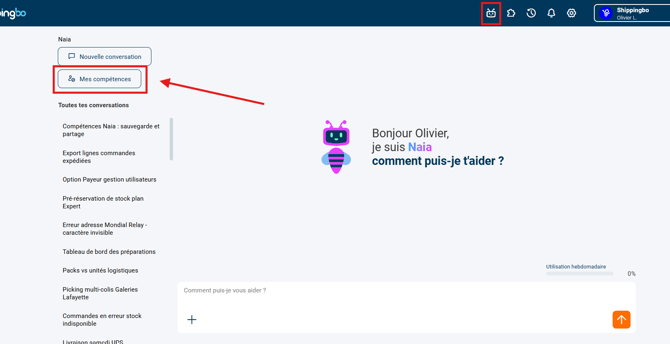
In the My skills menu, you can add the first skill to your Naia assistant:
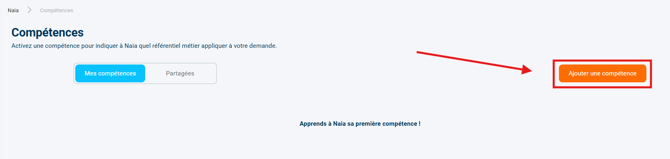
By clicking the button Add a skill, a form to fill in appears (all fields are editable and skills can be deleted afterwards, so you can freely create test skills to discover the feature):
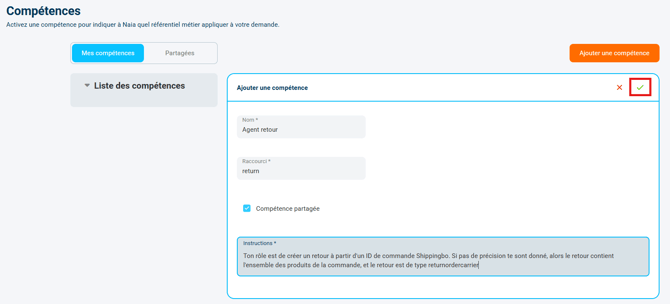
- Name: Name that will be displayed in the list of skills to activate
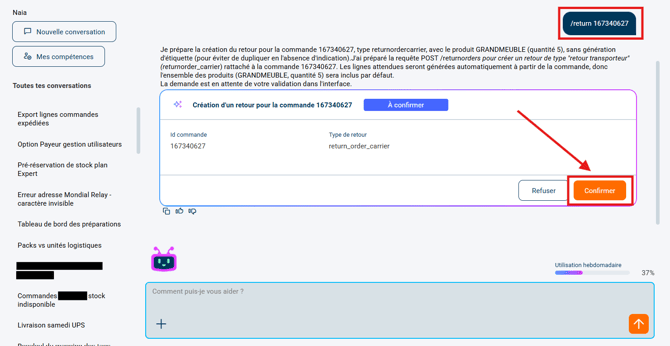
- Shortcut: Defines the command you will need to enter in the chat with Naia to activate the skill. In our example, by entering "return", you will need to enter the command /return in the chat with Naia.
- Checkbox option Shared skill: when the option is checked, the skill can be used by all the other users of the Shippingbo account. When the option is unchecked, the skill can only be used by the user who created it.
- Instructions: Prompt that Naia will run each time the skill is launched.
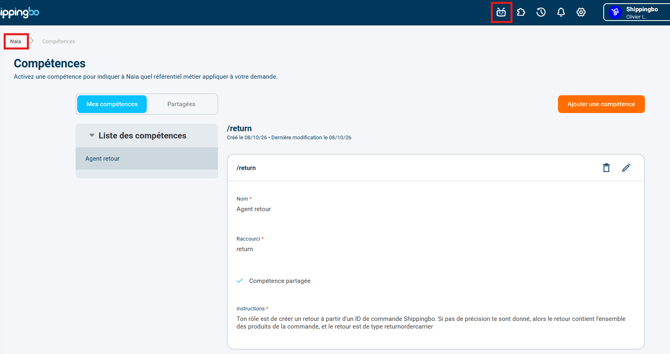
➡️ In this example, the skill will be activated whenever any user of the account types "/return" in the Naia chat
💡 Tip:
Give each shared skill a clear and precise label so that your colleagues immediately know in which situation to use it. This considerably speeds up the team's adoption of the tools.
3. Practical example
A logistics manager wants to standardize the diagnosis of blocked orders every morning:
- The manager gives Naia the following instruction: “Check whether my orders pending for more than 48 hours have an unreserved stock anomaly or a carrier mapping problem.”
- The manager saves this prompt under the skill name “Pending orders diagnosis”.
- The manager enables sharing of the skill with all the pickers and operators of the account.
- Every morning, operators simply select this skill to get the full report without having to retype the instruction.
⚒️ Framework and responsibilities:
Before fully using the feature described in this tutorial, we strongly recommend running a test phase with your own settings to check that the result matches your expectations. As the customer remains fully responsible for the actions carried out in the Shippingbo account, these tests are essential to use the tool with complete peace of mind.
To go further 🛫
Contact us 📬
Questions about this feature?
Feel free to write to us here so that we can answer your questions.