.png?width=210&height=40&name=bleu%20et%20gris_Sigle+logo%20SBO%20(4).png)
Summary

- Time savings: Fewer manual changes after picking.
- Improved accuracy: Customs lines are automatically matched to the right parcels.
- Better customs traceability: The declaration complies with customs regulations by detailing precisely the content of each parcel.
- Flexibility: You can still adjust the data manually if necessary.
2. Prerequisites✔️
This feature is available for all Shippingbo packs that can generate transport labels.
3. How does this new generation of customs documents work?
From now on, Shippingbo respects the actual content of parcels regardless of the carrier used, as validated during the picking check. This means:
-
Only the products present in a parcel appear in the customs lines of that parcel.
-
This behavior is automatic.
-
You can still adjust the declarations manually, if needed.
4. How do you enable the new generation of customs documents?
4.1 Setting up the new generation of customs documents
When using the new label generation page (more information here), the options required to generate customs documents and CN23 are enabled by default.
📢 Point of attention:
Make sure you have correctly validated the picking for each order before generating the CN23 documents.
🚩 Special case:
If the parcel content is manually modified after picking, remember to update the customs lines before printing the documents.
4.2 Manage customs documents with packs (optional)
If you use the product packs (bundles), go to Configurations>Logistics> CN23 tab:
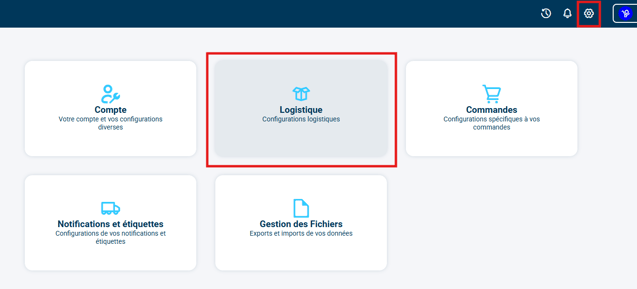
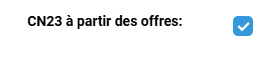
➡️ Checking the option CN23 from bundles lets you generate CN23s listing the order lines, which makes it possible todisplay the packs correctly on customs documents.
5. Practical example
You are an e-merchant specializing in sports accessories.
An order contains:
-
1 water bottle
-
2 towels
-
1 sports bag
After the picking check, you prepare 2 parcels:
-
Parcel 1: Water bottle + 1 towel
-
Parcel 2: 1 towel + 1 sports bag
Thanks to this feature, the customs documents generated will show:
-
Parcel 1 → CN23: Water bottle, 1 towel
-
Parcel 2 → CN23: 1 towel, sports bag
⚒️ Recommendation:
Before fully using the feature described in this tutorial, we strongly recommend running a test phase with your own settings to check that the result matches your expectations. As the customer remains fully responsible for the actions carried out in the Shippingbo account, these tests are essential to use the tool with complete peace of mind.
To go further 🛫:
- Configure CN23s by order source and origin
Contact us 📬:
Questions about this feature?
Feel free to write to us here so that we can answer your questions.