.png?width=210&height=40&name=bleu%20et%20gris_Sigle+logo%20SBO%20(4).png)
✔️ Prerequisites:
Available to all Shippingbo packs.
1. Why a new navigation menu?
The update to Shippingbo's navigation interface aims to make access to features more intuitive and efficient. The menu has been reorganized to make it easier to use and to offer two display modes suited to your preferences.
2. Overview of the new navigation menu
Activate the display mode you want:
Each user can customize their display mode. To switch between the detailed mode and the compact mode, simply click the "burger" button at the top left. The display preference will be automatically saved in the browser:
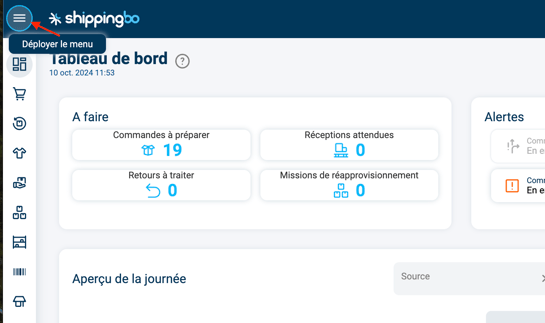
Available display modes:
-
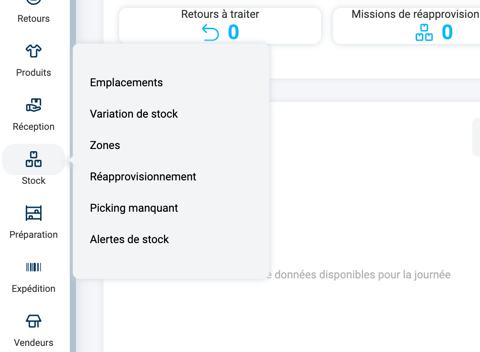
Detailed mode:
- Displays the full menu labels for easy access to features.
- Submenus appear as floating windows, giving direct access to the related options.
-
Compact mode:
- Displays only the menu icons, ideal for maximizing your workspace.
- Submenus are accessible via a drop-down panel, which collapses automatically after a page is selected.
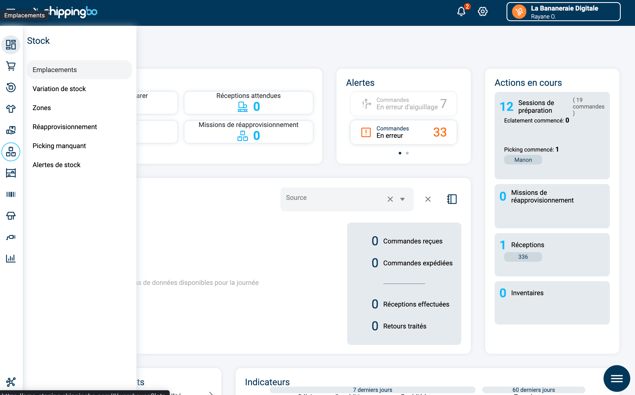
Example: If you work on a small screen and want to maximize your workspace, activate the compact mode to display only the menu icons.
3. Organization of the new navigation menu
New menu organization:
- Dashboard
- Orders
- Order list
- Create an order
- Preparation
- Shipping
-
- Generate a label
- Picking cart printing
- Shipping pallet
- Tracking number
- Mark as shipped
- Returns
- Products
- Products
- Lots and references
- Packs
- Receipt
- Stock
-
- Locations
- Stock variation
- Zones
- Replenishment
- Missing picking
- Stock alerts
- Sellers / Warehouses
- Connectors
-
- Sales channels
- Transport contracts
- External applications
- Analytics
- Revenue
- Order volume
- Best sellers
- Shippingbo ecosystem
Example: To prepare an order, you can easily navigate to the "Orders" menu and then select "Preparation".
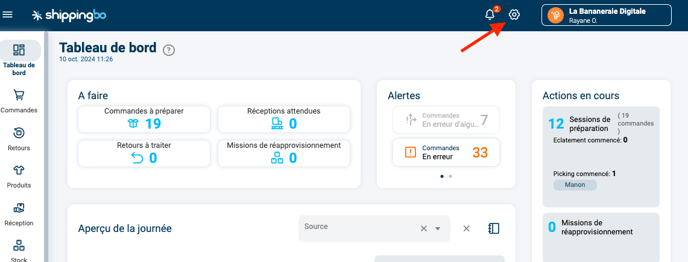
- Improved ergonomics: Simplified access to common functions.
- Display flexibility: Choice between two display modes according to your preferences.
- Optimized productivity: Faster and more intuitive navigation.
Contact us 📬:
Questions about this feature?
Feel free to write to us here so that we can answer your questions.