.png?width=210&height=40&name=bleu%20et%20gris_Sigle+logo%20SBO%20(4).png)
Benefits of the feature ✨
-
Time savings: The Shipping service mapping automates carrier selection, saving you from having to do it manually for each order. This lets you focus on other aspects of your business.
-
Error reduction: By defining precise rules, you limit the risk of human error in choosing shipping services, ensuring that each order is processed with the appropriate carrier.
-
Cost and service optimization: By automatically assigning the most suitable carrier according to weight, destination or other criteria, you optimize shipping costs and improve your customers' satisfaction by meeting delivery deadlines and requirements.
1. Prerequisites
2. How does the shipping service mapping work?
3. How to create a rule in your Shipping service mapping

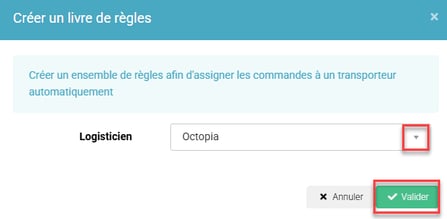


💬 Good to know:
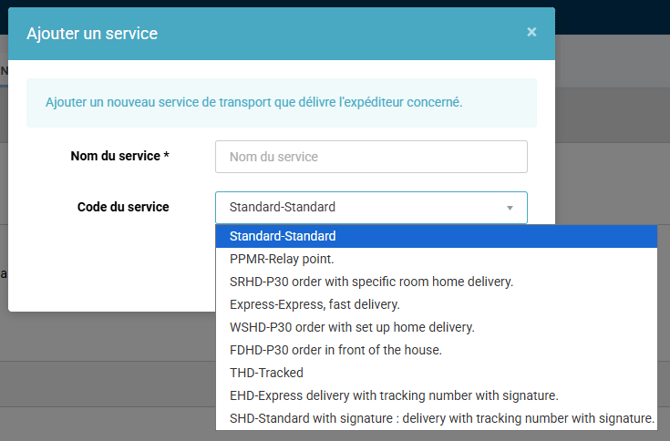
Depending on the delivery methods, the available destinations are different:
PPMR-Relay point: BE, NL, LU, DE, ES, PT, IT, FR
SRHD-P30 order with specific room home delivery: FR
FDHD-P30 order in front of the house: FR
THD-Tracked: BE, NL, LU, DE, ES, PT, IT, PL, AT, BG, CZ, DK, EE, FI, FR, GR, HR, HU, IE, LT, LV, MC, RO, SE, SI, SK, CH
EHD-Express delivery with tracking number with signature: FR
SHD-Standard with signature: delivery with tracking number with signature: BE, NL, LU, DE, ES, PT, IT, PL, AT, BG, CZ, DK, EE, FI, FR, GR, HR, HU, IE, LT, LV, MC, RO, SE, SI, SK, CH
⭐ Key point:
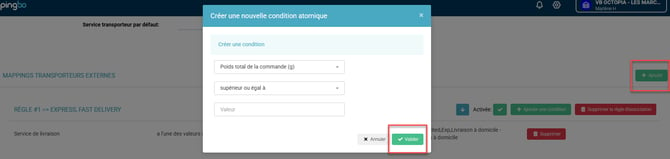
If you want your rule to include several conditions, there are two solutions:
-
Either you want both conditions to be effective for the rule to apply. In that case, they must be entered in the same rule. For example: "all orders with a total weight above 1kg and a delivery address in FRANCE must be shipped with Colissimo".
- Or you want the rule to apply if either condition is met. In that case, they must be entered in two separate rules with one condition each. For example: "all orders with a total weight above 1kg or a delivery address in FRANCE are shipped with Colissimo" or "all orders to the French overseas territories and all orders to Switzerland must be shipped with Colissimo".
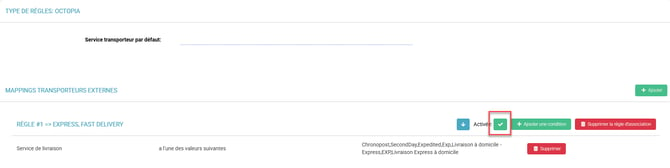
3.6: When your Mapping is complete, don't forget to activate your rules, as they are deactivated by default, by checking the box Enabled for the rules that are ready to be used:
⭐ Key point:
For a mapping rule to work, all carrier account names must be identical to those entered in the back office of your sales channel, down to the capital letter or even the comma.
3.7 Invoice management after a Cdiscount order: When an order from Cdiscount is delegated to Octopia Fulfillment, the associated invoice is automatically sent to Octopia once the order is confirmed and processed. Make sure your Cdiscount and Octopia connectors are properly synchronized to ensure smooth transmission of the document.
💬 Good to know:
The automatic sending of invoices to Octopia for Cdiscount orders makes it possible to meet the marketplace's requirements without any additional manual action on your part after the order is prepared.
4. Practical example
Context:
You are an e-merchant and you manage orders to several countries.
Using the feature:
Thanks to the Shipping service mapping, you can automate the assignment of the ideal carrier based on your needs. For example, you want all your orders of more than 2 kg to France to be shipped via Colissimo, and those to Europe with DHL.
By simply configuring these rules in the mapping, Octopia will automatically select Colissimo or DHL according to the criteria you have defined.
Result: faster, more efficient management adapted to each order, while making sure you comply with specific delivery conditions.
⚒️ Framework and responsibilities:
Before fully using the feature described in this tutorial, we strongly recommend running a test phase with your own settings to check that the result matches your expectations. As the customer remains fully responsible for the actions carried out in the Shippingbo account, these tests are essential to use the tool with complete peace of mind.
Contact us 📬
Questions about this feature? Feel free to write to us here so that we can answer your questions.