.png?width=210&height=40&name=bleu%20et%20gris_Sigle+logo%20SBO%20(4).png)
Summary

- Time saving: The store is notified instantly as soon as an order is routed, with no manual action needed.
- Increased responsiveness: Order preparation can start sooner.
- Stock optimization: Products are taken out of stock as soon as the notification is received, reducing lead times.
2. Prerequisites✔️:
- Work with Multi-Shippingbo.
3. How does the automatic notification work?
When an order is routed to a warehouse, a notification email is automatically sent to the address configured in the system, informing the pickers that a new order must be prepared as soon as possible.
Example: If you check the automatic sending option and have correctly filled in the warehouse address, an email is sent immediately as soon as an order is routed.
💡 Tip:
Remember to check the configuration of the warehouse email address before activating the feature to ensure the notifications are properly received.
4. How do I activate the automatic notification?
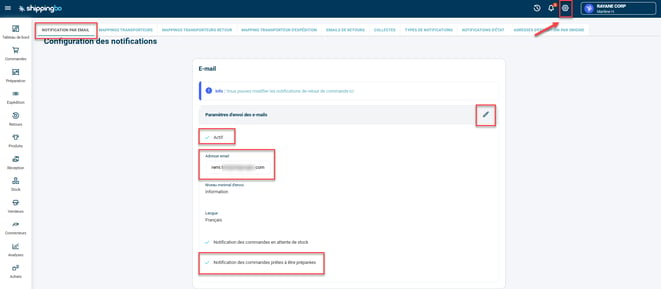
Go to the menu Configurations -> Notifications and labels -> Email notification. On this page, activate the following items:- Activate the option Active
- Check that the email address entered here is correct (you will receive the notifications at this address)
- Activate the option Notification of orders ready to be prepared
📢 Warning:
If the email settings are not correctly filled in or if the Active option is not checked, no email will be sent. Always check your settings after activation.
5. Practical example
Context:
A logistics warehouse activates this option to be alerted as soon as an order is routed from the e-commerce site. As soon as an order is transmitted, the preparation team automatically receives an email containing the information needed to start preparation without delay.
💠 Note:
The notification email address must be specific to each warehouse to ensure smooth communication and avoid recipient errors.
⚒️ Recommendation:
Before fully using the feature described in this tutorial, we strongly recommend running a test phase with your own settings to check that the result matches your expectations. As the customer remains fully responsible for the actions carried out in the Shippingbo account, these tests are essential to use the tool with complete peace of mind.
To go further 🛫
- Configure the routing error mapping
- Configure a routing delay for orders by warehouse
Contact us 📬:
Questions about this feature? Feel free to write to us here so that we can answer your questions.