.png?width=210&height=40&name=bleu%20et%20gris_Sigle+logo%20SBO%20(4).png)
Here we present the thermal printers that are compatible and functional with our label format: 10x15cm, so that you can automate your label printing and save a considerable amount of time when shipping your orders. We also offer certain PDA models that we recommend if your warehouse organization requires the use of this equipment.
1. Recommendations for preparation and shipping stations
First of all, it is important to know that our solution works on any operating system and web browser to view the information in the software.
However, to ensure optimal use of Shippingbo, we have some recommendations for the stations that will be dedicated to order preparation and shipping:
- Operating system: Windows only (the MAC OS operating system does not allow us to automate label printing, as it does not allow multiple paper formats to be defined for printing)
- Web browser: Google Chrome
- A thermal printer (among those listed in the examples below). This printer must be wired to the preparation station and the driver installed.
- A "barcode scanner" to read product barcodes or preparation slips. We do not recommend any particular barcode scanner model, as this equipment works like a keyboard, so a large number of models can be suitable. However, we do not troubleshoot issues with this equipment, as it depends on the model you use. For any scanning problem with the barcode scanner, please contact your supplier.
📢 Warning:
If you use a MAC or printer models other than those listed below, we cannot guarantee that the features for automating label printing will work properly. Nor can we guarantee the correct label format (10x15cm) for all carriers. If you choose to use a MAC or other printer models, we will therefore not be able to assist you with the configuration of the printing functions.
Workstation ergonomics
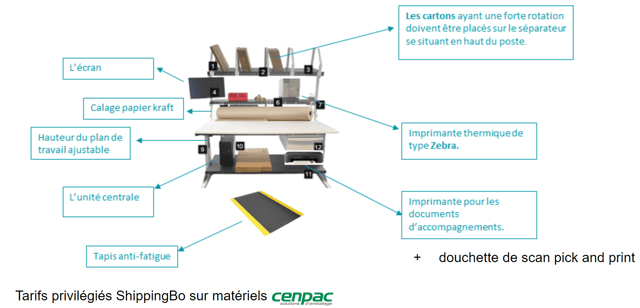
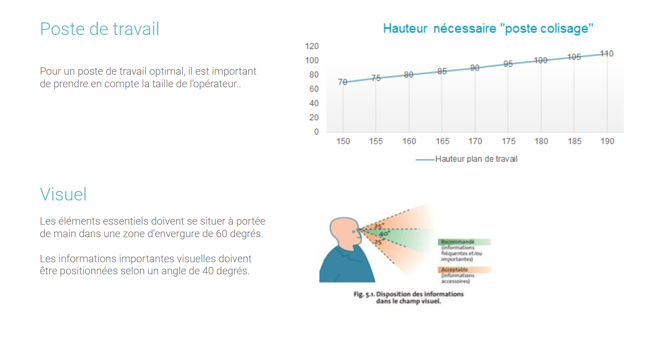
We recommend 1 station = 1 connected printer.
-
Operating system: Windows only (the MAC OS operating system does not allow us to automate label printing, as it does not allow multiple paper formats to be defined for printing)
-
Web browser: Google Chrome
-
A thermal printer listed in the examples below, wired to the preparation station.
-
A barcode scanner to read product barcodes or preparation slips.
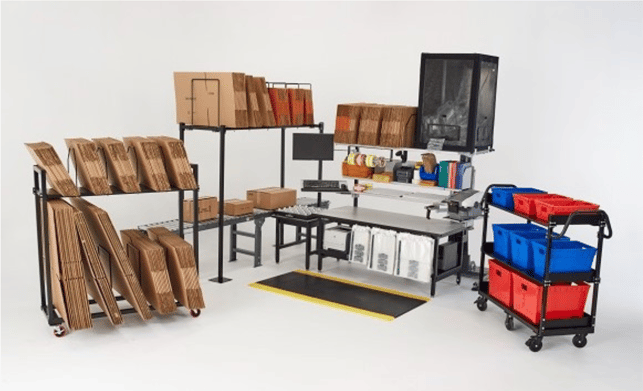
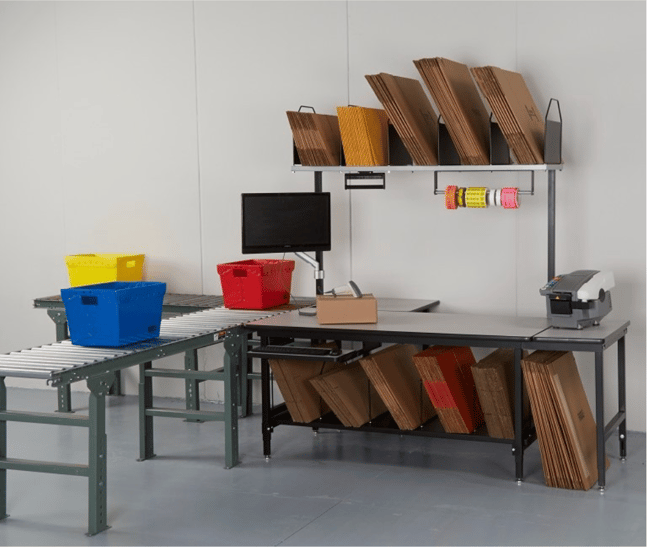
Some examples of ergonomic stations:
2. List of recommended equipment to set up your shipping stations
For convenience and cost savings, and to limit our environmental impact by avoiding excessive ink consumption, we favor thermal printers to print the shipping labels needed for your shipments.
To this end, our labels are issued in the standard format compatible with all carriers connected to Shippingbo: 10x15 cm.
To ensure that your labels are readable by carriers, it is important to use suitable, properly configured equipment. If labels are unreadable, parcels may indeed be refused or returned to you.
To calibrate your thermal printers, please watch this video tutorial
Supported printers:
3. Supported PDAs:
💠 Note:
For optimal use of your PDA with our solution, we strongly advise that PDAs be configured beforehand on our premises and shipped to you preconfigured so that they can read your EAN13, UPCA and GS1-128 codes.
4. Recommended barcode scanners:
💠 Note:
We do not recommend any particular barcode scanner model, as this equipment works like a keyboard, so a large number of models can be suitable. However, here is a list of barcode scanners that we know of and that perform well for daily use. For any scanning problem with the barcode scanner, please contact your supplier.
To go further 🛫:
- Configure the multi-print print server
- Configure the multi-print print server for the PDA