.png?width=210&height=40&name=bleu%20et%20gris_Sigle+logo%20SBO%20(4).png)
Benefits of the feature ✨
- Simplified returns: Easily generate return labels.
- Fast restocking: Quickly put returned items back into your inventory thanks to centralized management.
1. Prerequisites
-
This feature is only available for the TMS Expert+ pack.
- This feature requires you to have already configured a return service.
➡️ More information on connecting return services in the List of our carriers available in self-service.
2. How return management works in TMS Expert+
The page dedicated to return labels lets you group and monitor all the return labels generated from your Shippingbo account.
2.1 From the Shipment > Return labels pane, you will access the list of all the return labels generated in your Shippingbo space.
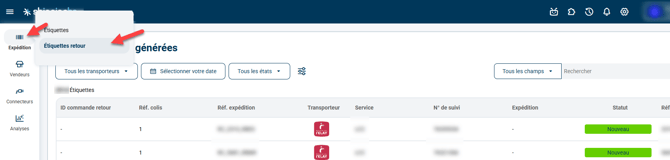
2.2 On this page, you can access the key information for each return:
- Return tracking number and associated carrier
- Original order linked to the return
- Delivery status of the return parcel
- Option to download or reprint the label
2.3 Each column offers a filter or a display order to make navigation easier
💬 Good to know:
The label list updates automatically as soon as a return label is created for an order.
2.4 Regularly export the list of your return labels to analyze your return volumes and optimize your flows with your partner carriers. Go to Configurations > File management > EXPORT tab > Exports button on the Invoiced return labels line:


3. Activating return management
This feature is available by default on your account as soon as you have the TMS Expert+ pack.
If you would like to subscribe to this module or activate advanced return management, you can contact our sales teams or Shippingbo support here.
4. Practical example
A customer requests the return of a product. After generating the return label from the order:
- Go to the Shipment > Return labels pane.
- Identify the line corresponding to the return using the order number or the customer name.
- Check the associated tracking number and the assigned carrier.
- Download the return label if you need to send it manually to the customer, or track the parcel's delivery until it is received at the warehouse.
⚒️ Framework and responsibilities:
Before fully using the feature described in this tutorial, we strongly recommend running a test phase with your own settings to check that the result matches your expectations. As the customer remains fully responsible for the actions carried out in the Shippingbo account, these tests are essential to use the tool with complete peace of mind.
To go further 🛫
Contact us 📬
Questions about this feature? Feel free to write to us here so that we can answer your questions.